
* This search uses partial matching. If you cannot find what you are looking for, try using fewer words (e.g. "change email address" → "email address" or "change").
No matching questions were found. Please try a different keyword.
Video generation
How do I generate a video?
In addition to entering a prompt in the input field on the home screen, you can generate a video by using a sample or one of your own generated videos as a reference video, or from files such as documents, scripts, audio, videos, and images. For details, see: https://no-lang.com/en/tutorial/generation-methods
What kinds of videos can I create with "Generate from text"?
There are two ways to generate a video from text: "Prompt" and "Script". With a prompt, the AI generates a video based on your question or instructions. When you generate from a script, the text you enter is read aloud in the video exactly as written.
What kinds of videos can I create with "Generate from documents"?
For PDF and PPTX files, you can generate a video using either "Explain every page" or "Explain key points only". Please see the samples for actual videos.
What kinds of videos can I create with "Generate from audio"?
By uploading a WAV or MP3 file with audio, you can generate a transcript or a video in which an avatar speaks in sync with the uploaded audio. Please see the samples for an example of the finished video.
What kinds of videos can I create with "Generate from video"?
With Generate from video, you can upload an MP4 video file to generate a video in which an avatar speaks along with the transcription or the audio of the uploaded video. See the samples for actual examples.
What exactly are vertical and horizontal video formats?
A horizontal video has a 16:9 aspect ratio. A vertical video has a 9:16 aspect ratio and is a video format designed for mobile.
Can I change the video format after the video has been created?
Yes, you can change the aspect ratio of a video from the editing screen. Go to "Edit" on the video page and change the aspect ratio at the top of the screen.
Can I upload my own avatar and generate videos with it?
We offer a feature for uploading "Live2D avatars" and "VOICEVOX standing-portrait avatars". With the Premium plan you can upload up to 2 Live2D avatars, and with the Business plan you can upload an unlimited number. Please see the tutorial for details. Some formats may cause errors; if that happens, please contact us through the contact form.
How can I delete a video I created?
Follow the steps below to delete a video.
1. Select the video you want to delete on the "Video Library" screen
2. Click the trash icon at the bottom right of the video
3. Click the delete button
1. Select the video you want to delete on the "Video Library" screen
2. Click the trash icon at the bottom right of the video
3. Click the delete button
If I enter a URL, will a video be generated from the contents of that web page?
No. You cannot convert the contents of a web page into a video by entering a URL. If you want to generate a video about a web page, please use the "Chrome extension". Learn more here: https://no-lang.com/en/chrome-extension
Can I create videos with audio in languages other than Japanese?
English is also supported. Other languages are under consideration.
Video editing
Can I make changes to a video I created?
Yes, you can.
You can edit the script, audio, style, images, and more with the video editing feature.
Edit from the "Video Library" list, or click "Edit" on the video page to enter video editing mode.
You can edit the script, audio, style, images, and more with the video editing feature.
Edit from the "Video Library" list, or click "Edit" on the video page to enter video editing mode.
Can I change the narration voice?
For videos you have already created, you can change the narration voice using the video editing feature. If you want to change the narration voice for videos you create from now on, change it in the video settings.
Can I change or edit the font, background video, or caption base?
You can change and edit the font, background video, and caption base with the video editing feature.
I cannot change the narration voice for some video generation methods.
For videos created with "Generate from audio" or "Generate from video", you cannot change the narration voice, and you cannot correct the pronunciation either.
Checking videos
Where can I find the videos I have created?
You can find the videos you created in the "Video Library" list.
Can I get the script used in a video as text?
Expand the toggle labeled "Script" in the description section of the video page to see the script used in the video.
Use on mobile devices
Is there a mobile app?
There is no mobile app at the moment, but we are considering one.
Are there any features that cannot be used on mobile?
Editing and downloading videos, creating and deleting prompts, and uploading avatars are available on the PC version only.
Using and sharing videos
Can I save the videos I create?
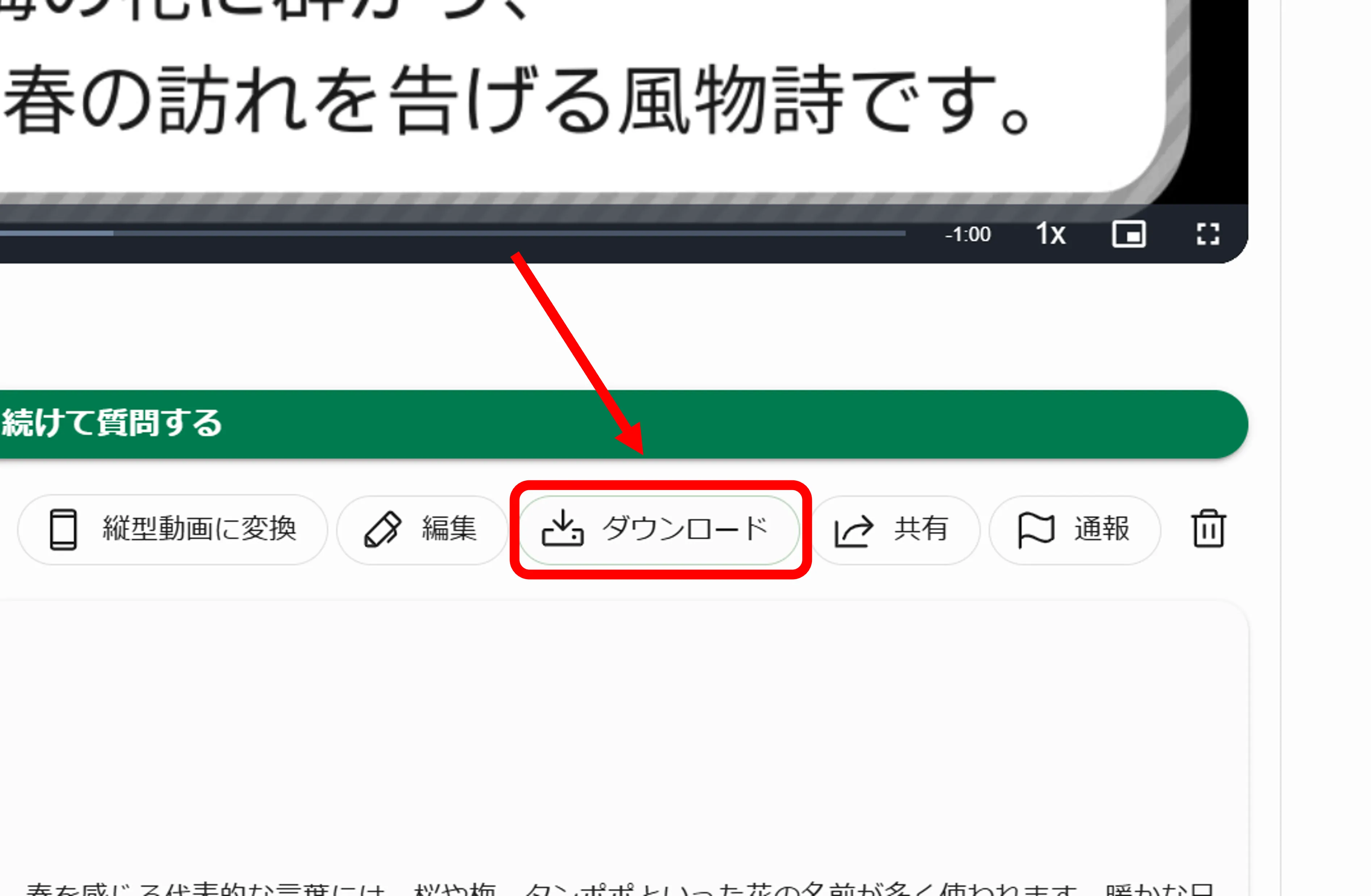
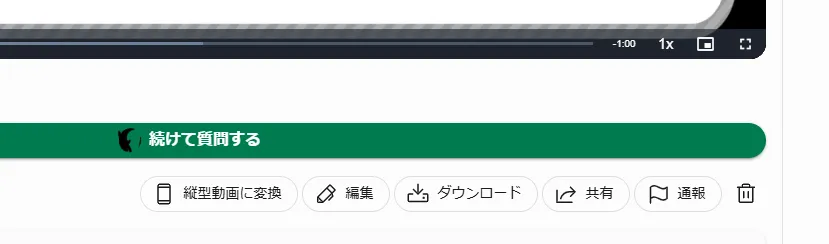
Currently, you can download only videos you created yourself, and only on the desktop version. On the video page, there is a "Download" button below the "Ask a follow-up" button; click it to download the video.
Can I use the videos I create for commercial purposes?
Videos created with NoLang can be used commercially.
Depending on the materials used, attribution may be required. Please copy the information under "Copyright" on the video viewing page and paste it wherever you prefer, such as in the description or comments on the platform where you post the video.
Depending on the materials used, attribution may be required. Please copy the information under "Copyright" on the video viewing page and paste it wherever you prefer, such as in the description or comments on the platform where you post the video.

How do I make a video public?
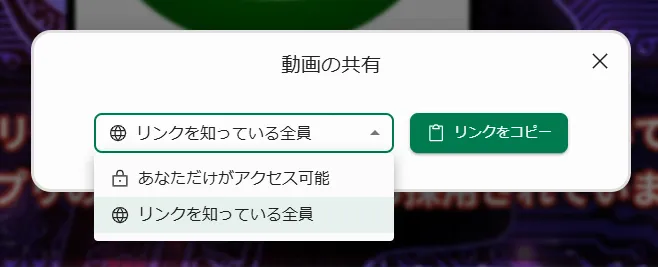
On the video page, click the "Share" button and set the video's sharing setting to "Anyone with the link" to make it public. To make it private again, change it to "Only you can access".
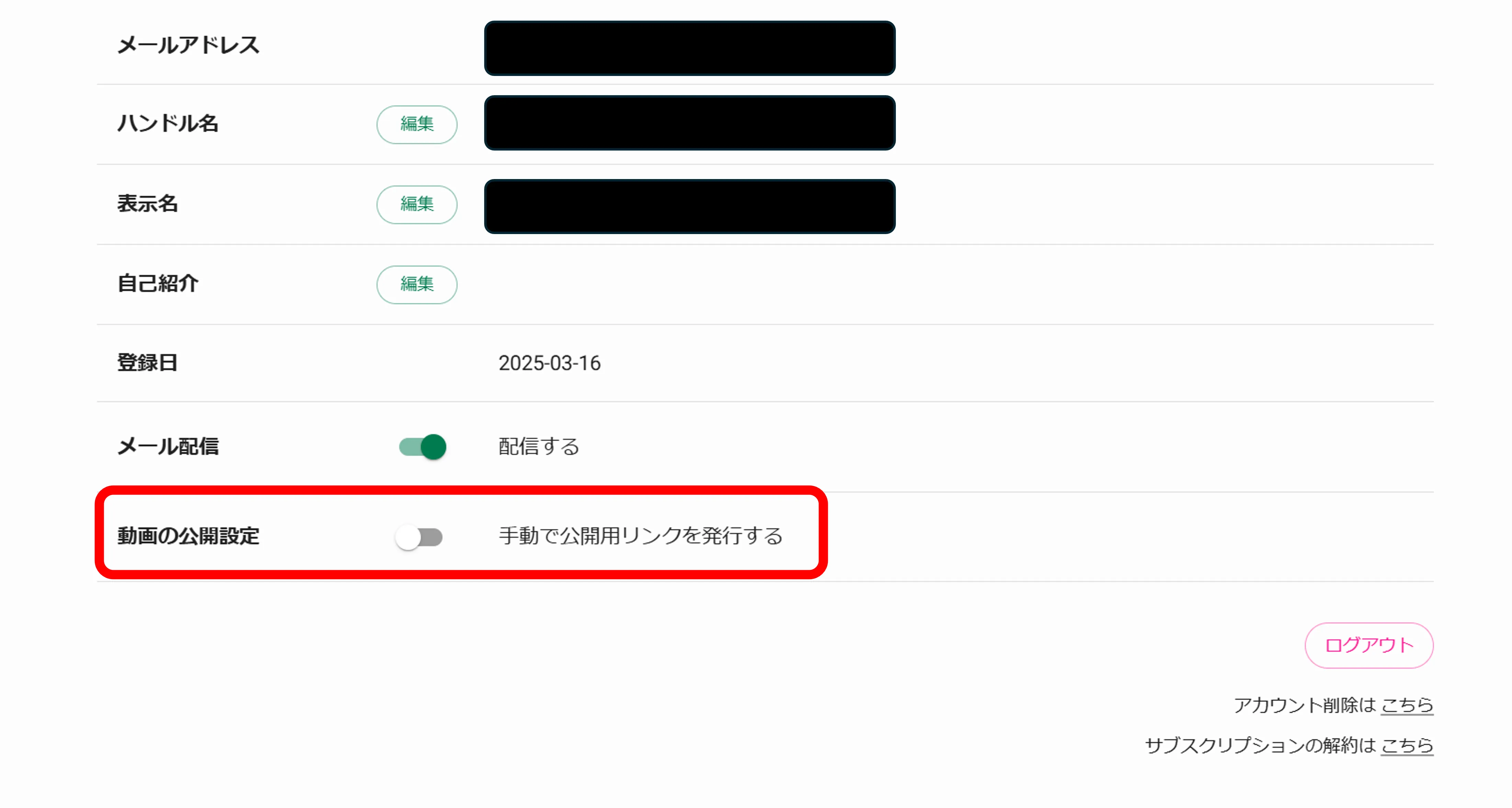
If you want your videos to be public by default, turn on "Video visibility" in the "User Settings" tab on My Page.
If you want your videos to be public by default, turn on "Video visibility" in the "User Settings" tab on My Page.
Can I upload the videos I create to other platforms such as YouTube, TikTok, or Instagram?
Yes, you can upload them. When you do, however, you must include the copyright information in the description or a similar place, so please do not forget. On the video page, open the toggle labeled "Copyright" in the description, press the "Copy" button to copy the copyright information, and paste it as it is.
If the copyright information is too long, issue a share link for the video instead: see "Q. How do I make a video public?", set the video to "Anyone with the link", and paste "Copyright: <share link>".
If the copyright information is too long, issue a share link for the video instead: see "Q. How do I make a video public?", set the video to "Anyone with the link", and paste "Copyright: <share link>".
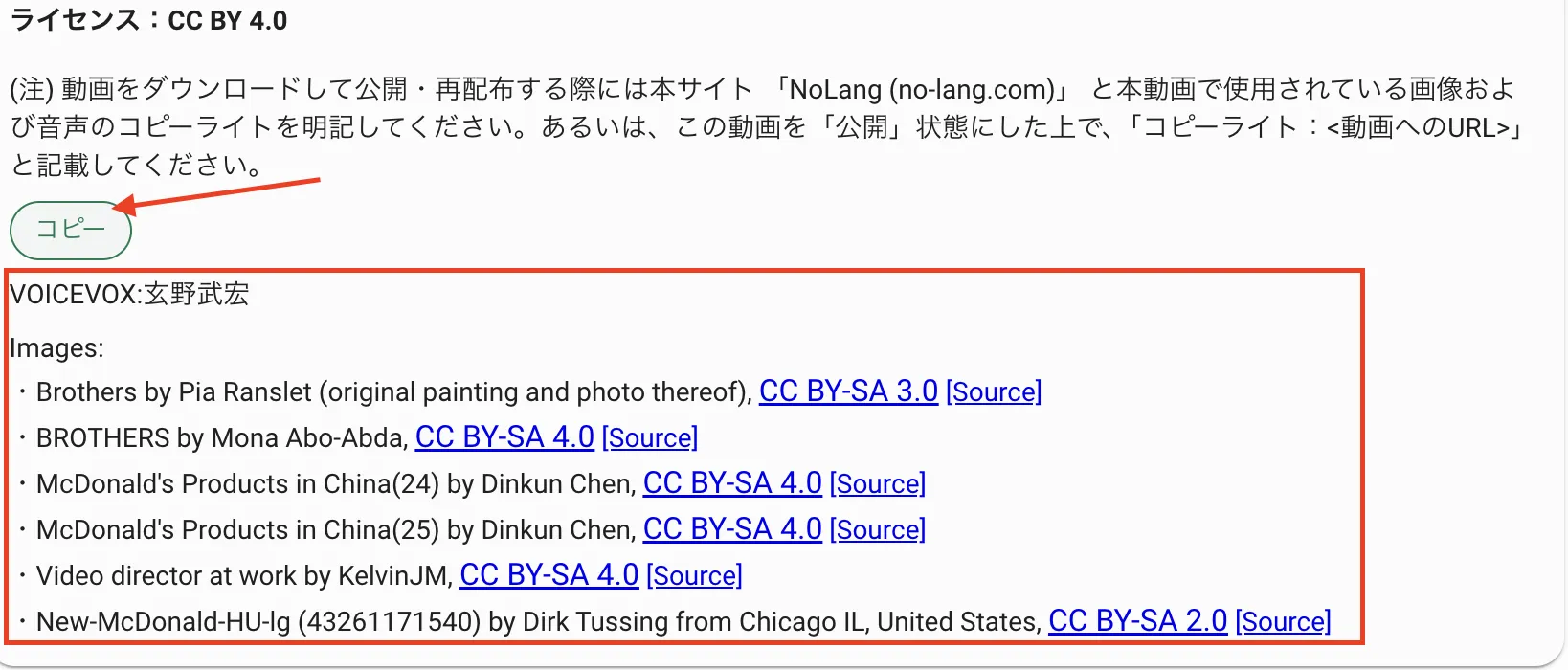
Where can I find the copyright information?
Copyright information is shown below the description section of videos created with NoLang.
Could you show me an example of how to include copyright information?
Please paste the following credit anywhere in the description or comments.
------------Example------------
Video generation: NoLang (no-lang.com)
VOICEVOX: Shikoku Metan
VOICEVOX: Manbetsu Hanamaru
------------Example------------
Video generation: NoLang (no-lang.com)
VOICEVOX: Shikoku Metan
VOICEVOX: Manbetsu Hanamaru
Are there any copyright issues with the videos I create?
We use images that are free of copyright issues, but if an image later turns out to have been published without authorization, we will notify you by email or another means. The same applies to background music. For text, the license and copyright depend on the PDF or the web page itself when using the Chrome extension.
I uploaded a video to social media and the audio was flagged for copyright. What should I do?
On platforms such as YouTube, fraudulent groups that claim rights even to free-share and public-domain audio are widespread, so videos are sometimes falsely flagged as infringing copyright when posted.
You can file a dispute, but processing it may take some time.
For that reason, if this happens, we recommend using different background music or uploading audio that you have downloaded yourself.
You can file a dispute, but processing it may take some time.
For that reason, if this happens, we recommend using different background music or uploading audio that you have downloaded yourself.
About the Chrome extension
Are images from the web page used in explainer videos created with the Chrome extension?
No, they are not used. If you would like to replace an image, please use the video editing feature.
Will the Chrome extension explain websites written in English in Japanese?
Yes, you can use it as a tool that translates and summarizes at the same time.
Where can I configure the settings used by the Chrome extension?
You can choose it from Chrome extension => Settings Management. The only settings available for selection are those of "Generate from a question/instruction".
Credits and paid plans
When are the credits included in a paid plan renewed?
Credits are replenished once a month, counting from the date you signed up for your plan. Please note that credits are not replenished at the beginning of each calendar month.
Do the monthly credits granted with a paid plan carry over to the next renewal date?
Yes. Credits remaining from the previous month carry over past the renewal date as long as you continue your paid plan.
What happens to my remaining credits if I cancel my paid plan?
If you cancel a paid plan, all remaining credits expire on the plan end date. Please note that expired credits are not restored even if you subscribe to a paid plan again after cancelling.
What happens to my remaining credits if a payment for a paid plan fails and the plan is automatically cancelled?
When a plan is automatically cancelled due to a failed payment, your remaining credits do not expire. Rest assured that your leftover credits are restored when you subscribe to a paid plan again.
Are free generation tickets one-time use only?
Yes. Free generation tickets are one-time use only.
If video generation or editing fails, will the credits I used be refunded?
Yes. If video generation or editing does not complete successfully due to an error, the credits used are automatically refunded. They are usually restored within 20 minutes. If your credits are not restored, please contact us through the inquiry form and we will address it promptly. Note that when you use real avatar generation, it may take several hours for credits to be restored.
When I upgrade my paid plan, do the remaining credits from the previous plan carry over?
Yes. When you upgrade your plan, the credits remaining on your previous plan carry over to the new plan.
When I downgrade my paid plan, when does the downgrade take effect?
A plan downgrade takes effect on the expiration date of your current plan. The switch to the new plan becomes effective from the next renewal date.
How do I cancel a paid plan?
Click the "Cancel your subscription here" button at the bottom of the "User Settings" tab on My Page. The cancellation process will begin.
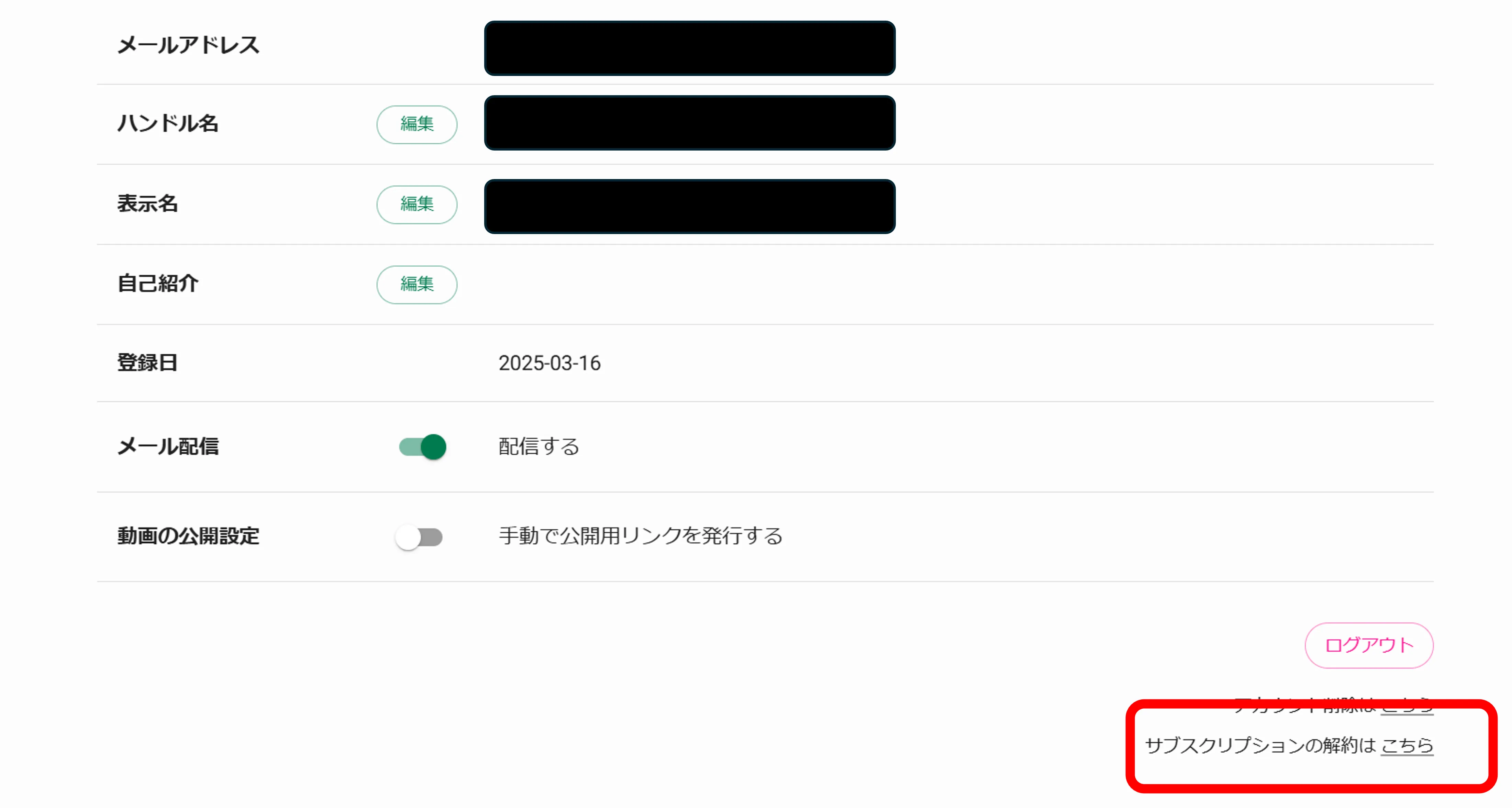
If I cancel my paid plan, can I keep using the current plan until its expiration date?
Yes. If you cancel a paid plan, it ends automatically when your current plan period expires. Please note that you will no longer be able to use paid services after the next renewal date.
I forgot to cancel and was charged, but I did not use the service at all. Can I get a refund?
We do not offer refunds for cancellations made at the customer's convenience. For details on refunds, please see the link below.
https://www.mvrks.co.jp/tokusho
https://www.mvrks.co.jp/tokusho
How do I update my payment information (credit card details)?
You can change the credit card information used for payment from "My Page" > "Plan Info" > "Update Payment Info". The new payment method will be applied from your next billing.
Where can I find my receipts?
Stripe sends receipts to the email address registered with NoLang, so please check your inbox.
From: NoLang
Subject: Receipt from NoLang (Receipt number XXXX-XXXX)
From: NoLang
Subject: Receipt from NoLang (Receipt number XXXX-XXXX)
Can I change the recipient name on receipts and invoices?
You can change the recipient name on receipts and invoices from "My Page" > "Plan Info" > "Update Payment Info". The new name will be reflected on receipts and invoices issued from the next billing cycle onward.
If you would like the recipient name on an already issued receipt or invoice changed (reissued), we can accommodate this for customers on the Premium plan or a Business plan only. Please forward the receipt or invoice sent from Stripe to the email address registered with NoLang to support.nolang@mvrks.co.jp, attaching it and stating the name you would like to use. Please allow approximately two business days for a response.
If you would like the recipient name on an already issued receipt or invoice changed (reissued), we can accommodate this for customers on the Premium plan or a Business plan only. Please forward the receipt or invoice sent from Stripe to the email address registered with NoLang to support.nolang@mvrks.co.jp, attaching it and stating the name you would like to use. Please allow approximately two business days for a response.
Period for viewing, editing, and downloading videos
On the free plan, can I no longer view, edit, or download videos more than two weeks old?
Yes. On the free plan, you can no longer watch, edit, or download them after two weeks. However, if you sign up for a paid plan, you regain access to all of the videos you have generated in the past.
If I move from the free plan to a paid plan, what happens to videos created more than two weeks ago?
By subscribing to a paid plan, you can once again view, edit, and download every video you have generated in the past.
If I cancel my paid plan and switch to the free plan, what happens to videos created more than two weeks ago?
Once you cancel a paid plan and switch to the free plan, you can no longer view, edit, or download any video created more than two weeks earlier. However, by subscribing to a paid plan again, you regain access to every video you have generated in the past.
Accounts and usage limits
Can I create videos without signing in?
No. While you are not logged in, you can only view videos.
What should I do if I am registered but can no longer log in?
If you cannot sign in, your account may have been created with a Google account rather than registered with an email address and password.
Please select the "Sign in with Google" button and sign in with the Google account you use for NoLang. If you registered with email verification, please sign in by entering your email address and password.
Please select the "Sign in with Google" button and sign in with the Google account you use for NoLang. If you registered with email verification, please sign in by entering your email address and password.
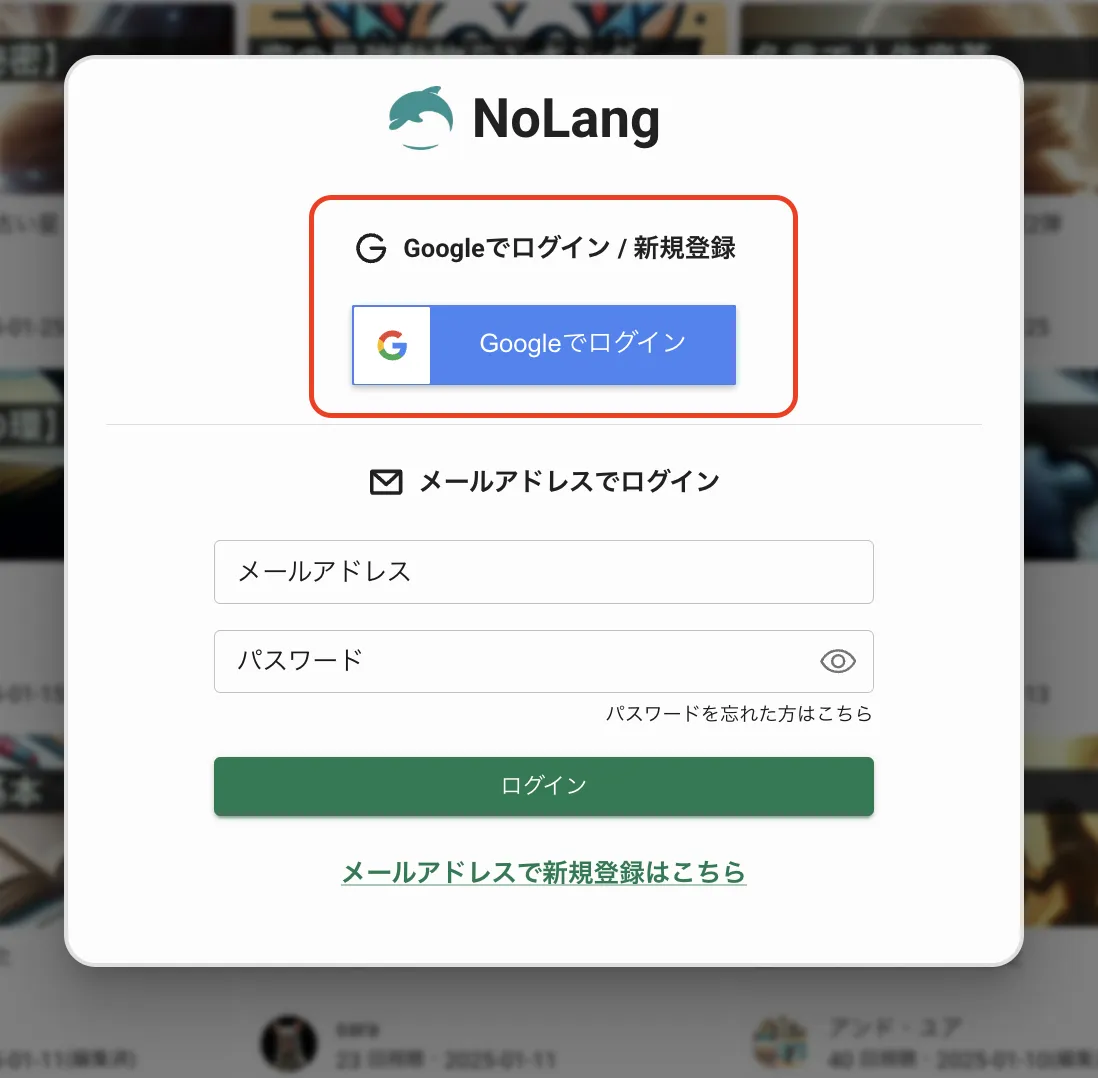
I forgot my password, and the reset email does not arrive even when I request one. What should I do?
If you do not receive the password reset email, your account may have been created with a Google account rather than registered with an email address and password.
Please select the "Sign in with Google" button and sign in with the Google account you use for NoLang.
Please select the "Sign in with Google" button and sign in with the Google account you use for NoLang.
Can I change an account created via Google sign-in to one that logs in with an email address and password?
Yes, you can. An account created with a Google account can be changed to an account that logs in with an email address and password. Go to "My Page" → "User Settings" to make the change. Afterwards, you can log in with the email address and password you set.
Settings page: https://no-lang.com/en/mypage/profile
Settings page: https://no-lang.com/en/mypage/profile
Can I change my registered email address?
Yes, you can. You can change the email address registered with NoLang. Go to "My Page" → "User Settings" to make the change. Afterwards, you can log in with the new email address.
Settings page: https://no-lang.com/en/mypage/profile
Settings page: https://no-lang.com/en/mypage/profile
What should I do if my account is suspended unfairly?
If your account has been suspended unfairly, please contact us through the contact form. We will lift the suspension depending on the circumstances.
How do I delete my account?
Click the "Delete your account here" button at the bottom of the "User Settings" tab on My Page. The deletion process will begin.
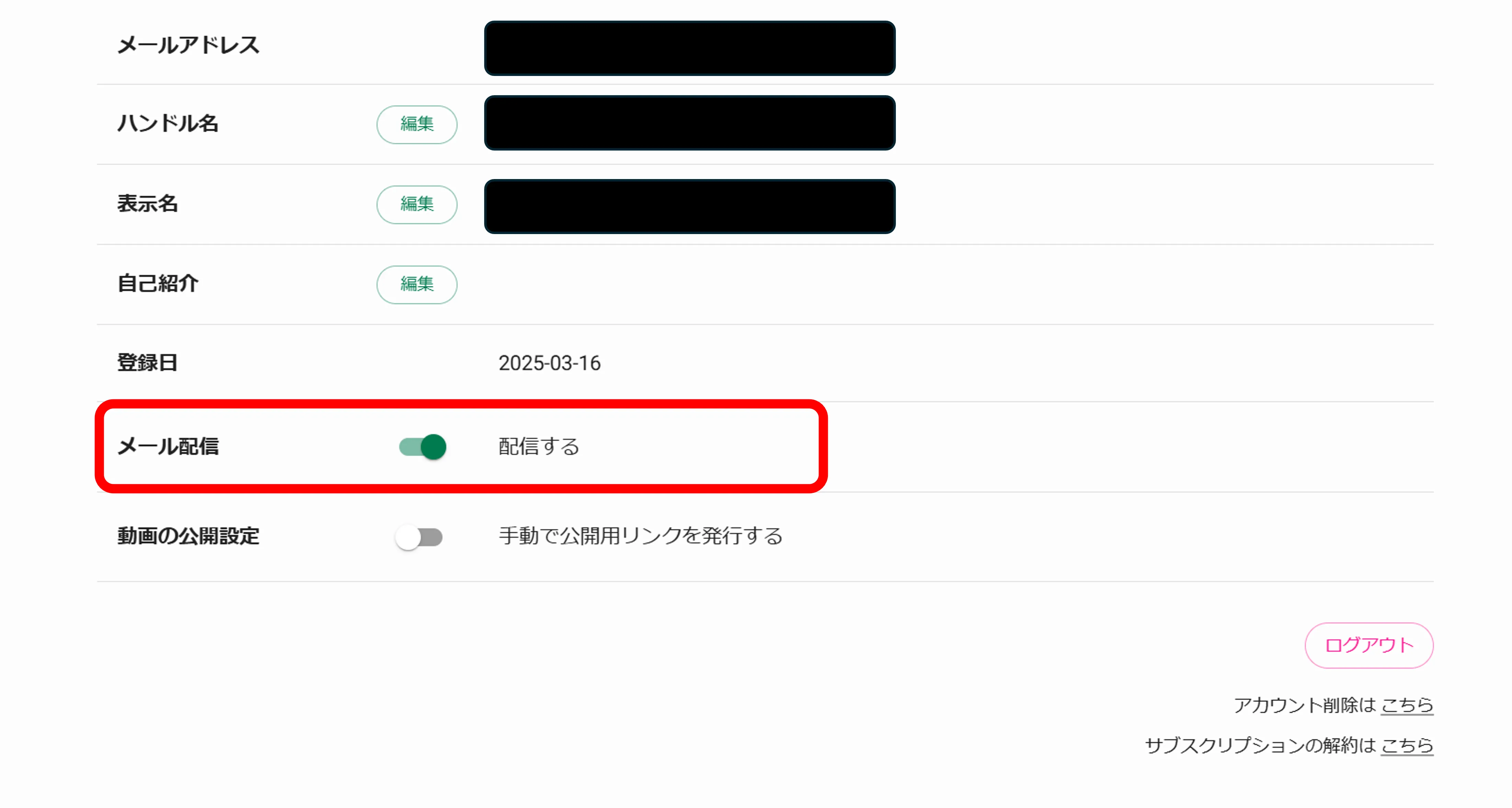
I would like to stop receiving emails.
Please turn off delivery from "My Page" → "User Settings" → "Email Delivery".
About card payment information
Where can I find receipts for card payments?
Stripe sends receipts to the email address registered with NoLang, so please check your inbox.
From: NoLang
Subject: Receipt from NoLang (Receipt number XXXX-XXXX)
From: NoLang
Subject: Receipt from NoLang (Receipt number XXXX-XXXX)
Can I change the recipient name on receipts and invoices for card payments?
You can change the recipient name on receipts and invoices for card payments from "Admin Page" > "Account Management" > "Payment Information Settings". The new name will be reflected on receipts and invoices issued from then on.
If you would like the name on an already issued receipt or invoice changed (reissued), please forward the receipt or invoice sent from Stripe to the email address registered with NoLang to support.nolang@mvrks.co.jp, attaching it and stating the name you would like used. Please allow about two business days for a response.
If you would like the name on an already issued receipt or invoice changed (reissued), please forward the receipt or invoice sent from Stripe to the email address registered with NoLang to support.nolang@mvrks.co.jp, attaching it and stating the name you would like used. Please allow about two business days for a response.
Still need help?
If you cannot find what you are looking for, or if you have any other questions, please feel free to contact us.
- Contact form: NoLang Contact Form
- Email (Personal plan): support.nolang@mvrks.co.jp
- Email (Business plan): nolang-corporate@mvrks.co.jp