Search for sales video examples and you mostly find two kinds of video. One is a rep talking to a webcam, recorded for one prospect. The other is a polished brand film that took an agency six weeks. Both are real, and neither tells you much about the video you actually need: the one that goes out at a specific point in your deal, says one thing clearly and asks the buyer to do one thing next.
This article sets out five sales video examples, one per stage of a B2B deal, each shown in full. For every example you get when to send it, what it tells the buyer, what it asks them to do and which parts you would swap for your own offer. All five are English samples made with NoLang for fictional companies, and each one is a template you can open and rebuild with your own deck or script. A second table covers the sales videos that work best recorded by the rep in person.
Try NoLang for FreeSales video examples at a glance
A sales video earns its place when it does a seller’s job while the seller is not in the room. That matters more than it used to. In 6sense’s 2025 B2B Buyer Experience Report, 94% of buying groups had ranked their shortlist before they engaged a seller, and the vendor they contacted first went on to win roughly 80% of the time. Much of the persuasion now happens in forwarded emails and internal meetings you never see, which is the stretch of the deal a video can cover for you.
| Stage | Example | What it tells the buyer | What it asks them to do | Format and length | Start from |
|---|---|---|---|---|---|
| Event and webinar invitation | Free AI webinar short | You can start even if AI feels difficult; here is what the free class covers | Book a free place | Vertical, 32 seconds | Your event page or a short script |
| First outreach | Field Inspection Cloud intro | Paper inspection records are slowing your team; this is what changes in the cloud | Look the service up and contact the team | Horizontal, 26 seconds | A short script about your service |
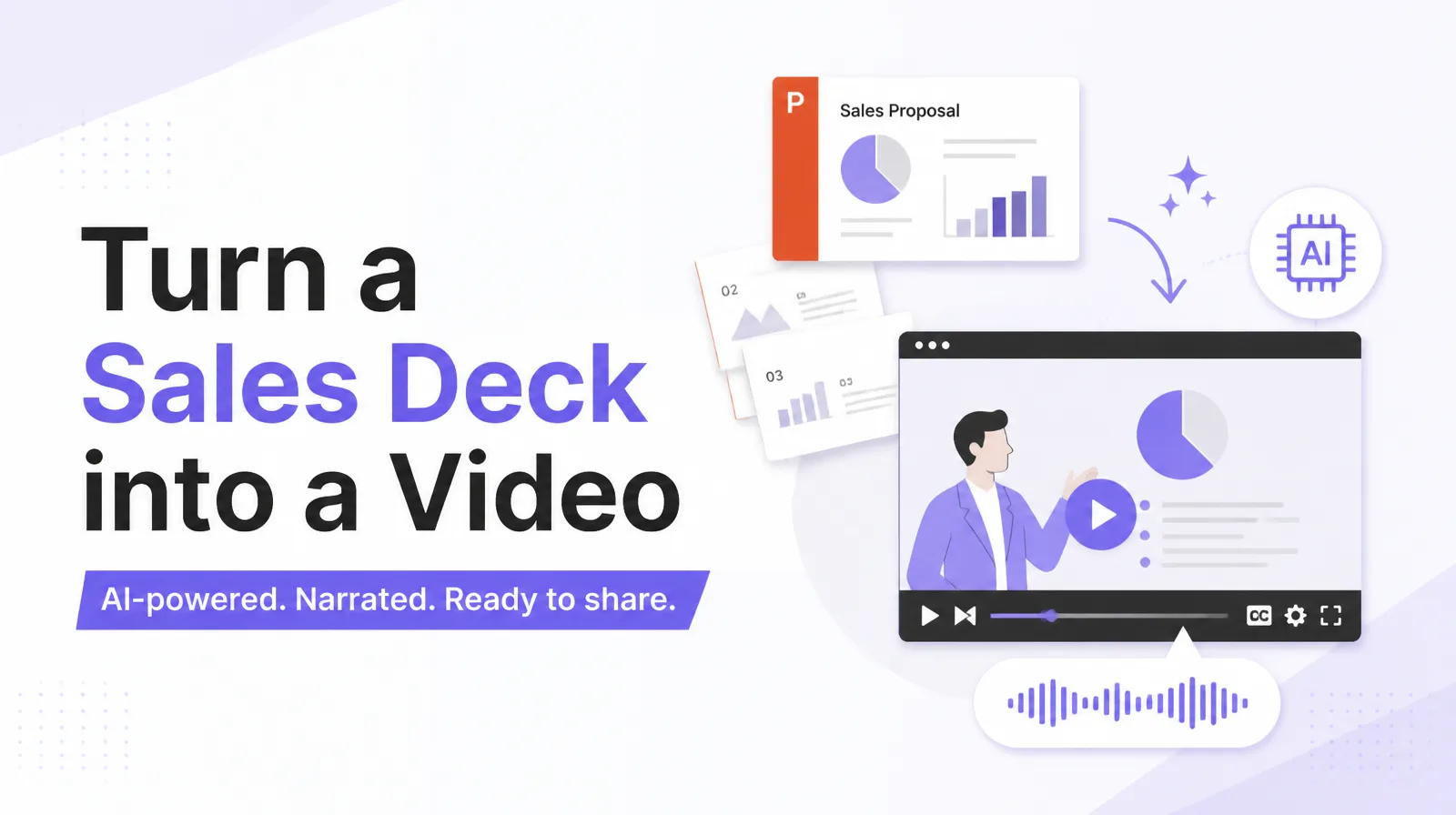
| Before the meeting | Security proposal deck | The risk, the three parts of the service, the rollout and the plan options | Come to the meeting ready to scope a quote | Horizontal, 2 minutes 8 seconds, with a presenter | Your proposal deck |
| After the proposal | Customer support proposal summary | The problem you described, the fix and an illustrative outcome | Start a free trial | Horizontal, 43 seconds | A problem, solution and outcome script |
| Comparison and closing | Ad automation results cards | What changed for a customer like them, in numbers | Book a free ad review | Horizontal, 57 seconds | A customer result and its figures |
Personal touches such as a cold note to one prospect, a meeting reminder or a post-call recap work better recorded by the rep; those are covered under “Sales videos worth recording yourself” below. For a service’s own marketing video rather than a video a seller sends, see how to make a service introduction video; for a physical product, see how to make a product introduction video. More English samples across industries are in the Video Gallery.
Five sales video examples, stage by stage
Event and webinar invitation: a 32-second vertical short
- When to send it: before an event or webinar, in a social feed, on the registration page, or attached to an invitation email to a list you have not spoken to yet.
- What it tells the buyer: it opens on a doubt the viewer already has (“Curious about AI but worried it might be too difficult?”), answers it (“No experience? No problem”), lists three things the class covers, then gives the practical details: free, 60 minutes, with templates to take away.
- What it asks them to do: “Book your free place.” The booking button appears on screen and is named in the narration, so the action lands with or without sound.
- What to swap for your own: the opening doubt (use the one your prospects actually voice), the three topics, the date and time, the giveaway and the registration link.
The whole short is built around one hook and one action. That is what lets it work at the top of the funnel, where the viewer owes you nothing and gives you a few seconds.
Vertical short for a free AI webinar
Use this format to invite HR managers to a free 45-minute webinar on onboarding checklists. Open with the worry that onboarding eats the first week, then list three takeaways and end on booking a seat.
First outreach: a 26-second service introduction
- When to send it: in a first email or LinkedIn message to an account that fits your profile but has not heard of you, or on the page a new contact lands on before deciding to reply.
- What it tells the buyer: three questions a site manager will recognize (paper checklists piling up, only one person knowing the history, waiting for reports from the field), one line of diagnosis (“It may be time to move beyond paper inspections”), then the change: record on a tablet, share with the team, access the history anywhere.
- What it asks them to do: search for the service and contact the team. For your own version, replace the search prompt with the action your first email asks for, such as a reply or a 20-minute call.
- What to swap for your own: the three pain questions in your buyer’s words, your product name and screen, and the closing action.
At first contact the buyer is deciding whether you are worth a reply, not evaluating your features. Twenty-six seconds is long enough to show that you understand their day and short enough to finish before they decide.
Field Inspection Cloud service introduction
Use this format to introduce a fleet maintenance app to transport managers. Start with the pain of paper vehicle logs, show one screen of the app, and end by asking them to book a short call.
Before the meeting: a proposal deck with a presenter
- When to send it: a few days before the meeting, to the contact and anyone they forward it to, so the meeting can start at questions instead of slide one.
- What it tells the buyer: a presenter walks through a security proposal in four moves: cyber risk and its business impact, the three pillars of the service (AI-assisted detection, expert monitoring, flexible plans), a four-step rollout from assessment to operation, and three plans with what each covers.
- What it asks them to do: it closes on how the final quote is set (device count, log volume and scope), which gives the buyer something concrete to prepare for the meeting.
- What to swap for your own: your deck. The risk slide, the pillars, the rollout steps and the plan table map directly onto the slides most proposals already have.
It covers what the first half of a meeting usually covers, so the time you do spend together can go to the buyer’s questions. How to choose which slides to convert and how to time the send are covered in how to turn a sales deck into a video.
Security service proposal deck
Turn our proposal deck for a managed IT support service into a presenter-led video. Cover the client’s current risks, our three service tiers and the four-week onboarding plan.
After the proposal: a summary for the people who missed the meeting
- When to send it: after the proposal meeting, to your champion, who forwards it to the decision maker and the budget holder who were not in the room.
- What it tells the buyer: the problem in the buyer’s terms (customer questions pile up and first replies wait six hours), the solution (AI handles the routine questions so the team can focus on complex cases) and an illustrative outcome (first replies from six hours to five minutes, satisfaction up 28%).
- What it asks them to do: explore the service with a free trial. In a live deal, point this at the next step you agreed, such as a pilot or a scoping call.
- What to swap for your own: the problem statement and the numbers the buyer gave you, your solution in one sentence, and the outcome you can stand behind.
The champion will retell your proposal in five minutes, and a retold proposal loses the parts that mattered. A 43-second summary in problem, solution, outcome order keeps the argument intact on its way up.
Customer support proposal summary
Summarize our proposal for an invoice automation tool for a CFO who missed the meeting. Problem: month-end close takes 10 days. Solution: automatic matching. Outcome: close in 4 days. End with booking a pilot.
Comparison and closing: results as cards
- When to send it: late in the evaluation, with a quote or a comparison document, when the buying group is asking whether anyone like them has done this.
- What it tells the buyer: a customer’s starting point (hours spent on ad operations, no idea which ads work), what the product changed (AI adjusts budgets and bids around the clock) and the results as one number per screen: ROAS 182%, conversion rate up 2.4x, admin time down 75%, monthly sales up.
- What it asks them to do: try a free ad review. For a live deal, make it the step that removes the last doubt, such as a reference call or a trial on their own data.
- What to swap for your own: a customer similar to this buyer in size and starting problem, figures that customer has approved, and one short quote.
Numbers on cards read faster than a narrator explaining a chart, and a buying group can watch them together in a minute. A filmed interview with a named customer is still the stronger evidence when you can get one; the card version is what you can send this week.
Ad automation case study in numbers
Use this format for a case study of our scheduling software at a 40-clinic dental group. Show missed appointments down 30% and front-desk time saved, and end with requesting a reference call.
Sales videos worth recording yourself
Some sales videos work because the rep is in them. The buyer is meant to see a face, hear their own name and recognize a detail from the last conversation. Those videos are recorded on a phone or a webcam in a few minutes, and a polished version would miss the point.
| Touchpoint | What to say | What to ask for | Length |
|---|---|---|---|
| Personal cold note | Who you are, why you picked this person, one problem you think they have | A reply or a short call | Under a minute |
| LinkedIn connection request | Your name and the one thing on their profile that made you reach out | Accept the connection | Around 30 seconds |
| Meeting reminder | The time, where to find the link, what you will cover | Show up on time, or reschedule | Around 30 seconds |
| Post-call recap | What you heard, the two or three priorities, what you are sending | Confirm the next meeting | One to two minutes |
| Re-engaging a quiet deal | Something new that is relevant to their situation | Get back on a call | Under a minute |
| Handoff after signing | Thanks, who they will work with next, the first steps | Book the onboarding kickoff | One to two minutes |
The two kinds combine well. A rep can record a 20-second personal note and attach the proposal summary or the results video from above, so the buyer gets the relationship and the argument in one send.
How to make one of these with NoLang
NoLang, from Mavericks, Inc., is an AI video generation service that builds narrated videos with subtitles from documents, scripts and prompts. Each example above can be rebuilt in one of three ways.
- From the example itself: “Create a Video with This Template” opens NoLang with the example set as the reference video. You describe your own offer, and the structure, pacing and look of the example carry over to your content.
- From document: upload the PDF or PowerPoint you already present. This is the route for the pre-meeting deck.
- From script: write what should be said, for one speaker or several. This suits the outreach intro, the proposal summary, the results cards and the event short.
Choose the example closest to your moment
Pick by stage, not by industry. A security proposal and an HR software proposal need the same four moves before a meeting.
Open the example, or start from your deck
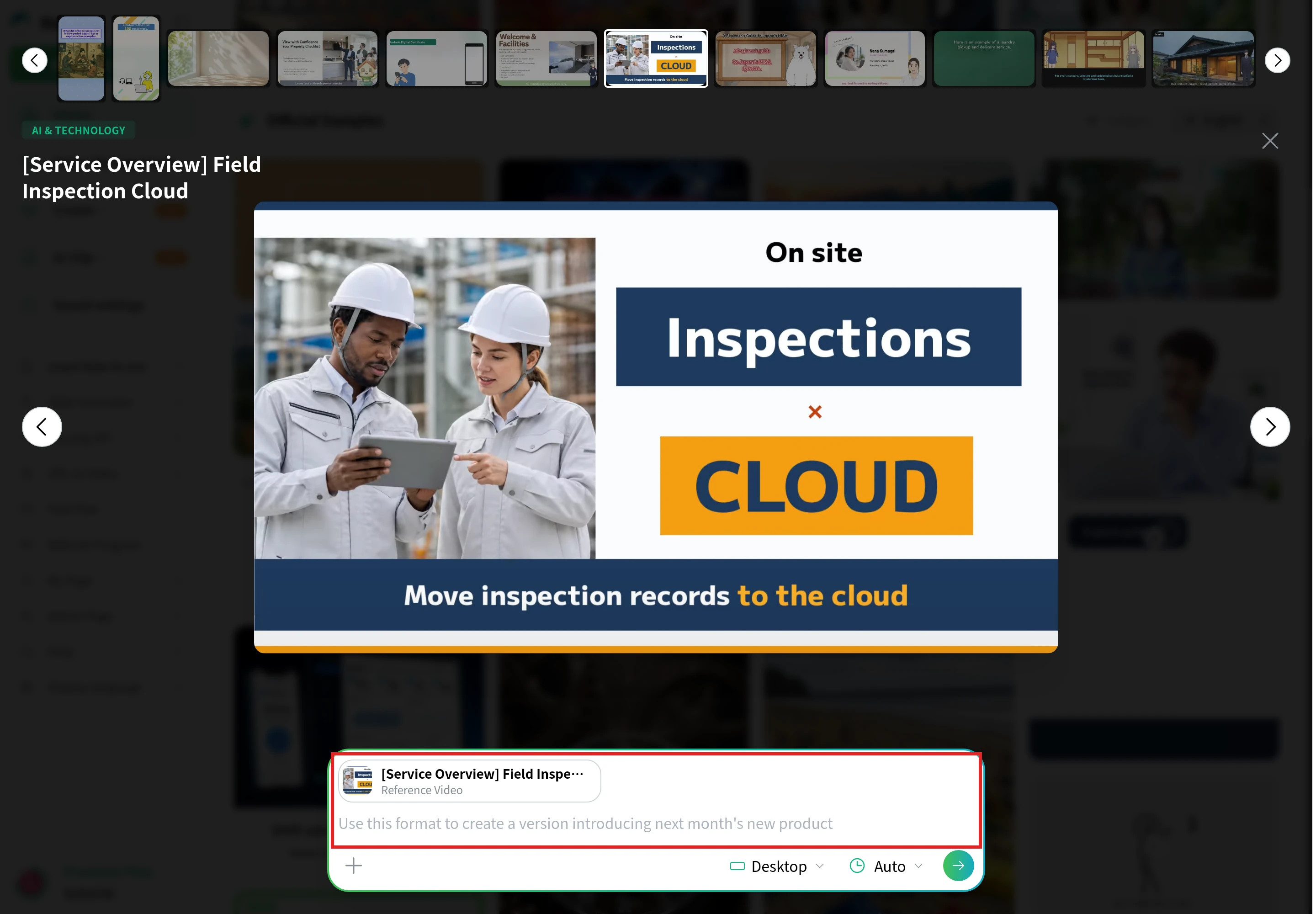
Select “Create a Video with This Template” under the example. The example appears as the reference video above the input box, where you write what your version should say.
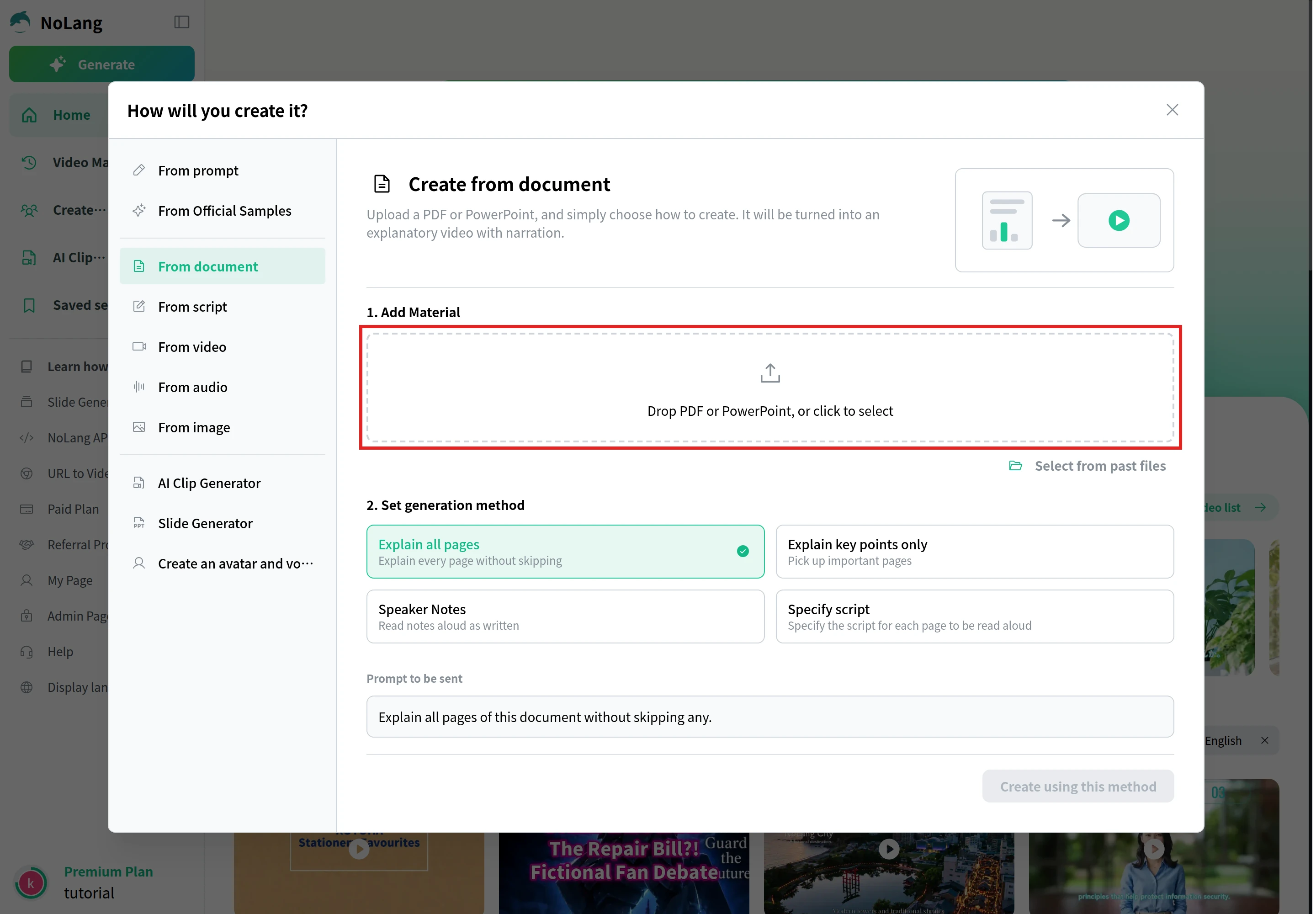
To start from a deck instead, select See more on the home screen and choose From document. Drop your PDF or PowerPoint into Add Material, and pick how it should be explained: Explain all pages, Explain key points only, Speaker Notes or Specify script.
Describe your offer and set the format
Write your problem, solution and action in plain sentences. Set the aspect ratio (horizontal 16:9 for anything you email or present, vertical 9:16 for a feed) and, if you like, the approximate length and the video language.
Generate, check the facts, then send
Read the result the way a buyer would. Check the client name, every figure and the closing action, then download the file or share it by link.
Because the video is generated from a deck or a script rather than shot, you can regenerate it whenever the offer changes, and a version per account or per language stops being a new project.
Make a Sales Video from Your DeckRecord, generate or hire
The examples point to three routes. Personal videos are recorded by the rep. Explanations that repeat from deal to deal, and change whenever the offer does, can be generated. Work where filming is itself the evidence, such as a customer interview or a brand film, is worth commissioning.
For that last route, Vidico’s pricing guide (updated September 2026) is a useful benchmark. It is a production company’s own published rates rather than an industry survey.
| Category | What it covers | Price range (USD) |
|---|---|---|
| Short social content | Single camera, 15 to 60 seconds, minimal editing | $1,500–$5,000 per project |
| Corporate and explainer video | Professional crew, script and branded graphics, 1 to 3 minutes | $4,500–$20,000 per project |
| Commercials and brand films | Multi-day shoots, talent, custom animation | $15,000–$50,000+ per project |
| Testimonial or interview | Case studies and customer stories | $1,000–$4,000 per finished minute |
The same guide puts a typical project at two to six weeks, with rush jobs adding 25 to 50% to the cost. For what sits inside these numbers, see what video production costs.
Commission the video you will show for three years; generate the ones you will rewrite three times this quarter. A filmed interview with a named customer says something no generated video can, because its value is that this person agreed to say it on camera. A proposal summary or a pre-meeting deck changes with every account, and that is the work generation takes off your desk.
Related articles
- How to turn a sales deck into a video: the full method for the pre-meeting example, from choosing slides to timing the send.
- What video production costs: the breakdown behind agency quotes.