ISO/IEC 27001:2022 (ISMS) certified

Used by 500+ companies, local governments, and public agencies

A video generation AI for producing corporate videos in-house

Videos you used to outsource, made in-house with AI

NoLang is a Japan-made video generation AI that creates videos from documents and text.

  • AI creates videos from documents and text, with no filming or recording
  • Choose how to create, the voice, and the avatar step by step
  • Revise in-house without reordering, even when the content changes
  • Companies using NoLang 500+
  • Users 200K+

Get the service overview by email

Free Download Materials

Ask if in-house production fits you

Contact Us

Try It for Free

PDF PPTX Into video

Screen image of a company introduction video made with NoLang Screen image of a recruiting video made with NoLang Screen image of a manual video made with NoLang

NO EDITING No Editing
Software

No need to film or record

500+ companies, local governments, and public agencies use NoLang

PROBLEM

Outsourcing your videos?
Do you face challenges like these?

  • Delivery dates are unpredictable, so launches get pushed back

  • Your intent doesn't get across, and messages go back and forth again and again

  • Even small fixes need a quote and an order

  • The content has changed, but the video is still outdated

IN-HOUSE

What does bringing video production in-house mean?

Bringing video production in-house means that videos you used to outsource to a production company are now made by your own team members.
You don't have to switch everything at once. You can start with the videos that are easiest to make and bring them in-house step by step.

Until now

Outsourcing to a production company

  • Proceeds in order: quote, order, meetings, delivery
  • Order again every time the content changes

In-house production

From now onNoLang

Made in-house with AI

  • Make videos from documents and text you have on hand
  • No filming, no editing software
  • Fix it in-house when the content changes

Until now, in-house production required filming equipment and someone who could use editing software.
With NoLang, you just choose how to create the video, a voice, and an avatar, so you can start without a dedicated person in charge.

COMPARISON

Outsourcing to a production company vs.
producing in-house with NoLang

We compare the two ways of making videos on 7 points.

Comparison of outsourcing to a production company and producing in-house with NoLang
Point of comparison Outsourcing to a production company With NoLang
Getting started Starts with quotes, orders, and meetings Start by writing the content or adding documents
How costs add up A quote and an order for every video and every revision Made within your monthly plan. No order needed for each video
Revisions and updates Ask the production company again for revisions Fix and confirm it in-house, and it becomes a new version at the same URL
Filming and recording Arrange a filming location, presenters, and audio recording No filming or recording. Made with AI voices and avatars
Presentation style Decide planning and direction in meetings with the production company Choose from document explanations, avatars, dialogue, slides, and more
What stays in-house The finished video is delivered Use videos you've made as reference videos, and save settings for reuse
In-house work Back-and-forth on requests, reviews, and revision instructions The person in charge makes, checks, and fixes it themselves

You don't need to switch everything at once.
Bring production in-house starting with the videos that are easiest to make.

WHERE TO START

No need to switch all at once.
Start with the videos that are easiest to make

NoLang can make videos for any purpose. Start with videos you already have documents or text for, then expand from there.

Start here

  • Company and service introductions
  • Training and internal education
  • Work procedures and manuals
  • Sales material videos
  • Internal announcements
  • IR and earnings videos

Estimate Documents or text already exist. Content changes often

Keep Going and Expand

  • Ad and PR videos
  • Short videos for social media
  • Recruiting videos
  • Product introduction videos
  • Event videos
  • Other-language versions

Estimate Many videos. Each department wants to make its own

55.9 %

For video production, the most common answer was "a mix of in-house and outsourcing"

Source: Hikaku Biz and Mteam, "Survey on In-House and Outsourced Video Production Rates and Challenges" (April 2025; 111 respondents, including people in marketing and PR). Fully in-house: 34.2%; a mix of in-house and outsourcing: 55.9%; fully outsourced: 9.9%.

For teams evaluating NoLang internally

Download the NoLang service overview
for free

Get an overview of NoLang and its Business plan by email.

Cover of the NoLang Service Overview

3-minute
overview

Free Download Materials

QUESTIONS

Before you bring video production in-house,
answers to 4 concerns

Companies working on in-house production cite four challenges: difficult tools, team members' time, editing skills, and quality. Here is how NoLang answers each one.

No one who can make videos

We have no employees who can use editing software, and no filming equipment either.
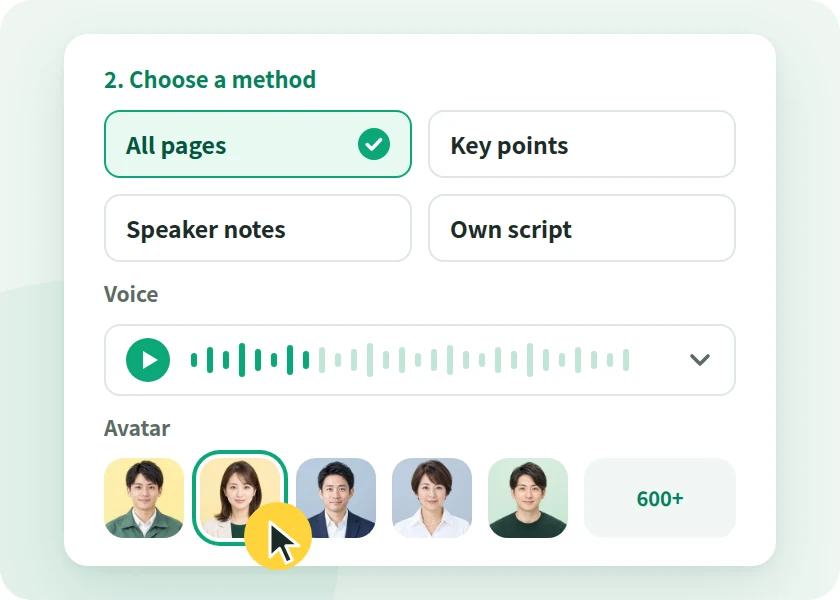
Illustration of the screen for choosing a method, voice, and avatar

With NoLang

No filming or editing software. Just follow the steps and choose

Write what you want to make or add your documents, then choose how to create the video, a voice, and an avatar. No filming or recording needed.
Quality is inconsistent

Look and structure may end up inconsistent across creators and departments.

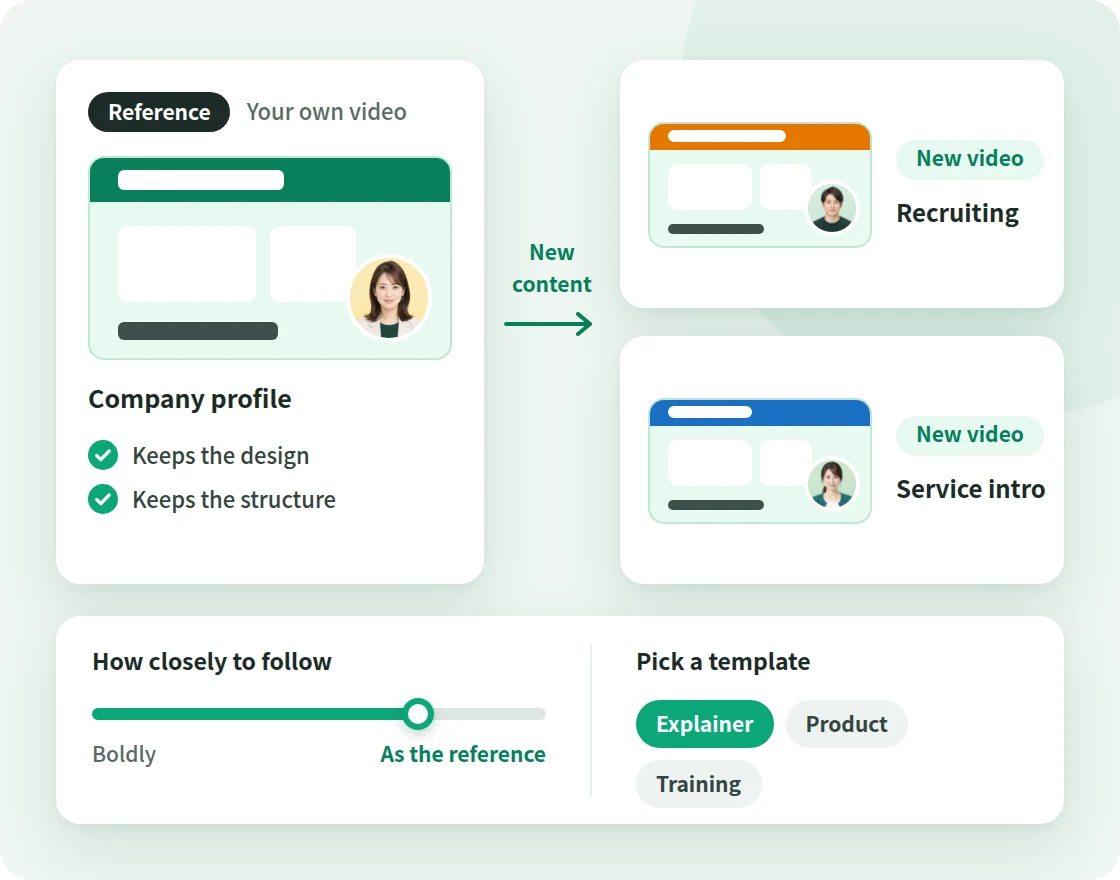
Diagram of creating a video with different content from a reference video while keeping its design and structure

With NoLang

Keep design and structure consistent with templates and reference videos

Use a video your company made as a reference video to create videos with different content while keeping the design and structure.

The workload falls on the person in charge

In the end, all the work will probably pile up on the one person who can do it, and it won't last.

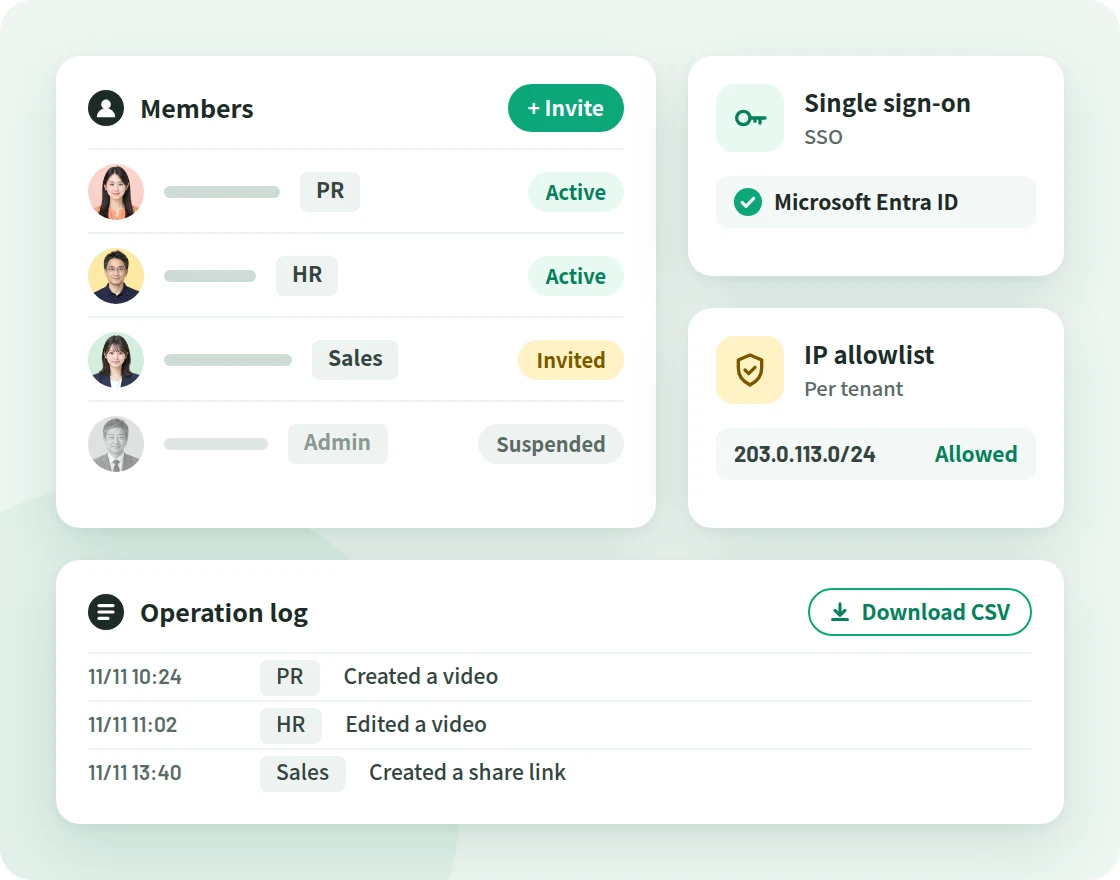
Diagram showing member invitation and suspension, single sign-on, IP address restrictions, and operation logs

With NoLang

Team members in each department create in the same tenant

On the Business plan, you can invite team members from each department. Generation settings can be saved and reused.

Videos can't be revised once they're made

If we have to remake the video every time the content changes, isn't that the same as outsourcing?

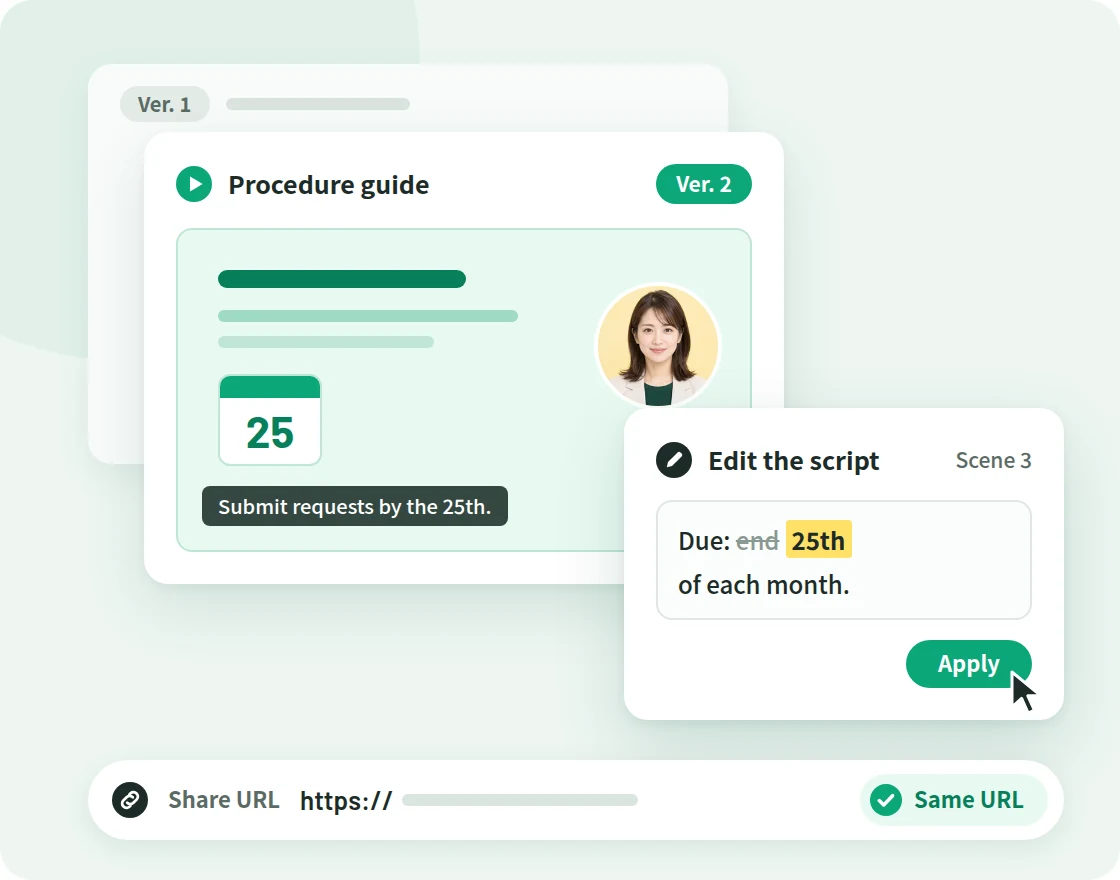
Diagram of editing the script and confirming to get version 2 of the video at the same URL

With NoLang

Fix and confirm, and it becomes a new version at the same URL

Just edit the script or assets. You can also describe what you want changed in text and fix only that part.

Source: Hikaku Biz and Mteam, "Survey on In-House and Outsourced Video Production Rates and Challenges" (April 2025). Among the 38 respondents who produce videos in-house, the most cited challenge (multiple answers allowed) was "Shooting and editing tools are hard to introduce and operate" (44.7%).

With NoLang,

Just add documents or text,
and AI turns them into videos.

  • No Filming or Recording

    Make videos from documents and text with AI voices and avatars, without filming or recording.

  • Create step by step

    Write what you want to create or add a document, then choose the creation method, voice, and avatar step by step.

  • Make Fixes In-House

    When you edit the script or assets and confirm, the video is updated to a new version at the same URL.

  • Use across departments

    On the Business plan, you can invite the people in charge in each department to the same tenant.

HOW IT WORKS

From getting started to sharing,
in three steps

Start by describing the video you want in text, or by adding PDF or PowerPoint (PPTX) documents. PPT, Keynote, and Word documents can be used once you export them to PDF or PPTX.

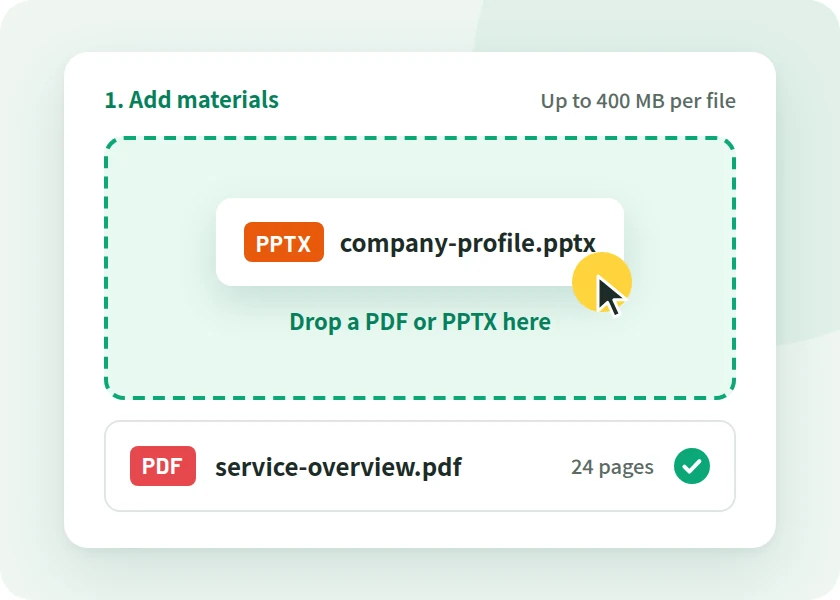
  1. Illustration of the screen for adding a PDF or PPTX document to NoLang

    STEP 01

    Write your content or add a document

    Write what you want the video to cover in the input field, or add a PDF or PPTX document.

  2. Illustration of the screen for choosing a method, voice, and avatar

    STEP 02

    Choose a method, voice, and avatar

    When creating from documents, choose one of four creation methods, then pick a voice and an avatar.

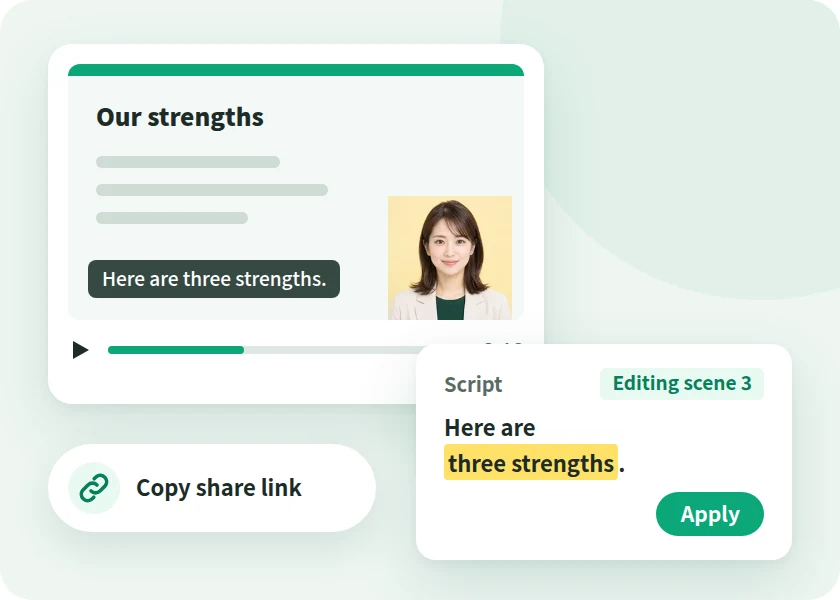
  3. Illustration of the screen for reviewing the finished video, editing the script, and sharing it

    STEP 03

    Generate, review, edit, and share

    Review the finished video, revise the script and subtitles, then share it with a share link.

From structure to revisions

AI handles all 6 steps for you

Structure Script Filming and recording Editing Subtitles Revisions The old
way
People Decided in meetings People Write from scratch People Arrange locations and performers People Arrange materials in editing software People Type them in to match the audio People Reshoot or re-edit With
NoLang
AI AI builds it from documents or text AI AI writes it. You can also provide a script Not required No filming or recording needed AI AI syncs the voice, avatar, and visuals AI Added automatically, in sync with the narration AI AI edits the video content as you instruct

All the person in charge does is explain the content and check the result.
For anything you want fixed, just describe it in text and AI fixes it.

Try It for Free

HOW TO START

From outsourcing to in-house.
Six steps to make the switch

You don't need to switch every video at once. Start with the videos that are easiest to make, then expand to other departments.

  1. STEP 01

    Prepare

    Take stock of the videos you outsource

    List the videos you currently outsource by type, volume, and update frequency.

  2. STEP 02

    Prepare

    Decide the order in which to bring videos in-house

    Start with videos where the documents or text already exist and the content changes often.

  3. STEP 03

    Prepare

    Decide who creates and who reviews

    Assign a creator in each department, and someone to check the content before publishing.

  4. STEP 04

    Try

    Make one video you plan to publish

    Make one video from documents you have on hand, and try everything through to revisions. You can start on the Free plan.

  5. STEP 05

    Expand

    Use a finished video as a reference video to standardize the format

    Use your first video as a reference video to create videos with different content while keeping the same design and structure.

  6. STEP 06

    Expand

    Roll out to departments and keep using it, revising as you go

    Invite team members from each department on the Business plan. When the content changes, each department fixes it themselves.

The in-house production team and its 3 roles

You can get started without building a dedicated production team. The flow up to a finished video is split into three roles.

  1. Request
  2. Preparing documents
  3. Generation
  4. Internal review
  5. Revisions
  6. Publish
  • Illustration of the screen for choosing a method, voice, and avatar

    Team members in each department

    Creator

    Create videos from documents or text, and revise them when the content changes.

    • Video generation
    • Editing
    • Templates and reference videos
  • Illustration of the screen for reviewing the finished video, editing the script, and sharing it

    Managers, PR, legal, etc.

    Reviewer

    Before publishing, watch the video via a share link and check its content and wording.

    • Share link
    • Unpublishing
  • Diagram showing member invitation and suspension, single sign-on, IP address restrictions, and operation logs

    Admins and the IT department

    Administrator

    Manages users and access, and checks usage.

    • Inviting and suspending users
    • Single sign-on
    • IP address restriction
    • Activity Logs

CHECK POINTS

When choosing a video creation tool,
8 points to check

These are points worth checking before adoption, whichever tool you choose. We've added NoLang's answer to each.

  1. CHECK 01 Does it suit the videos you want to make?

    You can make videos for any purpose, including company introductions, advertising and PR, recruiting, training, manuals, sales, IR, and internal communications. Browse sample videos by purpose and industry in the Video Gallery.

    View Video Gallery
  2. CHECK 02 Can employees with no experience handle revisions too?

    Follow the steps to choose your options and create the video, then revise the script or assets and confirm to publish a new version. You can also describe what you want changed in text and revise only that part.

  3. CHECK 03 Can it export to suit where the video is used?

    You can show finished videos with a share link, and download them too. You can create versions in other languages while keeping the original video (34 languages).

  4. CHECK 04 Commercial use and asset rights

    Videos and slides you generate can be reused commercially, including for external company introductions and ads. Before publishing, please check for yourself the rights to the photos, people, and voices used in your videos.

  5. CHECK 05 Can it be managed at the company level?

    On the Business plan, admins invite and suspend users, and can grant users in the tenant permission to view or edit.

    View Admin and Security
  6. CHECK 06 Is it OK to upload internal documents?

    On every plan, the documents you upload are never used to train AI. Mavericks, Inc., which develops and operates NoLang, is certified under ISO/IEC 27001:2022 (ISMS).

  7. CHECK 07 Can you check the total cost?

    Pricing and the terms of each plan are summarized on the pricing page. For the Business plan, contact us and we will walk you through it.

    View the Pricing Page
  8. CHECK 08 Where to ask, and how to pay

    Contact us to discuss Business plan details, API integration, and customization. We accept payment by card and by invoice (bank transfer).

If you're unsure, the surest way is to make one video you plan to publish and try the process through to revisions.

Try It for Free

SECURITY

Administration and security for business use

NoLang is a Japan-made AI video generator developed and operated in-house by Mavericks, Inc. Here is what IT departments and those handling internal approval will want to confirm.

Third-Party Certification

Certified to ISO/IEC 27001:2022 (ISMS)

ISO/IEC 27001 is the international standard for information security management systems (ISMS). Mavericks, Inc., which develops and operates NoLang, is certified to this standard.

ISO/IEC 27001:2022 certification mark
Registration No. GIJP-2064-IC
  • SSO

    Single sign-on with Microsoft Entra ID

  • IP Address Restrictions

    Restrict which IP addresses can be used for each tenant

  • Activity Logs

    Admins can filter activity logs and download them in bulk as CSV

  • User Management

    Invite and suspend users, with credits shared across the company

  • No AI Training on Your Documents

    Uploaded documents are never used to train generative AI

  • Pay by Invoice

    The Business plan accepts bank transfer (invoice) as well as credit card

  • REST API

    Generate videos from PDF or PPTX files via your own systems

  • Developed in Japan

    Developed and operated in-house by Mavericks, Inc.

Business Plan Features

  • Unlimited video generation (excluding some types, such as avatars)
  • Custom avatar and voice creation
  • Higher slide generation limits

For those considering in-house video production

Can you produce your videos in-house with NoLang?
Consult with us

USE CASES

Create internal videos
across departments and purposes

We introduce how to use NoLang by use case, in six scenarios. On the Video Gallery page, you can filter sample videos made with NoLang by purpose and industry.

Pages by Use Case

  • Training Videos

    Learn how to create training videos from training documents and handle yearly reviews in the editor.

    Go to the Training Videos Page
  • Real Estate Property Videos

    Learn how to create viewing and introduction videos from property photos and floor plans.

    Go to the Real Estate page
  • Video Gallery

    We feature over 90 sample videos made with NoLang. Filter them by 11 industries and 8 purposes.

    View Video Gallery

Browse by Use Case

Company and business introductions

  • PR
  • Corporate Planning
  • Sales
Challenge
We have company brochure materials, but videos can only be made by asking a production company, so they stay outdated even when the content changes.
With NoLang
Create videos that show and explain each page of your company brochure PDF or PPTX. When your business changes, revise the script and update the video at the same URL.

Recruiting and Company Introductions

  • HR
  • Recruiting
Challenge
You repeat the same explanation at every information session and never get around to intro videos for each job type.
With NoLang
Turn your information session documents into a video presented by an avatar. You can also introduce the work with an avatar made from an employee's photo.

Internal Training and Education

  • HR
  • Education
  • Compliance
Challenge
You remake training videos every time a policy is revised or the yearly review comes around.
With NoLang
Create training videos from training documents and update them in the editor with every revision. See the training videos page for details.

Work Procedures and Manuals

  • General Affairs
  • On-Site Training
  • Customer Support
Challenge
Procedure documents get handed out but go unread, and you keep answering the same questions.
With NoLang
From PDF or PPTX procedure documents and manuals, you can create videos that show each page and explain it. When a procedure changes, you can regenerate the audio for only the scenes you edited.

Product and service introductions

  • Sales
  • Marketing
Challenge
You give the same explanation in every proposal, and you outsource an introduction video every time a product is added.
With NoLang
Create introduction videos from product documents or descriptive text. You can also create versions in other languages while keeping the original video (34 languages).

Internal Communications and Announcements

  • PR
  • HR
  • General Affairs
Challenge
Even when management policies and policy changes are distributed in writing, they rarely get read to the end.
With NoLang
Create videos in which an avatar explains your announcement text or documents. Share them internally with a share link, and stop sharing whenever you need to.

TRACK RECORD

Over 500 companies, local governments,
and public agencies use NoLang

  • Companies using NoLang(businesses and public sector) 500+
  • Users 200K+

Some of the companies using NoLang (in no particular order)

CASE STUDY

Case studies from companies, local governments, and public agencies

NoLang videos are used for public relations, company introductions, and city government communications. You can play the published videos right here.

Horizontal Video YouTube

Vertical Short YouTube Shorts

Public Agency

Ministry of Defense

  • PR
  • Communications

PR videos on its initiatives and activities, published as a horizontal video and a vertical Short

Produces PR videos that clearly communicate its initiatives and activities. Both the horizontal video for YouTube and the vertical Short are created in NoLang alone.

  • Company 17LIVE

    Its own character delivers corporate messages in an approachable way

    Highly entertaining videos convey company information in an approachable way and help strengthen the brand image.

    • Business Overview
    • Company Profile
  • Local Government Hatsukaichi City, Hiroshima

    Complex administrative information, brought to residents through explainer videos

    Produces explainer videos about plans and programs with NoLang and publishes them on the web, reaching more residents with municipal information.

    • Tourism PR
    • Municipal Communications
  • Company WriteUp Co., Ltd.

    Sharing practical AI know-how to reach more new customers

    Shares practical, easy-to-understand information about AI on YouTube and other channels, building its expertise and credibility.

    • Marketing
    • New Customer Acquisition

FLOW

From inquiry to rollout

Here is the process from your first inquiry to producing videos in-house.

  1. 01

    Contact Us

    Submit the form and we'll send materials or a reply to the email address you entered.

  2. 02

    Consultation and Quote

    Talk with us about Business plan details, API integration, and customization.

  3. 03

    Sign Up

    To pay by card, sign up through the web form in about 5 minutes. For invoice payment (bank transfer), contact us and we will guide you through it.

  4. 04

    Go Live

    You can use the Business plan from your start date. An admin invites members from each department, and they start creating videos.

FAQ

FAQ

Questions we receive from the people in charge and from IT departments when they consider in-house video production.

Which is better for video production: outsourcing or in-house production?

You don't need to choose one or the other all at once. A realistic approach is to bring in-house the videos you already have documents or text for and whose content changes often, then expand the range of videos you make.

With in-house production, you can fix a video in-house when the content changes, without quotes or orders.

What kinds of videos can I make with NoLang?

You can make videos for any purpose, including company introductions, advertising and PR, recruiting, training, manuals, sales, IR, and internal communications. You can make both horizontal videos and vertical short videos.

You can browse sample videos made with NoLang by purpose and industry in the Video Gallery.

Can employees with no video editing experience create videos?

Write what you want the video to cover in the input field on Home and submit it to start generation. When creating from documents or a script, you also choose the creation method, voice, and avatar step by step.

No software installation is needed; NoLang runs in your browser. For editing, we recommend Google Chrome on a PC.

Can a video be made from start to finish with AI alone?

Describe the video you want in text or add your documents, and AI creates a video complete with structure, script, narration, and subtitles.

The person in charge checks that the content is correct. To make a fix, rewrite the script or describe what you want changed in text.

When does in-house video production stop being sustainable?

It becomes hard to sustain when the work falls on one person, when the look varies by creator, or when videos are not revised after the content changes.

With NoLang, you can invite team members from each department to the same tenant, use videos you have made as reference videos to keep design and structure consistent, and publish a new version at the same URL once you revise and confirm it.

How is this different from video editing software and design tools?

With video editing software, you arrange and edit the materials yourself. With NoLang, you describe the video you want in text or add a document, and AI creates a video complete with structure, script, narration, and subtitles.

Besides short videos that summarize the key points, you can choose "Explain all pages", which explains your documents without skipping a page, or "Specify script", which reads the script you wrote exactly as written.

Can I use the videos I create for external company introductions and advertising?

Yes. Videos and slides generated with NoLang can be reused commercially, including for external-facing company introductions and advertising.

Before publishing, please check the rights to the photos, people, and voices used in your videos yourself. Conditions such as attribution are set out in the Terms of Service.

Can multiple departments use it?

Yes. On the Business plan, you can invite the people in charge in each department to the same tenant. Admins can invite and suspend users.

Are uploaded documents used to train AI?

No. On every plan, the documents you upload are never used to train AI.

Can it read internal terms and product names aloud correctly?

You can fix pronunciation word by word and register up to 1,000 words in the dictionary. The dictionary is used for newly generated Japanese videos, and you can apply it to existing videos from the "Dictionary" tab.

Can we pay by invoice?

The Business plan supports payment by bank transfer (invoice) as well as by credit card.

For payment by invoice, contact us and we'll walk you through it.

Can I try it for free? Where can I check the pricing?

On the Free plan, you can try creating videos from your own documents and text. Pricing and the terms of each plan are on the pricing page, and the Business plan is covered on the business page.

Ask Another Question

CONTACT

See if you can produce your videos in-house.
Start with our materials and a consultation

Choose the option that fits your stage of evaluation.

For teams evaluating NoLang internally

3-minute overview

Service overview

An overview of NoLang and its Business plan.

  • Details of the Business plan
  • Sent by email after you submit the form
  • Easy to share internally as a PDF
Cover of the NoLang Service Overview
Free Download Materials

We'll send the materials to the email address you enter.

For those who want to discuss in-house video production

Feel free to reach out

Contact Us

You can consult us about how well NoLang fits your videos and how to make the switch.

  • Quotes and rollout planning
  • Questions about paying by invoice (bank transfer)
  • API integration and customization
Contact Us

We will reply to the email address you provide.

For teams who want to try it first

Try for Free

Before requesting materials or a consultation, try the actual app for yourself.

Try It for Free