
Mavericks, Inc., the Tokyo-based company behind NoLang, one of Japan’s leading AI video generation services, has added an interval setting that places silence between lines of dialogue and a caption line-break function for vertical video. With the update, people who have no video editing background can create natural conversational pacing and readable subtitle layouts through simple on-screen operations. The two features support clearer, higher-quality video for training, product promotion, IR and every other kind of corporate communication.
Two new features in the AI video generator NoLang widen the range of expression
Mavericks, Inc. has added two features to the AI video generation service NoLang that users had requested most often: pause control through an interval setting between spoken lines, and caption line breaks in vertical video. NoLang is built around a simple screen that lets anyone edit video, and this update means that people with no video editing knowledge or experience at all can produce the kind of timing and the kind of readable subtitle layout that a professional editor would deliver, using only intuitive operations. The convenience of automatic AI generation stays the same, while the finished video communicates more clearly to viewers.
New feature 1: interval settings that insert silence between lines
The new interval setting lets users insert silence of any length, in increments of 0.1 seconds, at the joint between one spoken line and the next. The control is available in the editing screen for each video, opened from “Video Management” > “Edit video”. The result is the natural breathing room a live speaker would take, giving viewers the time they need to process and understand what they have just heard.
In a presentation video, for example, a deliberate silence just before a key phrase draws the viewer’s attention: “The biggest advantage of this product is … (a one-second pause) … its outstanding cost performance.” In a dialogue-style video, a pause can suggest that a speaker is thinking for a moment about what the other person just said. Used this way, the setting produces video with the kind of rise and fall that keeps viewers watching.
New feature 2: caption line breaks and multi-line display in vertical video
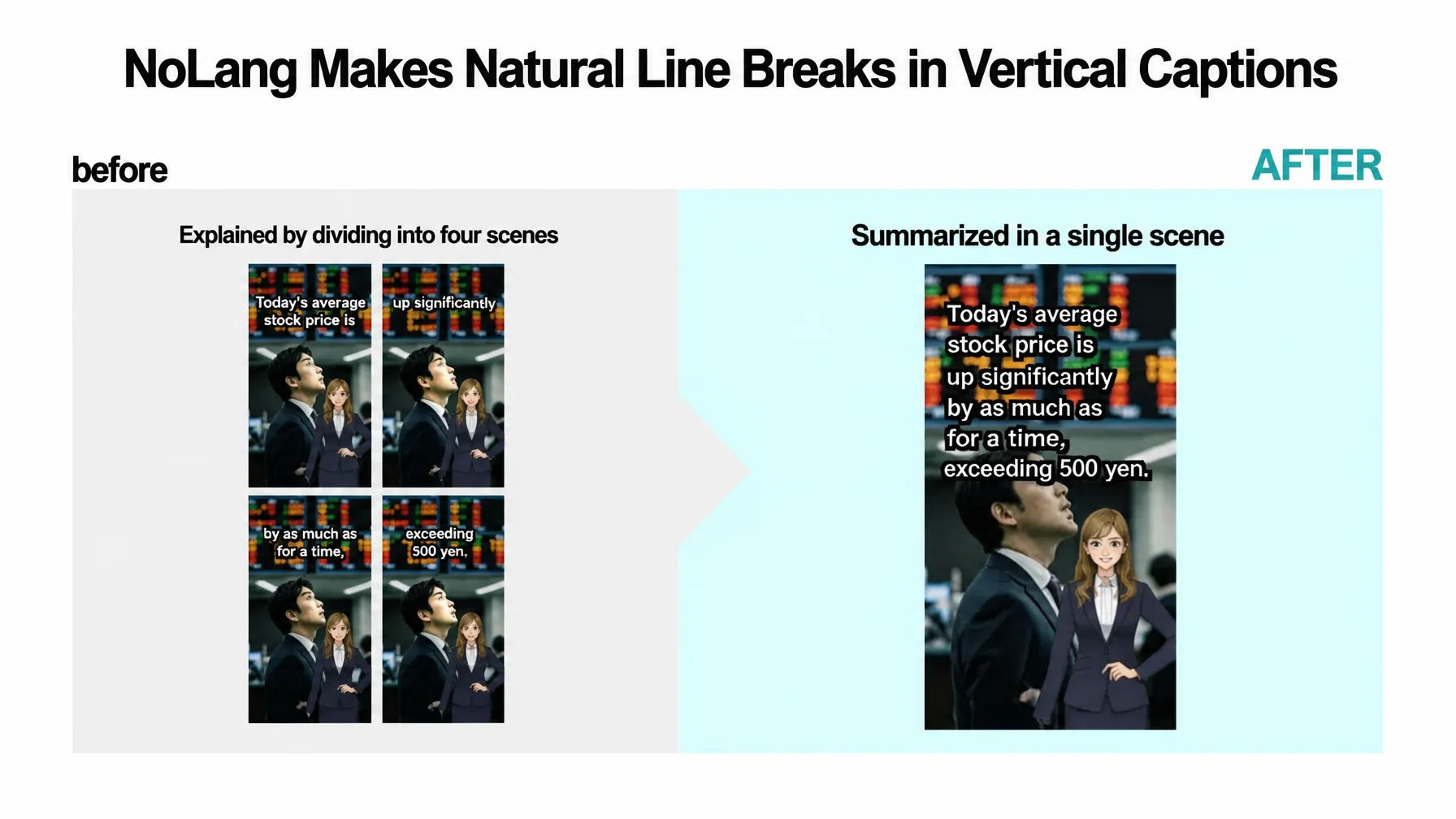
Caption display in vertical video for TikTok, YouTube Shorts and similar platforms has been substantially updated. Users can now insert a line break at any point while creating captions in the editing screen, so subtitles can run across two or more lines. Text can therefore fit within the narrow screen of a smartphone without shrinking the font to an extreme size, which improves legibility and helps prevent viewers from dropping off because the text is hard to read.
The feature is useful wherever information has to be conveyed precisely, such as vertical news-commentary video covering fast-moving markets and breaking stories. Displaying a long sentence like “The Nikkei Stock Average rebounded sharply today, with gains briefly exceeding 500 yen” used to mean either extremely small text or an unnatural split of the sentence across separate scenes. The new feature allows a natural break at each phrase or unit of meaning, so subtitles are designed with the viewer in mind: even a viewer who misses the narration can grasp the content immediately from the text alone.
Business scenarios opened up by freer control of pacing and text
The two features widen the range of situations in which NoLang can be used, particularly business scenarios that require both precise communication and sustained viewer attention.
Internal training and manual videos
When internal training walks through a complex workflow with many steps one at a time, a pause after each step helps employees follow the explanation. Longer, more difficult text such as definitions or cautionary notes can be shown legibly across several lines, so staff take in the visual information more easily and the video does more to teach.
See a real video exampleProduct and service introduction videos
In vertical ads and promotional video for social media, or product introduction video placed on a landing page, benefits no longer have to arrive in an unbroken rush: an effective pause before the price is announced, for example, can build the viewer’s desire to buy. The pacing also breaks up the monotonous rhythm typical of AI narration and leaves a stronger impression of the key selling points, which contributes to higher click-through and conversion rates.
Executive messages and IR videos
Internal communications that spread a corporate philosophy, IR videos explaining financial results to investors, and messages from leadership addressed to job candidates all involve executives speaking in their own words. Adjusting the pauses deliberately according to the weight of the message, rather than reading straight through, conveys the conviction and intent behind those words far more deeply. It dispels the mechanical impression that AI avatars can leave, allows communication with the human quality and persuasiveness of someone speaking face to face, and strongly supports building trust with stakeholders.
What comes next
NoLang will continue to develop not as a tool that merely automates video production, but as a partner that gives shape to what business professionals want to say. Mavericks will keep reflecting user feedback quickly and adding features that put the advanced techniques of professional editors within one click of anyone.
Contact us
