
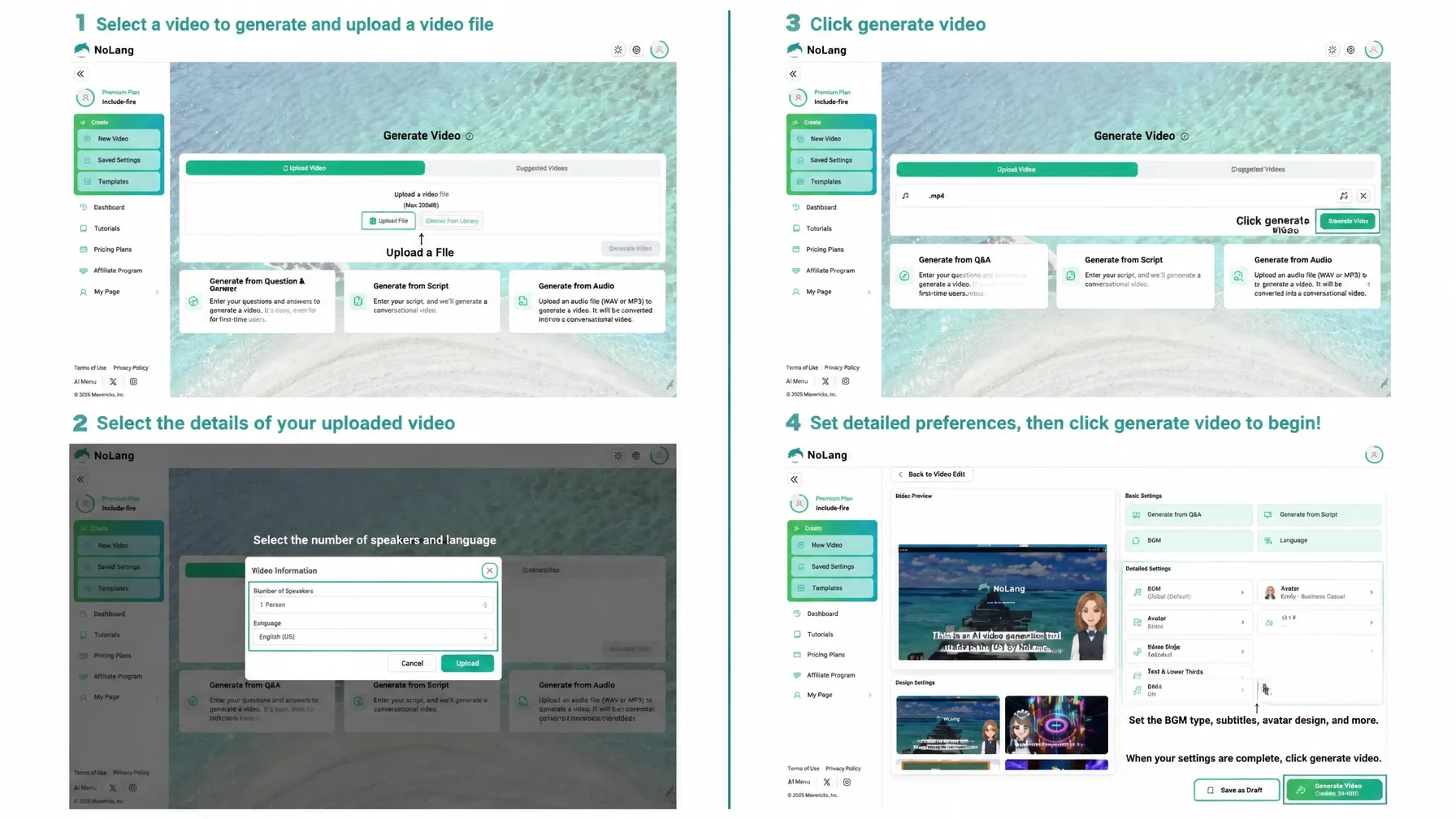
Mavericks, Inc., the Japanese company behind the video generation AI NoLang, has released a new feature that adds subtitles, background music, and sound effects to an existing video file automatically with AI. Users only upload the file. The feature is aimed at footage that is tedious to transcribe, such as interviews and panel discussions: it combines high-accuracy automatic transcription with speaker separation for up to two speakers, and AI-driven insertion of royalty-free sound effects and background music. Existing video assets can be turned into higher-quality content immediately, even by people with no editing skills.
Background and challenges
Video has become a standard part of corporate marketing and internal training. Using footage that has already been shot, however, requires editing work, and that keeps a high, thick wall in front of wider video use inside companies.
In video editing, the transcription needed for on-screen captions is especially expensive and slow. Transcribing the audio accurately and placing the text at the right moment is the most labor-intensive routine task in the whole editing process. It is not unusual for captioning a one-hour video alone to cost tens of thousands of yen and take about a week. The work becomes even harder for panel discussions and interviews, where two speakers talk in turn: separating who said what and transcribing each line accurately is extremely tedious, and it pushes both cost and lead time further up.
Editing the sound - adding background music and sound effects - is also effective for raising quality and holding a viewer’s attention. But choosing music that fits the mood of the video, and placing sound effects at the right moments, takes specialist skill and extra hours. When those audio sources are used commercially for corporate PR or marketing, the person in charge also has to keep licensing in mind at all times, and managing the risk of infringement is a heavy mental burden.
AI automates transcription and the insertion of background music and sound effects for existing videos
To solve these problems - captioning, sound effect insertion, and rights clearance - Mavericks, Inc. has added a feature to NoLang that lets users upload an existing video file and automate the editing with AI. The AI analyzes the uploaded video and handles the tasks that used to take the most effort: transcription, including speaker separation in two-person conversations, and the insertion of background music and sound effects, which normally requires specialist skill and rights management.
Valuable footage that was previously posted exactly as shot, because outsourcing was costly, the work took too long, and copyright infringement was a risk, can now be brought back to life as high-quality video content by anyone, at low cost, and safely.
Main features and benefits
Just upload a video, and the AI runs high-accuracy automatic transcription and inserts royalty-free background music and sound effects. Professional-quality editing is possible with zero editing skills.1
Feature 1: Automatic transcription with speaker separation, plus subtitle insertion
Upload a video and the AI transcribes the audio in it with high accuracy, then places the text on the video as captions at the right moments. The feature supports speaker separation for up to two speakers, so even in videos where several people talk, such as panel discussions and roundtables, each speaker’s lines can be transcribed and captioned easily. This dramatically cuts the hours that manual captioning used to take and sharply raises the productivity of the person doing the work. The generated captions can be edited on the intuitive NoLang interface: text corrections, font changes, and position adjustments require no knowledge of professional video editing software.
Feature 2: Automatic insertion of background music and sound effects by AI
NoLang comes with a built-in library of royalty-free background music and sound effects that can be used commercially. On top of that, the AI analyzes the text content of the video, its script, and its context, then inserts fitting background music and sound effects at the points that should stand out - automatically. Users are freed from selecting audio and from the fiddly work of placing it, and the video gains a rhythm that keeps viewers engaged. Every track in the library is royalty-free, so users can create videos without worrying about license infringement. Videos that used to be flat, straight-from-the-camera recordings turn into professional-looking content that holds a viewer’s interest, thanks to the background music and sound effects the AI adds.
Use cases
Communications and PR
Add automatic captions and sound effects to archived event footage and webinar recordings. Archived events and webinars, where holding attention is harder than in a live session, can be reworked into videos that use captions and sound, which increases viewer numbers and engagement.
HR and training
Add accurate captions, technical terms included, to recordings of internal training to improve learning efficiency. Sound effects at the key points help trainees stay focused, so the recording is reused as teaching material and education costs go down. Recordings of company briefings and Zoom sessions can also be reused: a video with captions and sound effects created in NoLang and placed on a careers page lets new-graduate and mid-career candidates who could not attend learn more about the company, which in turn reduces recruiting costs.
Media and creators
Leave full captioning of interviews and panel discussions to the AI and cut the hours involved substantially. The freed-up resources can go to planning and other genuinely creative work. Because two people can be transcribed at once, the feature also suits transcription for panel and interview videos.
What comes next
Mavericks, Inc. will keep improving transcription accuracy and will push forward development of AI video analysis. NoLang will continue to serve as a platform where anyone can easily convert information assets in any format - text, PDF, audio, and video - into the video content that communicates best, supporting the digital transformation and productivity of companies in Japan.
Contact usFootnotes
-
Supported file formats are .mp4, .mov, and .webm. ↩

