
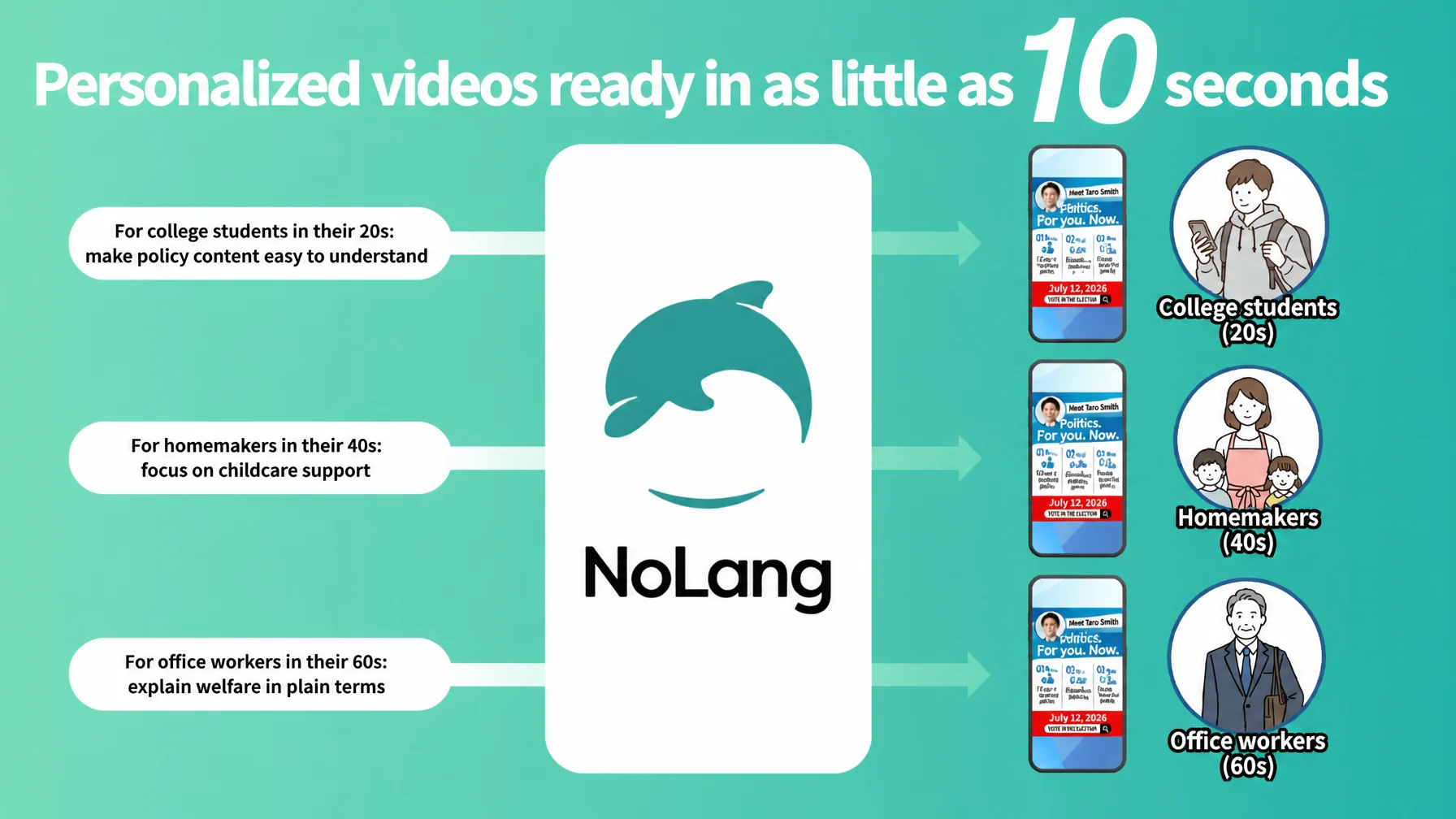
Mavericks, Inc., the company behind NoLang, a video generation AI used by 150,000 people in Japan, has expanded its library of election video templates ahead of Japan’s 2026 House of Representatives election. The templates let a campaign keep posting video on social media every day, even during a busy election period. NoLang extracts the key points from text materials and instantly generates video that voters will watch to the end. Formats range from vertical short video for social media to horizontal video for detailed explanation, so a candidate’s commitment to politics and the substance of their policies reach each voter directly.
Try NoLangAI summarizes policy documents into video, adapts the message to each voter group, and generates a video that lands in as little as 10 seconds
NoLang is a video generation AI that produces high-quality video in as little as a few seconds from text, PDF documents, website URLs, images, or audio files. According to research by Mavericks, it was the first service of its kind in Japan. Since its release in July 2024 it has passed 150,000 registered users, making it one of the largest generative AI products to come out of Japan (as of January 2026).
In a campaign, the details of a policy are the most important basis on which voters decide, yet text-heavy documents are often felt to be dense and hard to read. Mavericks expanded its election-specific video templates to address that. The AI reads policy content accurately and converts it into a clear explanatory video, so the key points reach even people who have shown little interest in politics.
With NoLang, a campaign can immediately produce several videos on the same policy, each shifting the emphasis to suit a region or an age group. For the same economic policy, for example, a video for younger voters can highlight higher starting salaries while a video for older voters centers on stable social security. That kind of audience-by-audience delivery takes no extra work on the candidate’s side.
Four new templates for every stage of a campaign, from social media to YouTube
This update adds three vertical short video templates for social media and one horizontal template for detailed explanation.
Vertical video templates (for social media)
1. Explain policies and pledges simply
Enter a document that gathers policies, pledges, and related information, and the template creates a video ready to upload to TikTok, Instagram Reels, or YouTube Shorts.
2. Policy Q&A: answer common questions clearly
Enter Q&A materials or other assets about a policy and the template creates a vertical video suited to each social platform. It can also generate an avatar that closely resembles the candidate from a photo of their face and put that avatar in the video, which makes the message feel closer to viewers and more engaging.
3. Reach voters with a simple record of results
Enter text or document data such as past reports on assembly activity, policy collections, or a manifesto, and the template automatically creates a vertical video optimized for each platform. Dense policy documents full of technical terms, the kind voters tend to avoid in plain text, become clear video content built around the key points. That widens recognition across a broad audience, including younger voters, and creates an opening to deepen understanding of and interest in the policies.
Horizontal video templates (for websites and YouTube)
Policy details and manifesto explanation
Enter a PDF or PPTX document such as a policy collection or a manifesto and the template creates a horizontal video suited to a website or YouTube. Its distinguishing feature is that a video can look as if the candidate appears in it even when the candidate is absent. Combining a realistic AI avatar with the voice clone function reproduces audio that sounds like the actual candidate speaking. Without setting aside recording time for a busy candidate, the staff member handling video can produce persuasive videos in volume.1
A candidate’s avatar reads out the policies, so outreach speaks to voters 24 hours a day even when the candidate is not there
NoLang offers AI features that put the candidate, or a campaign mascot character, into the video so the message feels more familiar to the audience.
Turn a mascot character into the narrator of the video
A single image of a mascot character is enough to create an avatar that moves inside the video. Having a local character or a character created for the campaign explain the policies gives a friendly impression to a wide range of viewers.
Real avatar and voice clone: reproducing the candidate’s appearance and voice
During a busy campaign period, it is hard for a candidate to set aside time for filming or voice recording. With the real avatar function and the voice clone function in NoLang, a campaign can produce credible “candidate appears in person” videos in volume while keeping the burden on the candidate to a minimum.
Real avatar function: Generates an avatar that closely resembles the person and speaks smoothly, from a single photo of their face.
Voice clone function: Creates an AI voice that reproduces the person’s vocal quality and speaking style from a short sample of audio.
With these features, entering text is enough to complete a video that looks as though the candidate is delivering the speech. Even the delivery can be varied automatically, energetic for younger voters and measured for older voters, with no time required from the candidate. Letting voters get to know the person before the policy builds a relationship of trust.
No expertise needed. Four simple steps: enter what is required and wait 10 seconds
The template feature in NoLang is intuitive enough for campaign staff who are not familiar with IT.
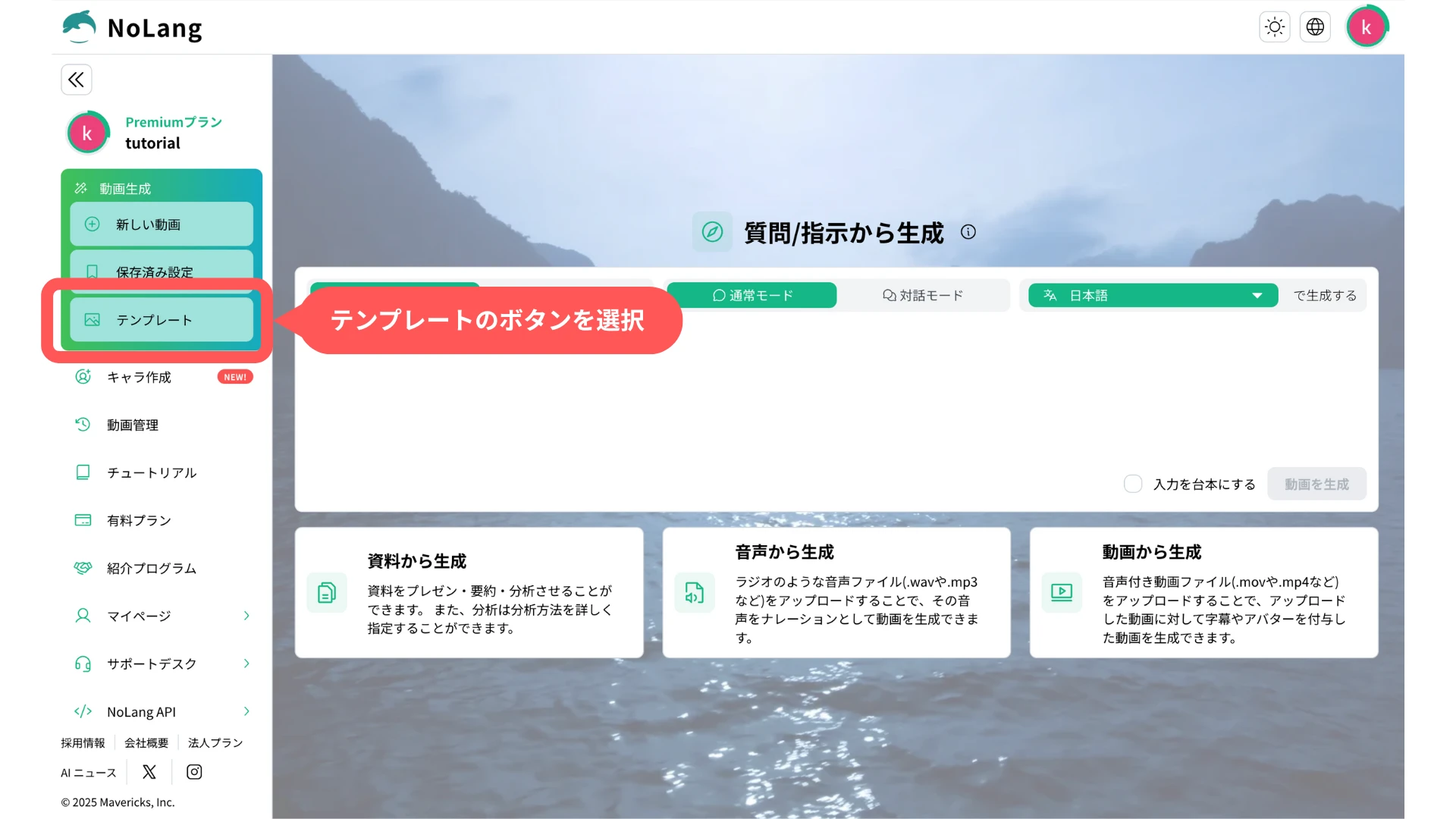
1. Select the Template button
Select “Template” on the creation screen to move to the template screen.
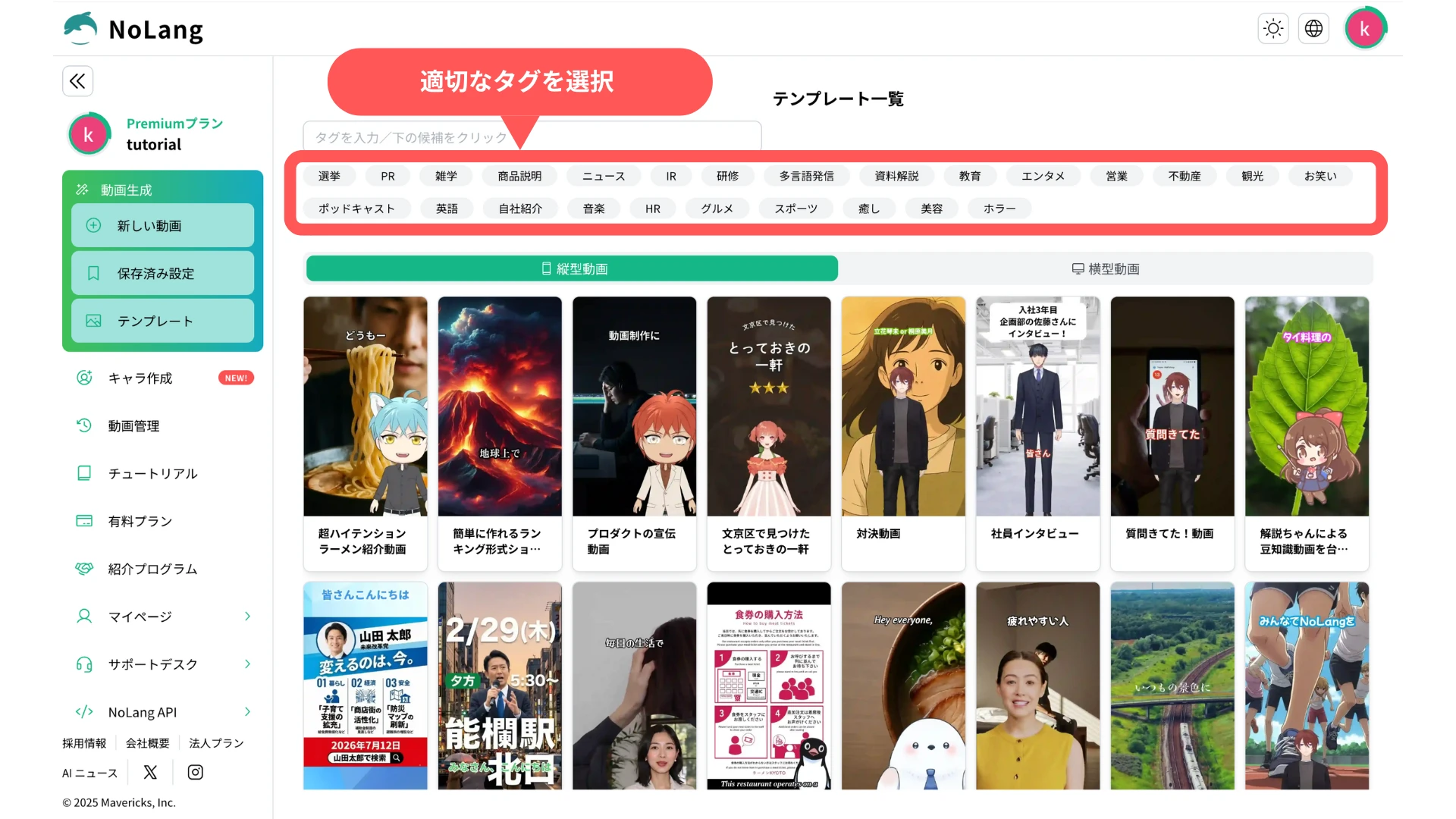
2. Select a tag
Select the “Election” tag from the tag field.
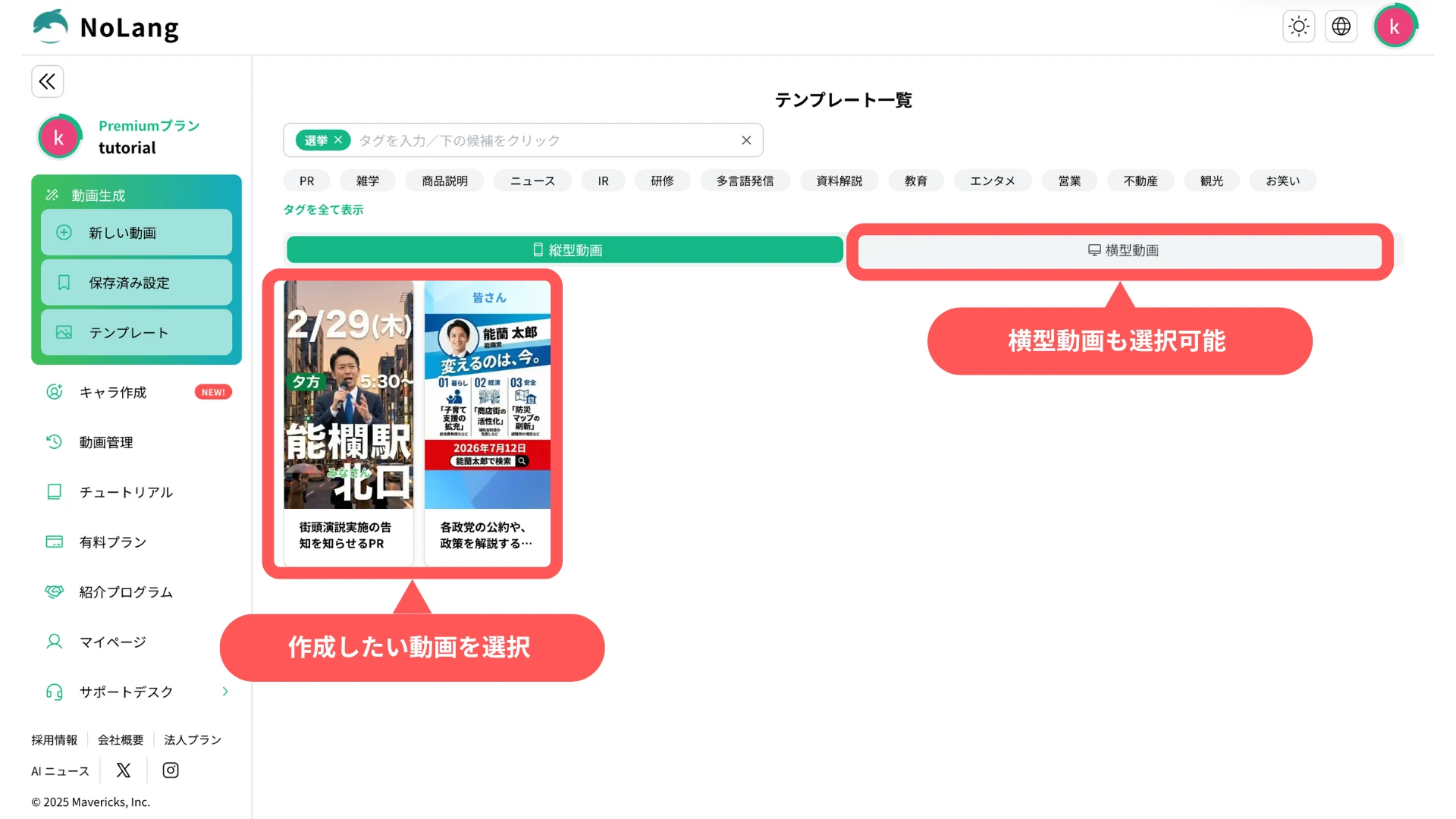
3. Select the video you want to create
Select the template for the video you want to create. Horizontal video can be created as well.
4. Generate the video
Enter a prompt and your assets, then press the “Generate” button. In as little as 10 seconds you get a high-quality video complete with background music, subtitles, and narration.
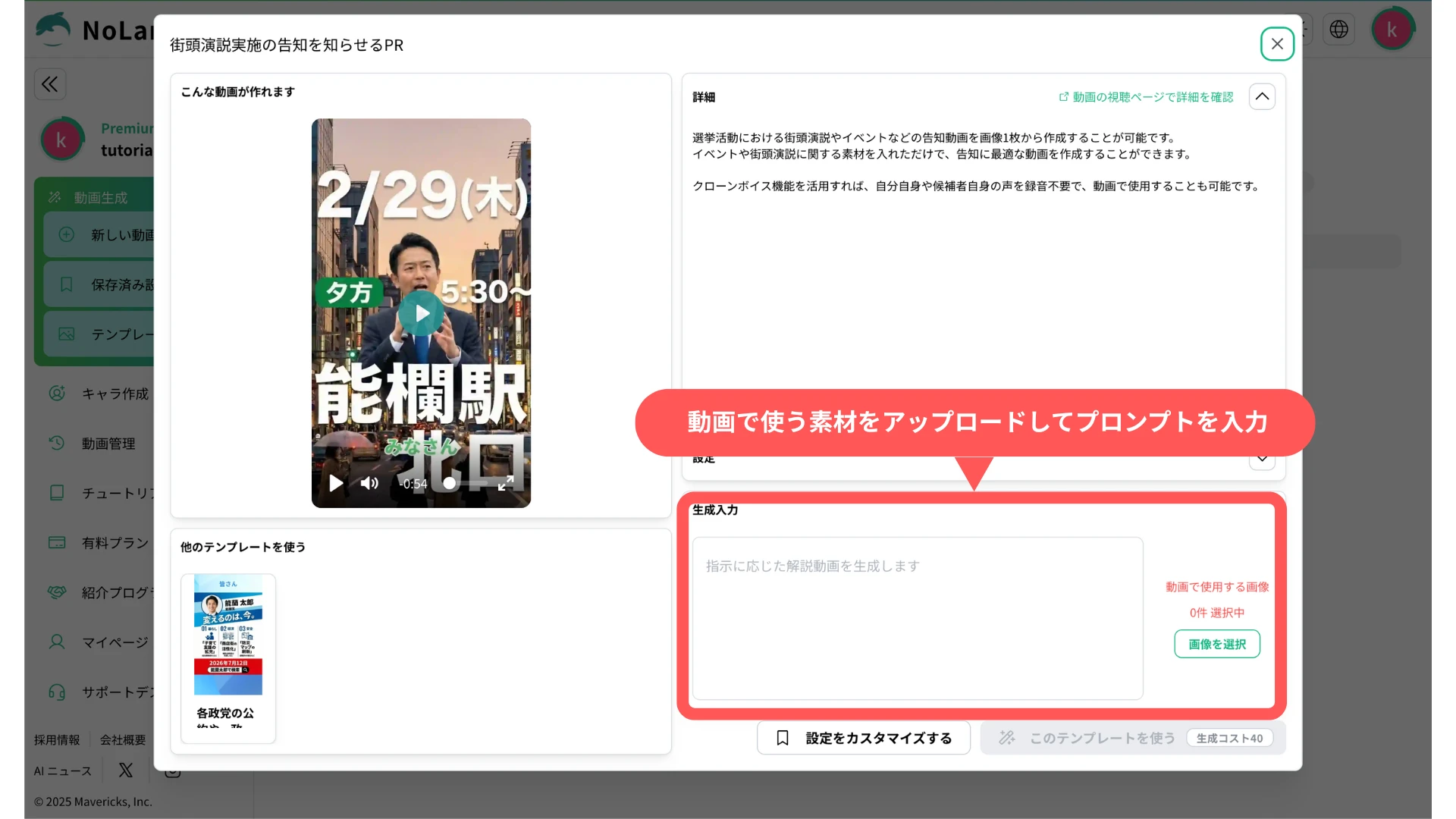
For more detail on how to operate the feature, see the official tutorial as well.
See the Official TutorialDisclaimer
The following describes the safety measures that apply to use of this feature.
To promote compliance with the Public Offices Election Act and appropriate use of generative AI in the House of Representatives general election, Mavericks has set the following guidelines for use of the service. Users are asked to read them.
1. Consent for likeness and voice rights
When using the real avatar and voice clone functions, consent must be obtained from the person concerned and from the rights holder. Impersonation by a third party and unauthorized secondary use are strictly prohibited.
2. Compliance with the Public Offices Election Act
When content created with this service is used for internet election campaigning, users must comply with the Public Offices Election Act, which covers the ban on campaigning by email, the rules on the campaign period, and the obligation to display the candidate’s name and other information.
3. Prohibition on generating false information
Using this feature to defame a specific individual, or to spread false information with no basis in fact, violates the terms of use and can result in account suspension.
4. Limitation of liability
Mavericks accepts no liability for any trouble, damage, or legal dispute arising from content created and distributed using this service. Users are responsible for verifying the accuracy of information and for how they operate it.
What comes next
Mavericks will continue to release updates that make video creation smoother and more capable, including further election templates, a wider set of avatars for campaign use, and additional prompts covering a broader range of election scenarios. Feedback and requests from creators and users are welcome.
Try NoLangFootnotes
-
Creating and using a realistic AI avatar from a photo is available only on the Business plan. ↩

