
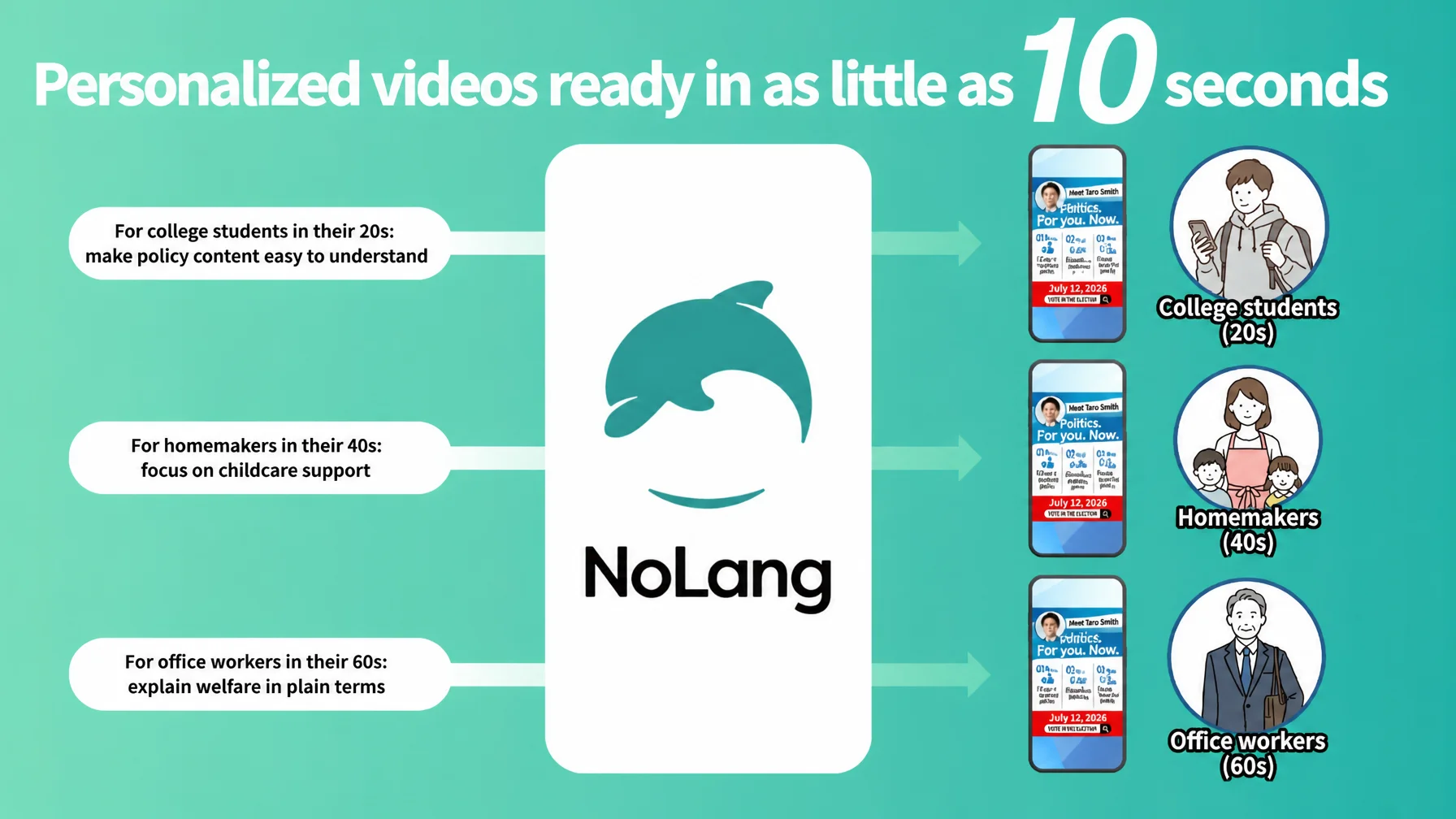
Mavericks, Inc., the Japanese company behind the AI video generation service NoLang, has released a transcription template built for election campaigns, covering speech and policy explainer videos. The AI transcribes the audio of a campaign speech or an assembly Q&A session automatically and produces a subtitled video in as little as 10 seconds. A candidate can record a street speech on a smartphone, upload the file to NoLang on the spot, and post the finished subtitled video straight to TikTok, YouTube Shorts, or Instagram Reels. Existing footage, such as archives of past street speeches or records of assembly questions, can also be reused as subtitled video, which makes it easier to spread on social media. Even with a short campaign period and a limited budget, a campaign can deliver a candidate’s activity to voters quickly and effectively.
Try NoLangSubtitles added to video automatically: reuse an existing video archive as subtitled content with NoLang transcription
NoLang is a video generation AI service that produces high-quality video in as little as a few seconds from text, PDF documents, a website URL, or an image, audio, or video file. It is the first video generation AI service of its kind in Japan (according to Mavericks). Since its release in July 2024, registered users have passed 150,000 and more than 60 companies have adopted it, making it one of the largest generative AI products to come out of Japan (as of January 2026).
In recent elections, video has become the most powerful platform for reaching voters. According to a recent survey1, politicians’ intent to use YouTube rose roughly 184% year over year and TikTok roughly 213%, and video-first communication is becoming the new standard. Short-form video spreads especially fast: in Japan’s 2024 general election, a 35-second short video recorded more than 12 million views2, showing how much engagement a condensed message about everyday life can earn.
Many campaigns, however, sit on valuable video archives of street speeches and assembly questions that go unused. These recordings document a candidate’s record and policy work, but without subtitles the content is hard to follow, so they are poorly suited to social media. Transcribing the audio and adding subtitles has meant outsourcing to a specialist vendor, at a cost of tens of thousands of yen per hour of footage and a lead time of several days. As a result, valuable records of past activity never reached voters, and campaigns missed the chance to show a candidate’s continuous work. Posting a street speech to social media on the same day it was recorded was also difficult, because subtitling took too long.
Transcribe a speech video, convert it instantly into subtitled video, and use it for social media and archives
With the speech and policy explainer transcription template now released by Mavericks, Inc., a user uploads a speech video or a recording of an assembly Q&A session, and the AI recognizes the audio automatically and transcribes it with high accuracy. The video is then output immediately with subtitles inserted.
Main features of the template
-
Video file upload: supports .mp4, .mov, and .webm
-
Accurate automatic transcription: the AI recognizes the audio of a speech or a Q&A session and inserts it into the video as subtitles
-
Output in multiple formats: both vertical video (TikTok / Instagram Reels / YouTube Shorts) and horizontal video (YouTube / websites / email newsletters)
-
Processing in as little as 10 seconds: transcription and subtitle insertion included, so production is fast
-
Secondary use of the transcript: the extracted text can also be published as meeting minutes on a website or used as newsletter copy
NoLang’s video generation features also let a user enter text or PDF documents and generate videos personalized to voter demographics.
For example, from a policy document a user can generate several versions at once, each with the wording and tone suited to a different group of voters: university students in their twenties, homemakers in their forties, seniors, and so on. A concise, energetic tone for university students in their twenties; explanations with concrete everyday examples for homemakers in their forties; a video that starts from the social background and explains carefully for company employees in their sixties. The same policy content is delivered in the way that best fits each voter’s interests and level of familiarity.
Turn a past speech archive into a track-record video. Post a morning street speech by midday. Transcription accelerates video use
With the new template, a campaign can use the video assets it already owns in a variety of ways.
Use case 1: Converting a past archive into a track-record video
Suppose a campaign still has video from a street speech four years ago in which the candidate promised to bring the childcare waiting list to zero. The campaign uploads that video and runs transcription. It then adds performance data to the extracted text, along the lines of “the pledge from back then has been delivered,” and generates a new track-record video. Posted in vertical format to TikTok or Instagram Reels, it makes an effective case to younger voters that this candidate keeps promises. At the same time, a longer horizontal version can be produced and shared with supporters on the campaign website or by email.
Use case 2: Making assembly questions visible and taking them to social media
Video of questions in an assembly session is valuable evidence of deep policy understanding and a real track record, but it is long and full of technical terms, so ordinary voters tend to avoid it. With NoLang’s transcription, a campaign turns the audio of a 30-minute Q&A video into text and outputs a subtitled video immediately. The extracted text can also be published on the minutes page of the website, which improves how well the information is found through search engines.
Use case 3: Post a morning street speech by midday, for timely communication
Say a candidate gives a street speech in front of a station at 8 a.m. The campaign records it on a smartphone and uploads the video to NoLang while riding the train to the next stop. The subtitled, transcribed video is finished in as little as 10 seconds, so it can be posted to TikTok or Instagram Reels over the lunch break and reach voters’ timelines the same day. Subtitling used to take several days, which made this impossible; now a campaign can share the day’s speech on the same day and keep its communication fresh throughout the campaign period.
Templates for every stage of a campaign: the range of video templates NoLang offers
Alongside the new video transcription template, NoLang offers more than ten templates covering the many situations of a campaign. From candidate introductions to policy explainers, announcements of street speeches, and Q&A-format videos, a user picks the format that fits the goal. No specialist knowledge is required to produce professional-quality campaign videos at volume.
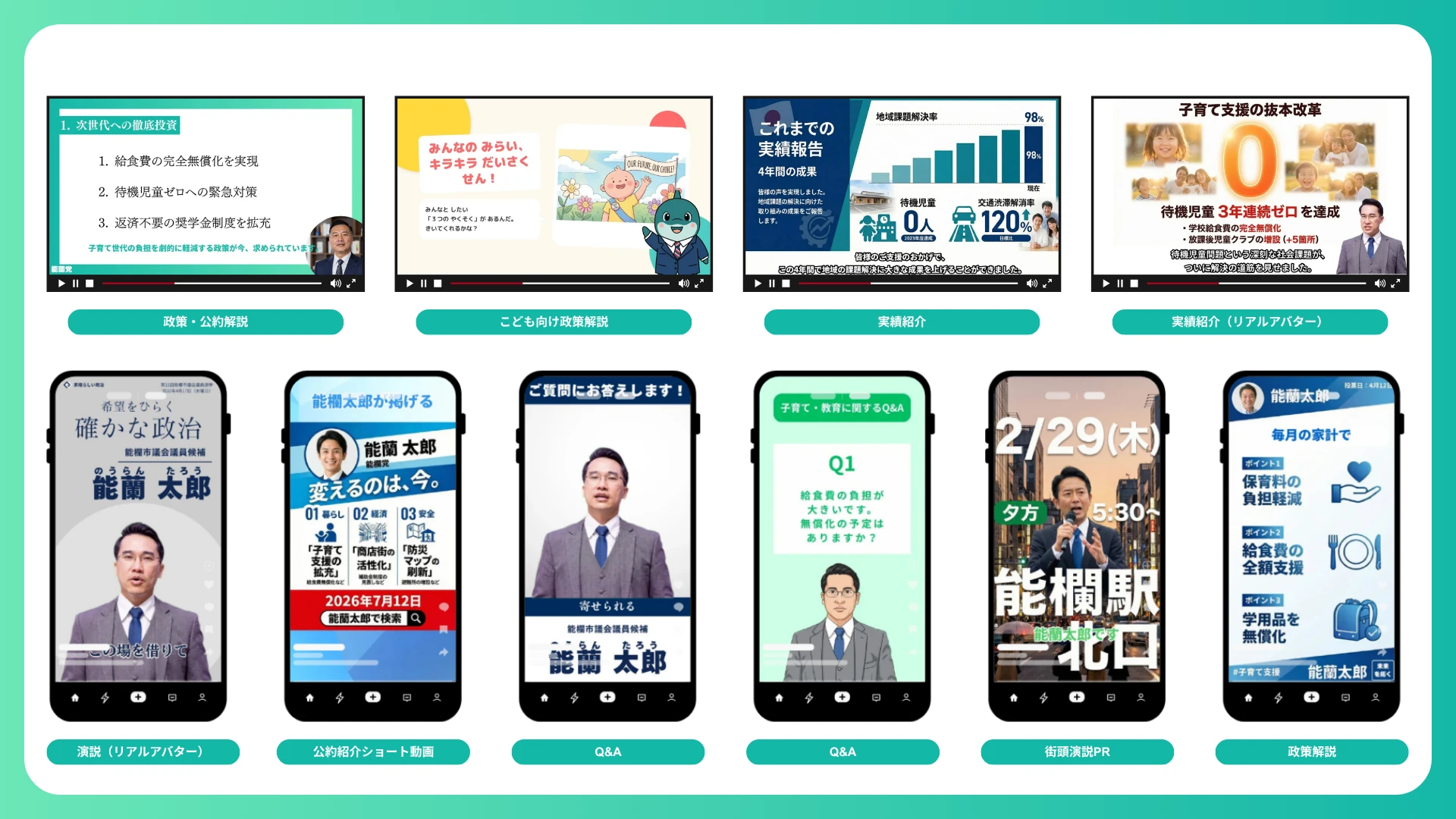
Combining these templates with transcription lets a campaign create new content out of a past video archive and keep communication going without a gap during the campaign period.
How to use the election templates
The NoLang template feature is designed so that people new to generative AI can use it intuitively.
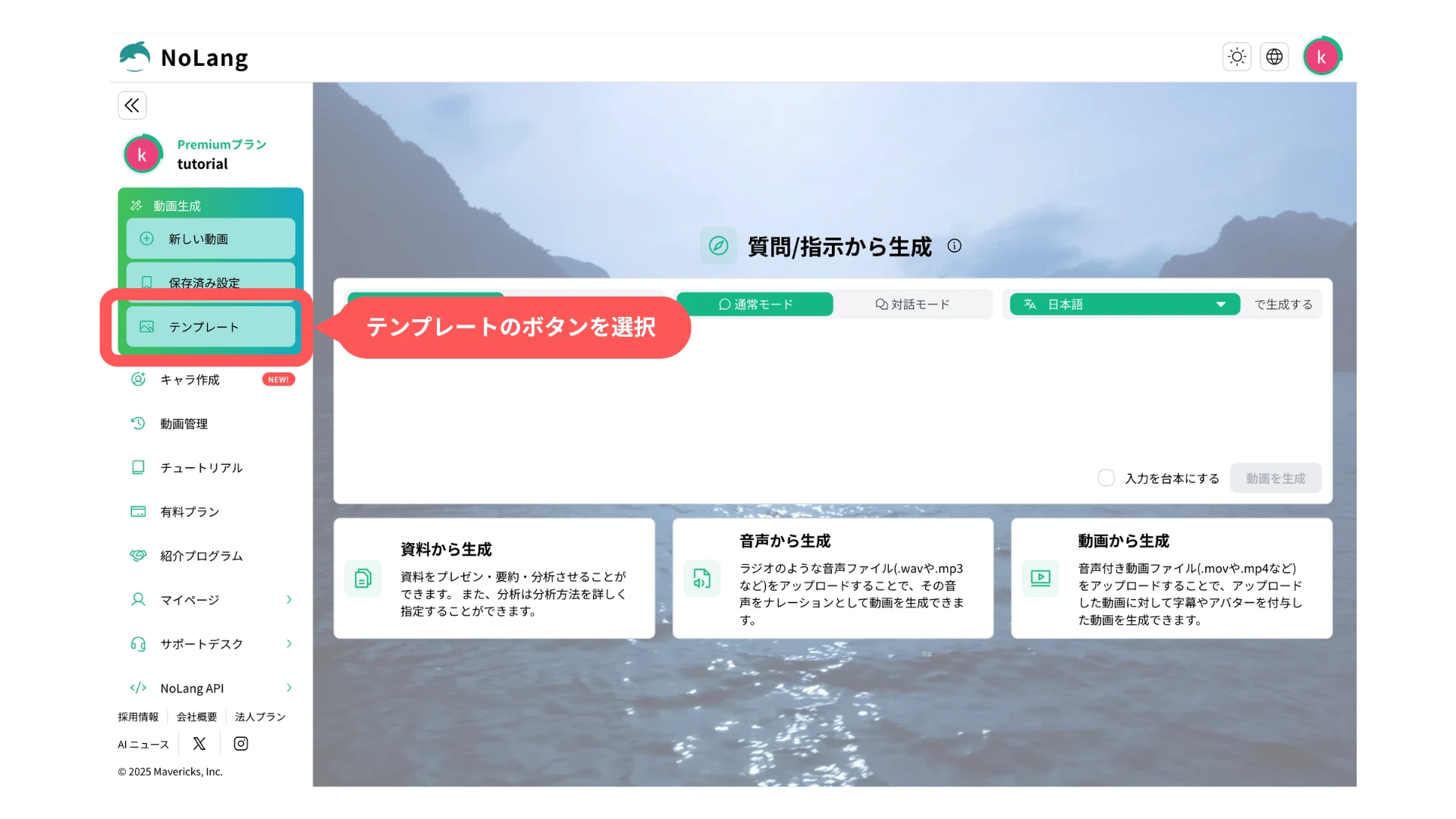
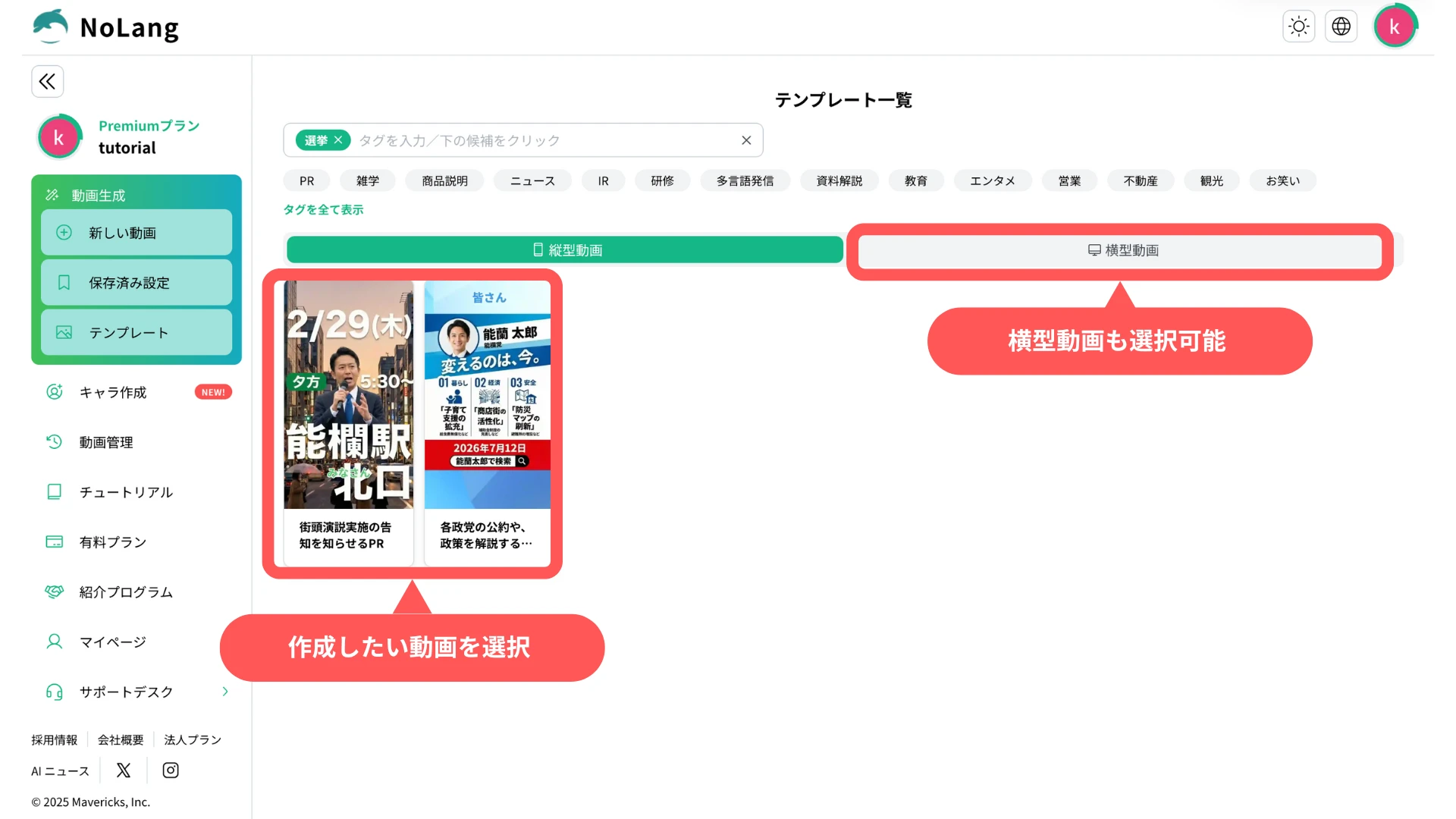
1. Select a template
On the production screen, select “Template” to open the template screen.
2. Select a tag
In the tag field, select the “Election” tag.
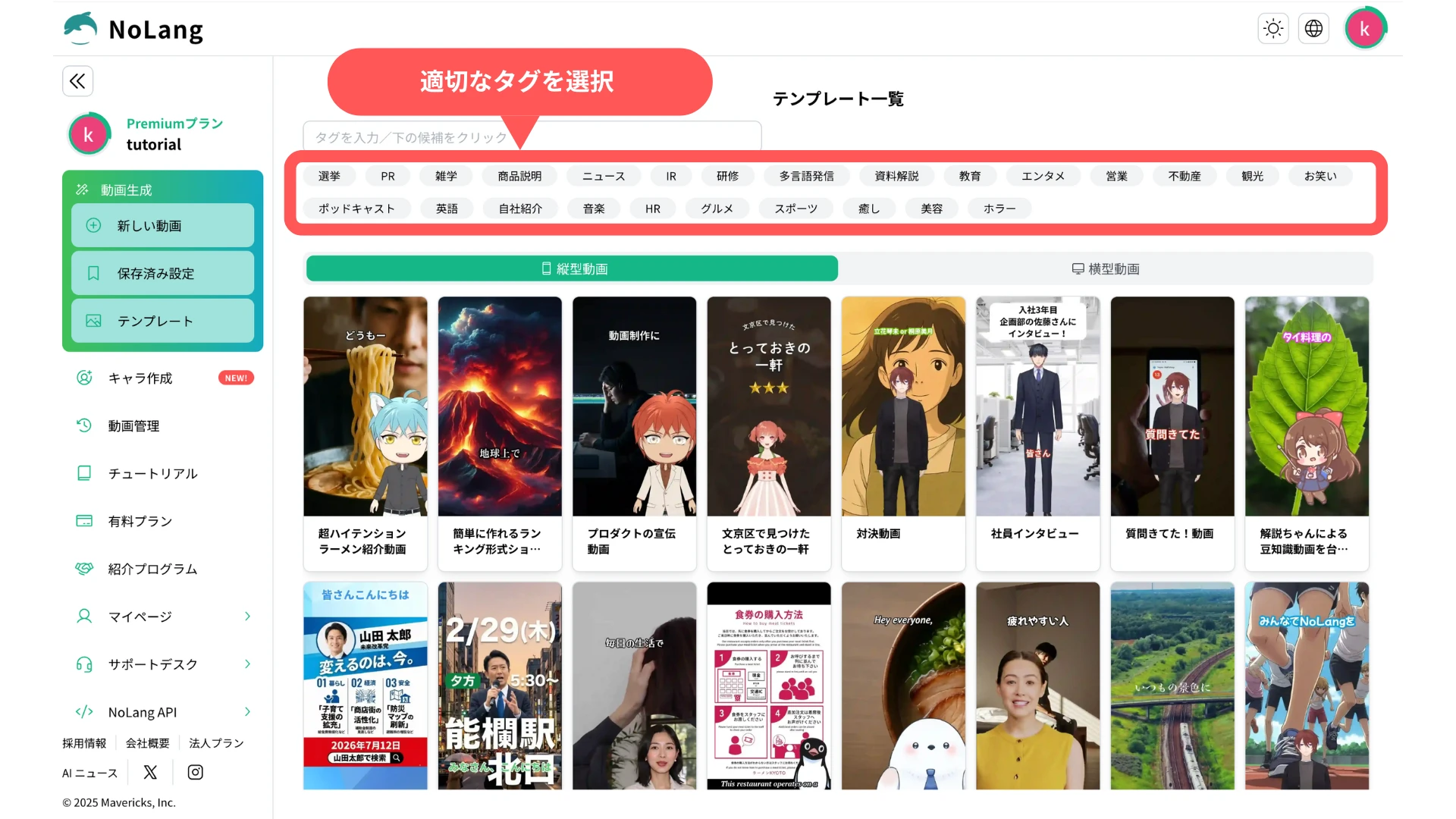
3. Select a template
Select the template for the video you want to create. Horizontal video can be created as well.
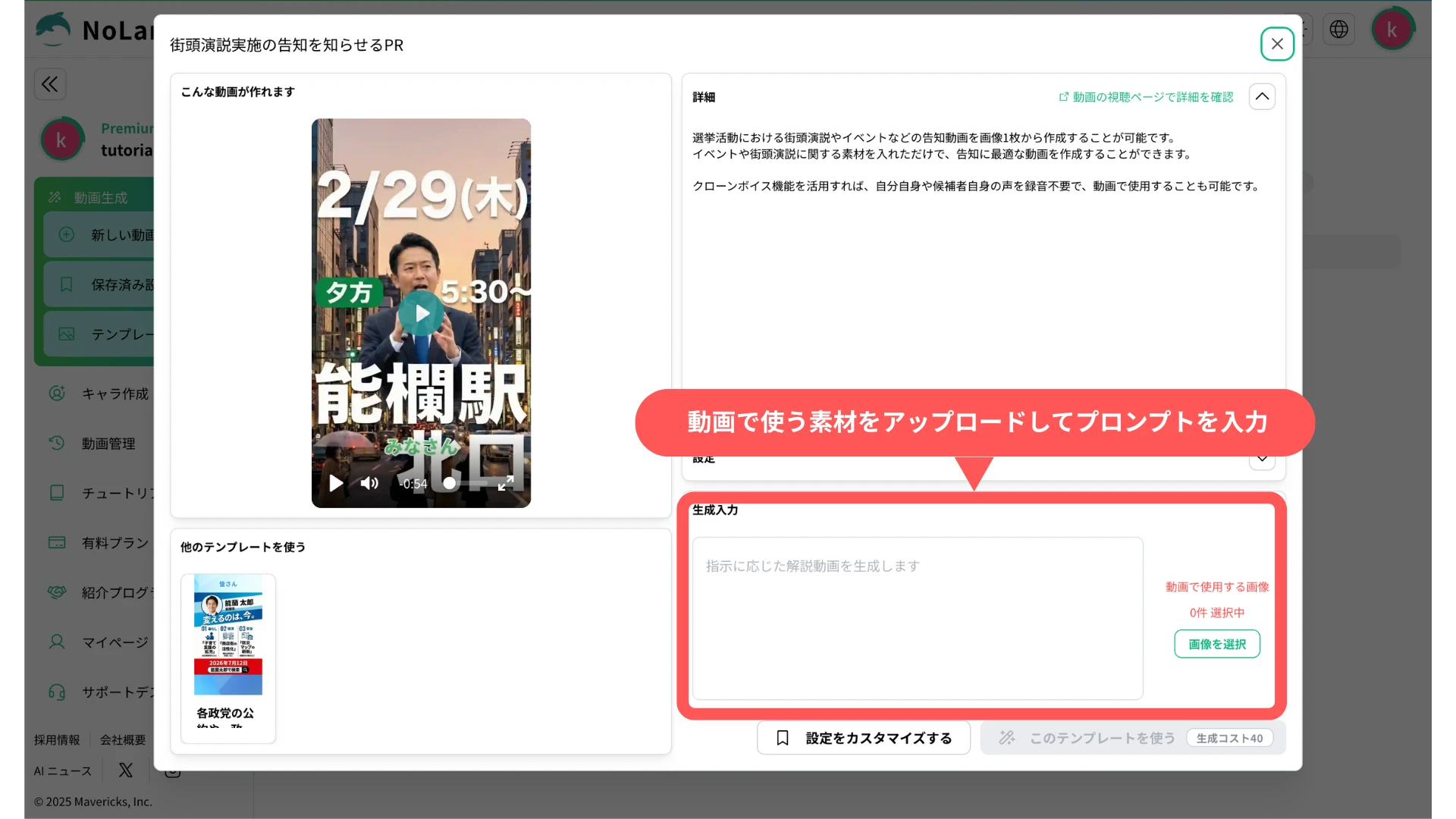
4. Enter a prompt and materials, then generate the video
Enter the prompt and the materials and press the “Generate” button. In as little as 10 seconds, a high-quality video with background music, subtitles, and narration is complete.
For more detailed instructions, see the official tutorials as well.
See the official tutorialsDisclaimer
The following describes the safety measures that apply to the use of this feature.
For use of this service in a general election for the House of Representatives, Mavericks, Inc. has set the guidelines below to promote compliance with the Public Offices Election Act and appropriate use of generative AI. Users are asked to read them.
1. Consent for likeness and voice rights
When using the real avatar and voice clone features, the user must obtain the consent of the person concerned and of the rights holder. Impersonation by a third party and unauthorized secondary use are strictly prohibited.
2. Compliance with the Public Offices Election Act
When content created with this service is used for internet election campaigning, the user must comply with the Public Offices Election Act, including its ban on campaigning by email, its rules on the campaign period, and its requirement to display the candidate’s name and other information.
3. No generation of false information
Using this feature to defame a specific individual or to spread false information that is not based on fact violates the terms of use and may result in account suspension.
4. Limitation of liability
Mavericks, Inc. accepts no liability for any trouble, damage, or legal dispute arising from content created or distributed using this service. Users are responsible for verifying the accuracy of information and for how they operate.
What comes next
Mavericks, Inc. will continue to ship updates that make video creation smoother and more capable, including more election templates, a wider selection of avatars for campaign use, and additional prompts covering a broader range of campaign situations. The company welcomes opinions and requests from creators and users.
Try NoLangFootnotes
-
Survey of 253 politicians across Japan (2025), in Japanese https://prtimes.jp/main/html/rd/p/000000198.000019431.html ↩
-
Video performance of one party leader in Japan’s 2024 general election, in Japanese https://mainichi.jp/articles/20241025/k00/00m/010/260000c ↩

