
Mavericks, Inc., the Japanese company behind the AI video generation service NoLang, has released a set of video templates built specifically for election campaigns. The templates cover the communication tasks campaign teams face every day: introducing a candidate, announcing a street speech, and summarizing a manifesto. A single photo and a short line of text are enough to produce a polished campaign video in seconds, with no specialist skills required. By making vertical video easy to publish on social platforms, Mavericks aims to help voters understand politics better and to push video production forward across political activity in general.
Try NoLangTemplates for candidate PR videos, manifesto explainers and other campaign uses, released to lift social engagement, voter turnout and political participation
NoLang is an AI video generation service that produces high-quality video in as little as a few seconds from text, PDF documents, website URLs, images or audio files. It was the first service of its kind in Japan (according to research by Mavericks, Inc.). Since its release in July 2024 it has passed 150,000 registered users, making it one of the largest generative AI products to come out of Japan (as of December 2025).
Mavericks, Inc. has now released three election-specific templates to support the video communication that campaigns increasingly depend on. Alongside them, the company is offering a next-generation campaign solution built on the Real Avatar feature, which recreates a person’s appearance, and the Voice clone feature, which recreates their voice. From street speech schedules that change by the day, to a record of past work, to manifesto explainers for social media, a campaign can now create and publish a video in as little as 10 seconds even at the busiest point of an election period. More templates for other campaign uses and purposes are planned.
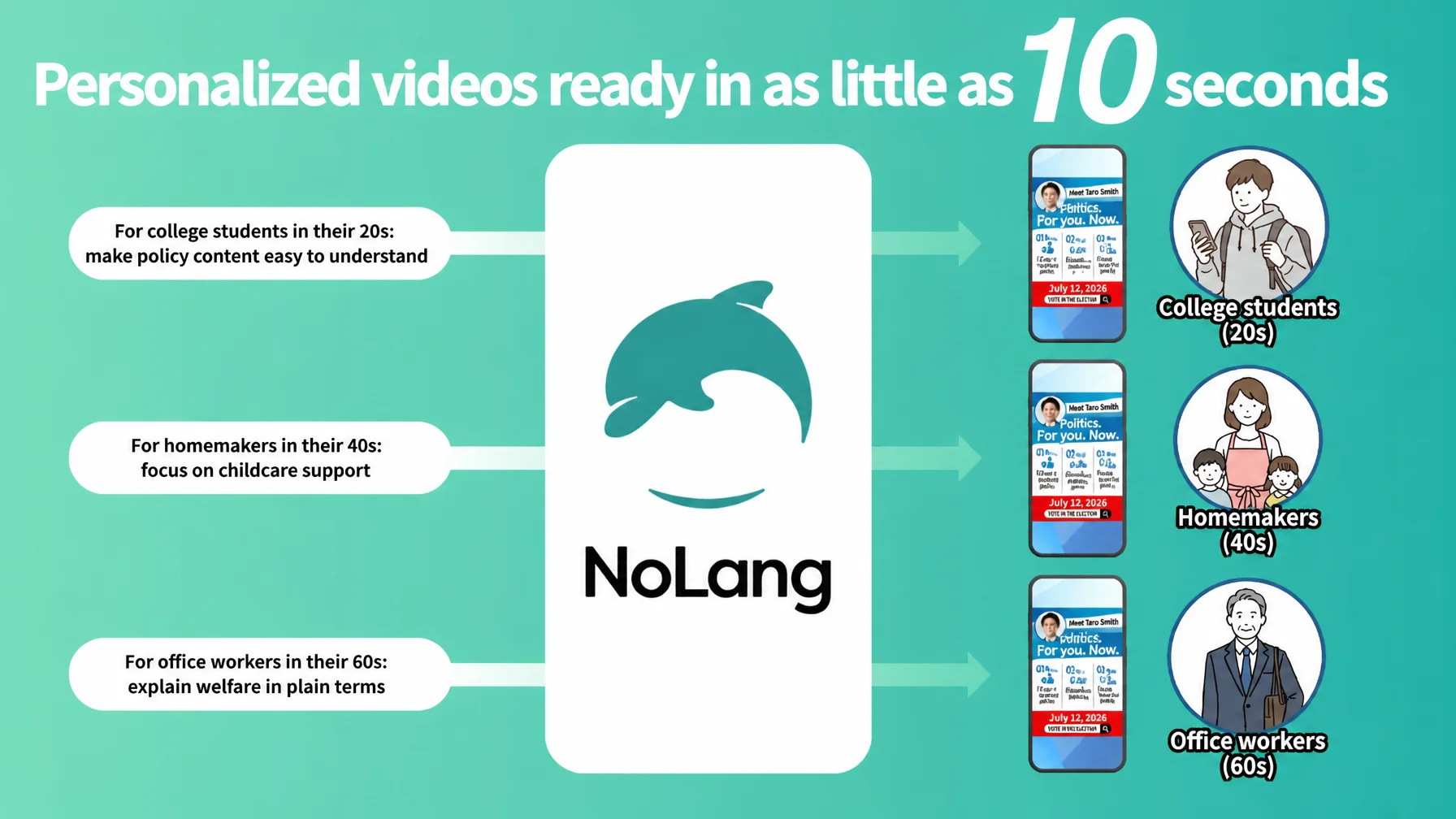
Personalized video that reaches each voter, generated in as little as 10 seconds
Campaigns have traditionally had to send the same message to every voter. With NoLang, a campaign can instead generate personalized video optimized for a voter’s demographics, interests or local context in as little as 10 seconds.
Education policy can go to households raising children and welfare policy to older voters, each in the tone and wording that suits them, so the message reaches further and lands better. Lower cost per video and a production flow that supports personalization together give campaigns strong support for creating and using video within the short window an election allows.
Why video matters in election campaigns: the numbers behind a new standard
In recent elections, video has grown into the most powerful platform for reaching voters. A recent survey1 found that politicians’ intent to use YouTube rose roughly 184% year on year and TikTok roughly 213%, making video-first communication the new standard.
Short video spreads especially fast. In Japan’s 2024 general election, a 35-second short video recorded more than 12 million views2, showing how well a condensed message about everyday life can drive engagement. Video is also retained better than text, and viewing time on services such as YouTube tends to rise toward the end of a campaign, which makes video decisive as a final push with undecided voters.
The three election-specific templates in detail
Combined with the image upload and document import features in NoLang, these templates can be put to work immediately.
1. Candidate introduction and explainer
What it does: Upload a PDF or PPTX document summarizing a candidate’s work and record to date, and NoLang automatically generates an introduction video written to connect with voters. The output can be customized into the format that best fits the local context and the make-up of the electorate.
What stands out: The length of the explanation can be set to Briefly, Normal or Detailed to match the target’s profile and age group. A short, time-efficient video for younger voters and a carefully paced explainer for older voters can both come out of the same source document.
2. PR announcing a street speech
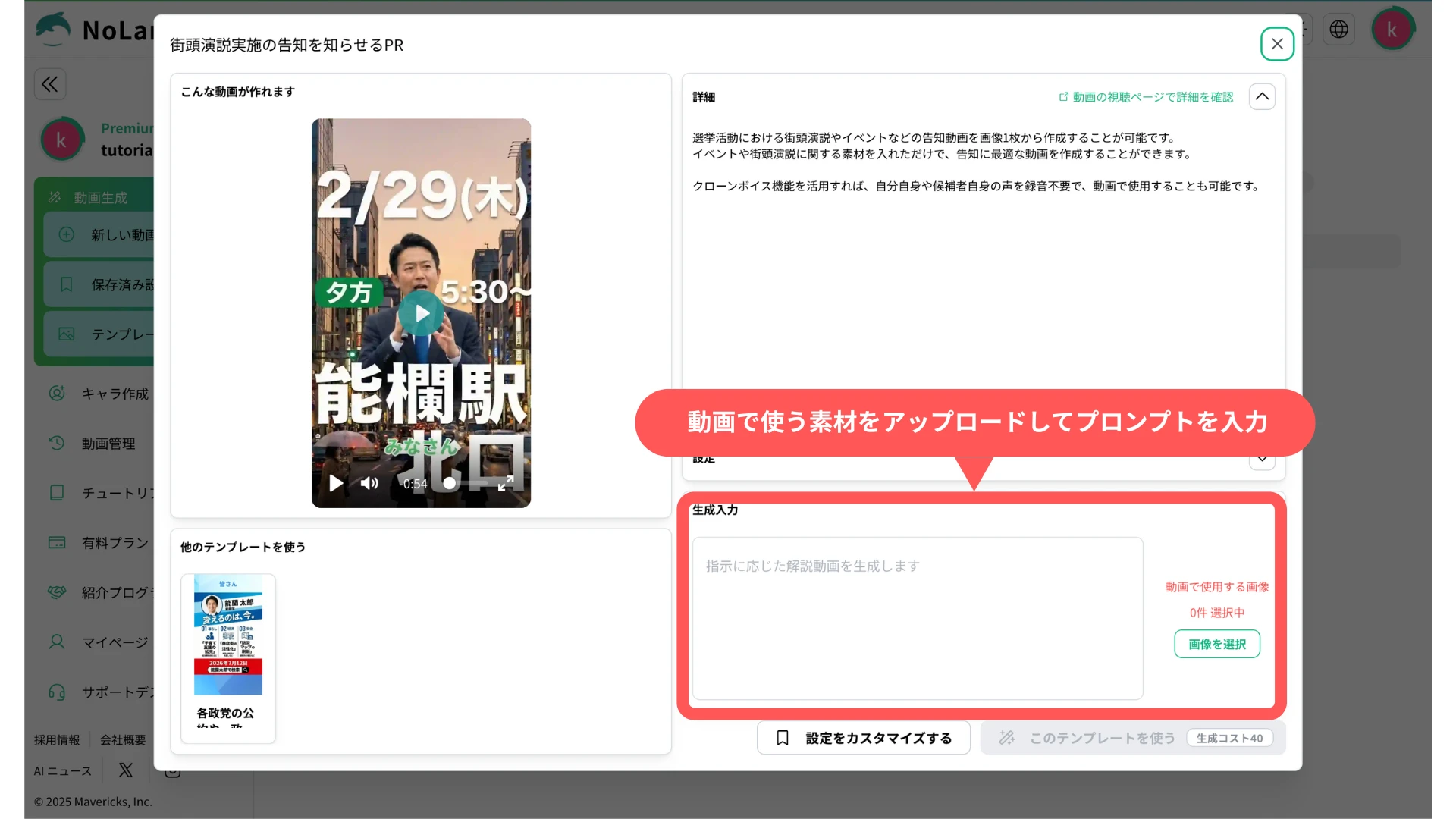
What it does: Upload a single announcement image for a street speech, personal rally or event, and you get an announcement video designed to stand out on social media.
What stands out: Video tends to earn more impressions than a still image, which maximizes turnout at the event. Used together with the Voice clone feature, the candidate’s own voice can be added to the video without a recording session, so the announcement carries more of their energy.
3. Vertical short video explaining a party’s manifesto and policies
What it does: From a single image summarizing a manifesto, NoLang generates a vertical short video optimized for TikTok, Instagram Reels and YouTube Shorts.
What stands out: Enter the candidate’s name and priority policies as text at generation time, and the AI interprets them accurately and explains them in terms viewers can follow. Even policy that is difficult and hard to approach becomes something a viewer can grasp intuitively and understand correctly. And because the experience is simply watching a video on a phone, policy reaches people who have had little interest in politics until now.
Real Avatar and Voice clone: the candidate’s own stand-in does the talking
During an election period, candidates rarely have time to sit for video shoots or narration recordings. The Real Avatar and Voice clone features in NoLang let a campaign produce a steady stream of credible videos featuring the candidate while keeping demands on their time to a minimum.
Real Avatar feature: Upload a single front-facing photo and NoLang generates an avatar that closely resembles the person and moves smoothly.
Voice clone feature: Record just one minute of audio, or upload an existing audio file, and you can create an original voice that reproduces the person’s tone and inflection.
Real Avatar videos can be produced in multiple patterns at once, optimized for voters’ demographics and interests, in the same way as the personalized videos described above. Producing several personalized videos would normally mean a separate shoot or recording for each one; with NoLang that is not necessary at all. An energetic, time-efficient pitch for younger voters and a measured, trust-focused delivery for older voters are generated automatically, each tuned to its audience, with no extra demand on the candidate. Letting voters know the person before the policy does a great deal to build familiarity and lasting trust.
How to use the election templates
The template feature in NoLang is designed so that people new to generative AI can use it intuitively.
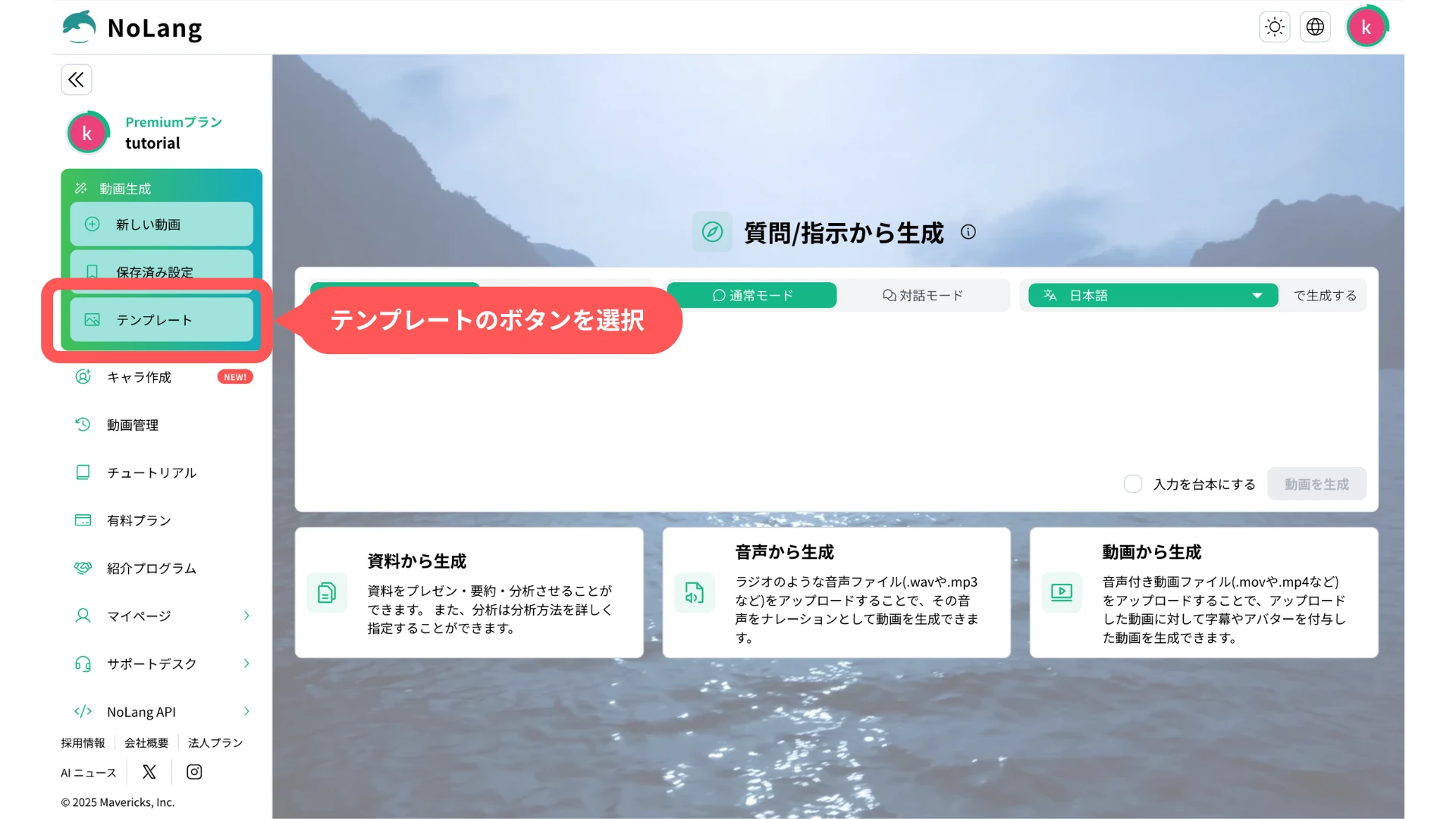
1. Select a template
On the production screen, select Template to move to the template screen.
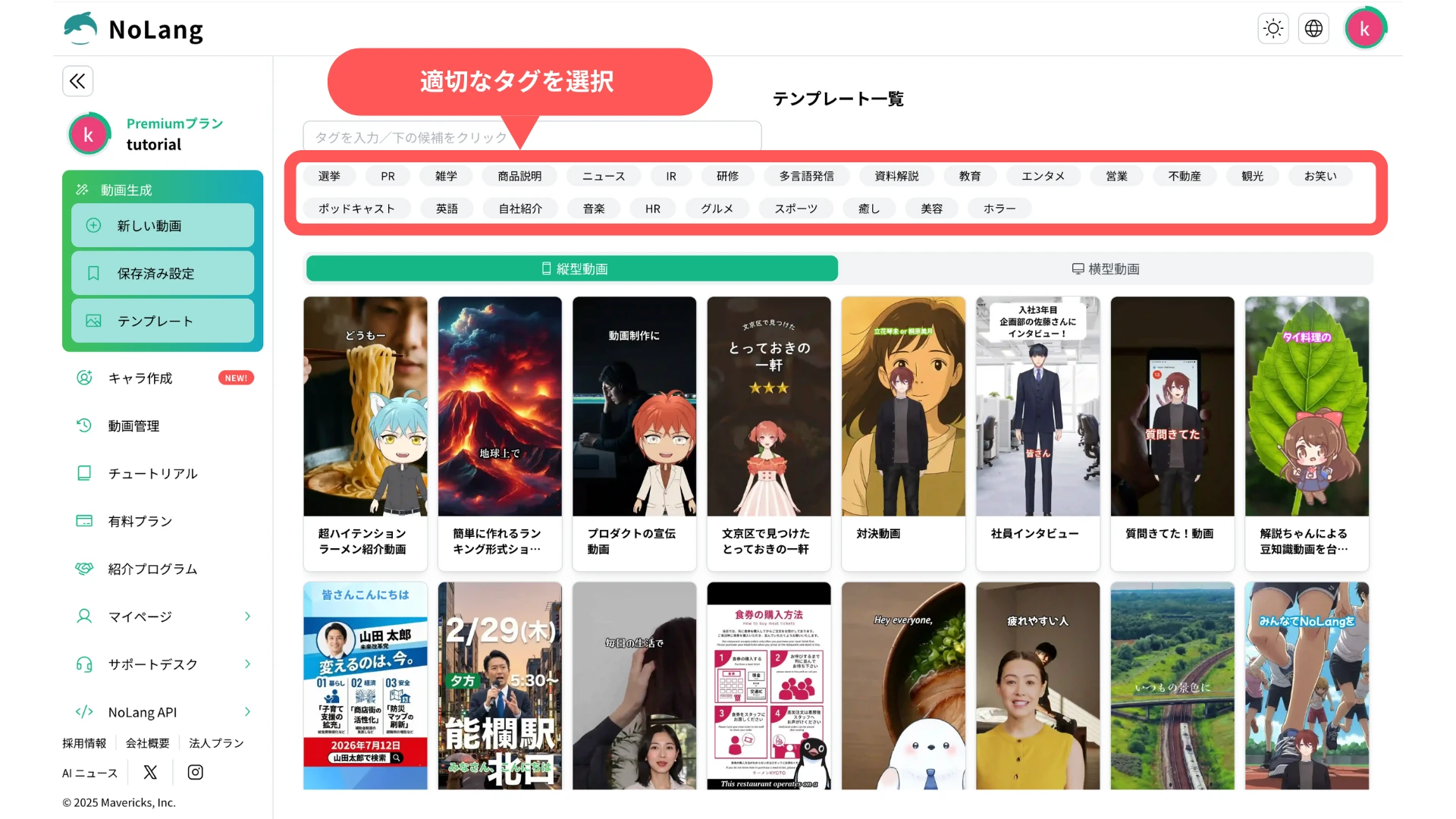
2. Select a tag
Choose the “Election” tag from the tag field.
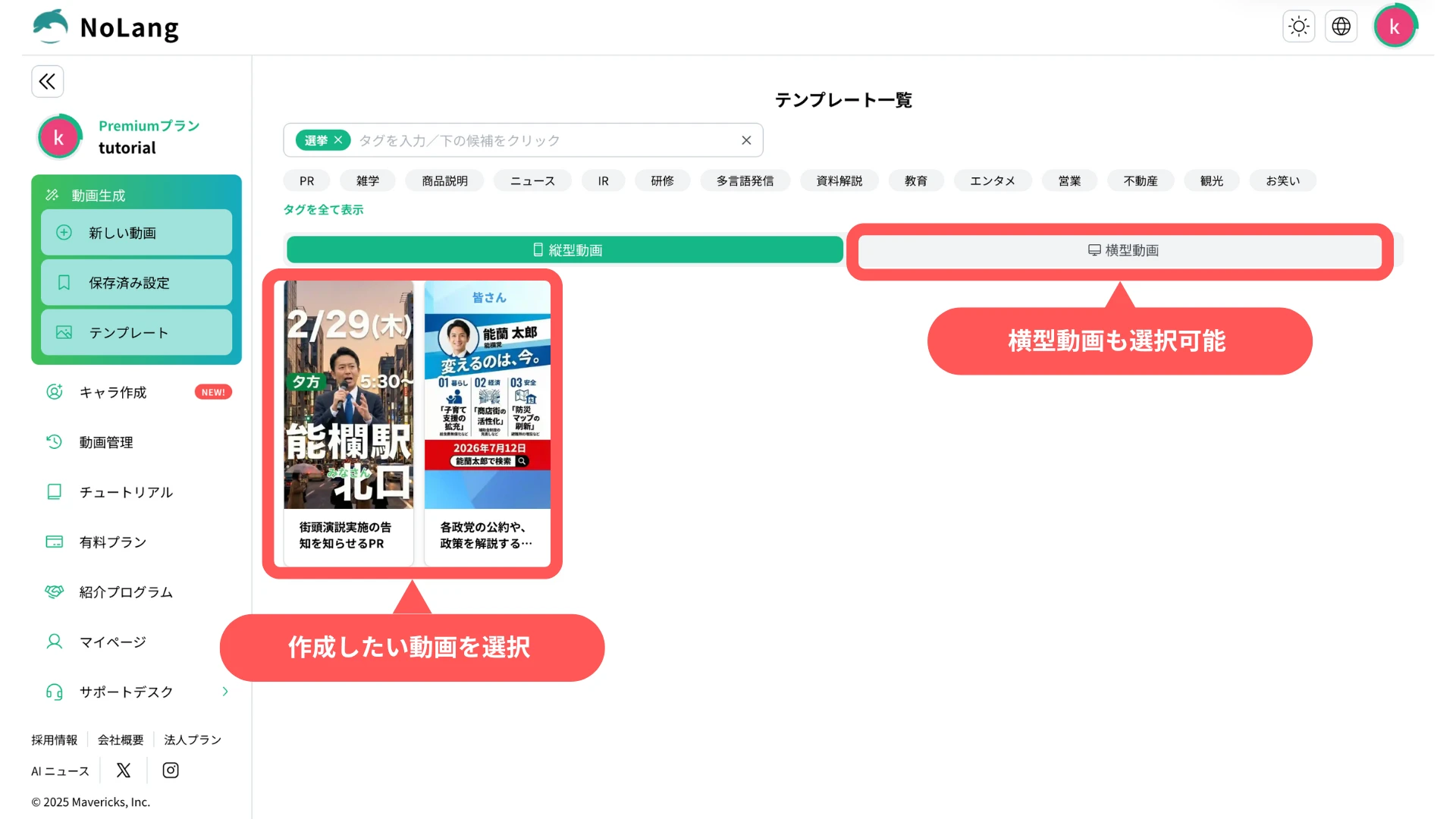
3. Choose your template
Choose the template for the video you want to make. Horizontal Video is available as well.
4. Enter a prompt and assets, then generate
Enter your prompt and assets and press Generate. In as little as 10 seconds you have a high-quality video complete with background music, subtitles and narration.
For more detailed instructions, see the official tutorials below.
View the Official TutorialsDisclaimer
The following covers the safety measures that apply to the use of this feature.
For use of this service in connection with a general election for the House of Representatives, Mavericks, Inc. has set the guidelines below to promote compliance with the Public Offices Election Act and the appropriate use of generative AI. Users are asked to read them.
1. Permission for likeness and voice rights
When using the Real Avatar and voice clone features, you must obtain the consent of the person concerned and of any rights holders. Impersonation by third parties and unauthorized secondary use are strictly prohibited.
2. Compliance with the Public Offices Election Act
If content created with this service is used for internet election campaigning, you must comply with the Public Offices Election Act, including the ban on campaigning by email, the rules on the campaign period, and the obligation to display the candidate’s name and similar information.
3. No generation of false information
Using this feature to defame a specific individual or to spread false information not grounded in fact violates the terms of service and may result in account suspension.
4. Disclaimer of liability
Mavericks, Inc. accepts no liability for any trouble, damage or legal dispute arising from content created or distributed using this service. Users are responsible for verifying the accuracy of information and for how they operate it.
What comes next
Mavericks, Inc. will continue to ship updates that make video production smoother and more capable, including further election templates, a wider selection of avatars for campaign use, and additional prompts covering the range of election scenarios. The company welcomes opinions and requests from creators and users.
Try NoLangFootnotes
-
Survey of 253 politicians across Japan (2025) https://prtimes.jp/main/html/rd/p/000000198.000019431.html (in Japanese) ↩
-
Video results for a particular party leader in Japan’s 2024 general election https://mainichi.jp/articles/20241025/k00/00m/010/260000c (in Japanese) ↩

