
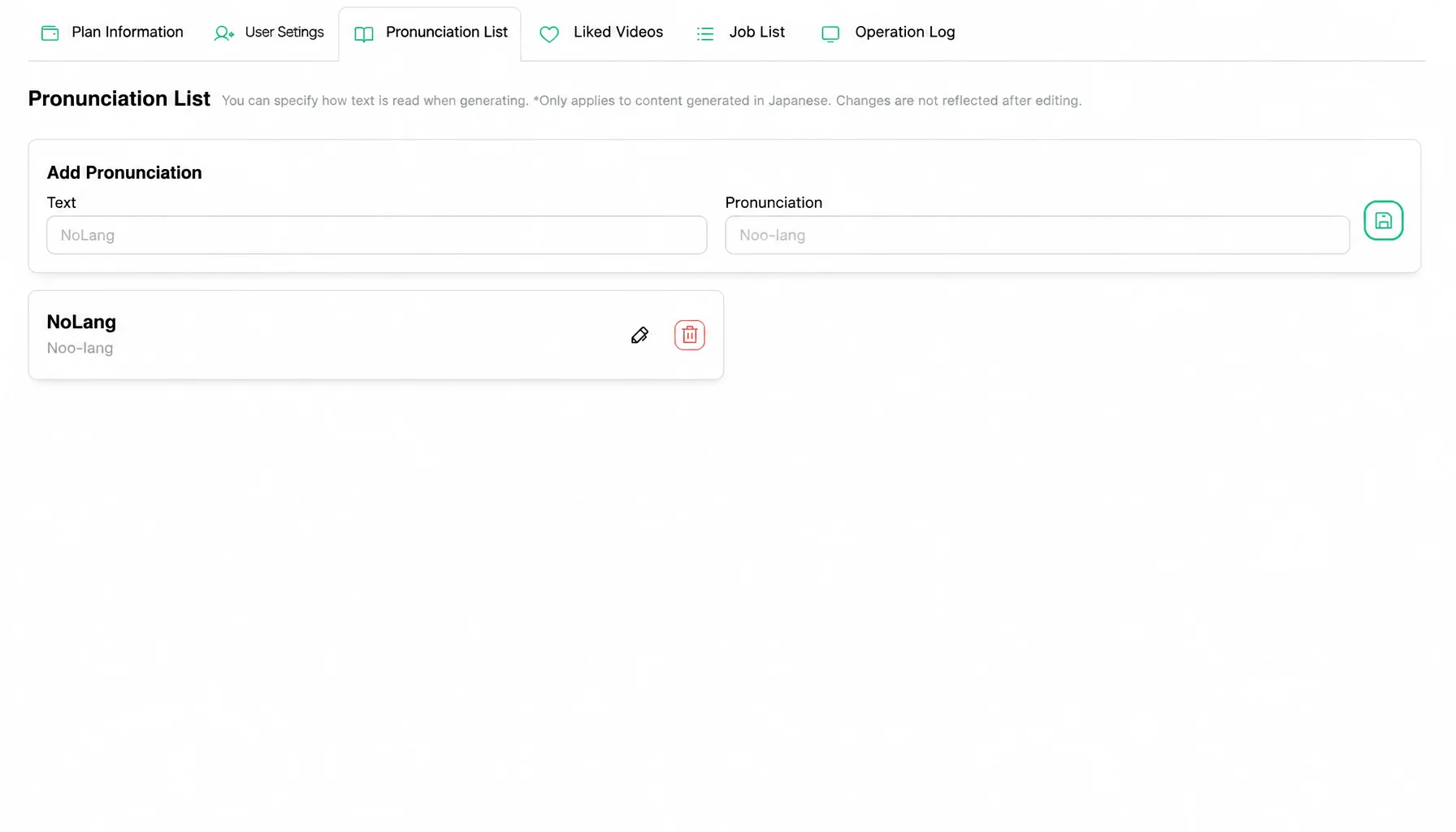
Mavericks, Inc., the Japanese company behind the AI video generation service NoLang, has added a dictionary feature to NoLang. Companies register the correct reading of a proper noun once — a product name, a technical term, an executive’s name — and NoLang uses that pronunciation whenever it generates a video afterward. On the Business plan, the dictionary can be shared across the company.
Try NoLang NowThe triple burden of cost, time, and quality in business video narration
Video is spreading quickly across business activities such as internal training, IR, marketing, sales, and company introductions, and 52% of companies now use video internally.1
Narration quality matters a great deal in these videos. In an experiment on conference presentation videos, poor audio quality lowered the overall five-point rating by about 0.6 points compared with the same video in high quality, and every item — the quality of the talk, likability, and the importance of the research — was rated worse.2 The same issue applies in business: in a training video, audio quality is closely tied to how well people learn and understand.
Yet many companies struggle to secure that narration quality. Outsourcing costs tens of thousands to hundreds of thousands of yen per video and adds lead time between the order and the delivery. For small and midsize companies, which cannot allocate a large budget to video production, that hurdle is especially high.
Recording narration in-house instead brings its own problems: the effort of recording, the cost of equipment, and quality issues such as pronunciation that differs from person to person and product names or technical terms that are never read the same way twice.
AI voice was expected to solve all of this — cost, time, dependence on individuals, and quality — but conventional AI could not pronounce a company’s own proper nouns correctly. The service name “NoLang,” for example, is read “Nolan,” yet AI would read it “No-lang.” Every misreading had to be fixed by hand, and that correction work reduced the productivity it was supposed to improve.
A dictionary feature that teaches AI the correct reading and shares it across the company
To address these narration problems at the root, NoLang has added a dictionary feature.
The feature lets users register any text together with the correct reading for it. Once an entry is in the dictionary, NoLang reads that proper noun or technical term with the intended pronunciation in every video it generates from then on.
On the Business plan, the dictionary can also be shared with the team. Knowledge that used to sit with one person — how a given technical term is read — or that varied between departments becomes explicit knowledge stored in the AI as an asset of the organization.
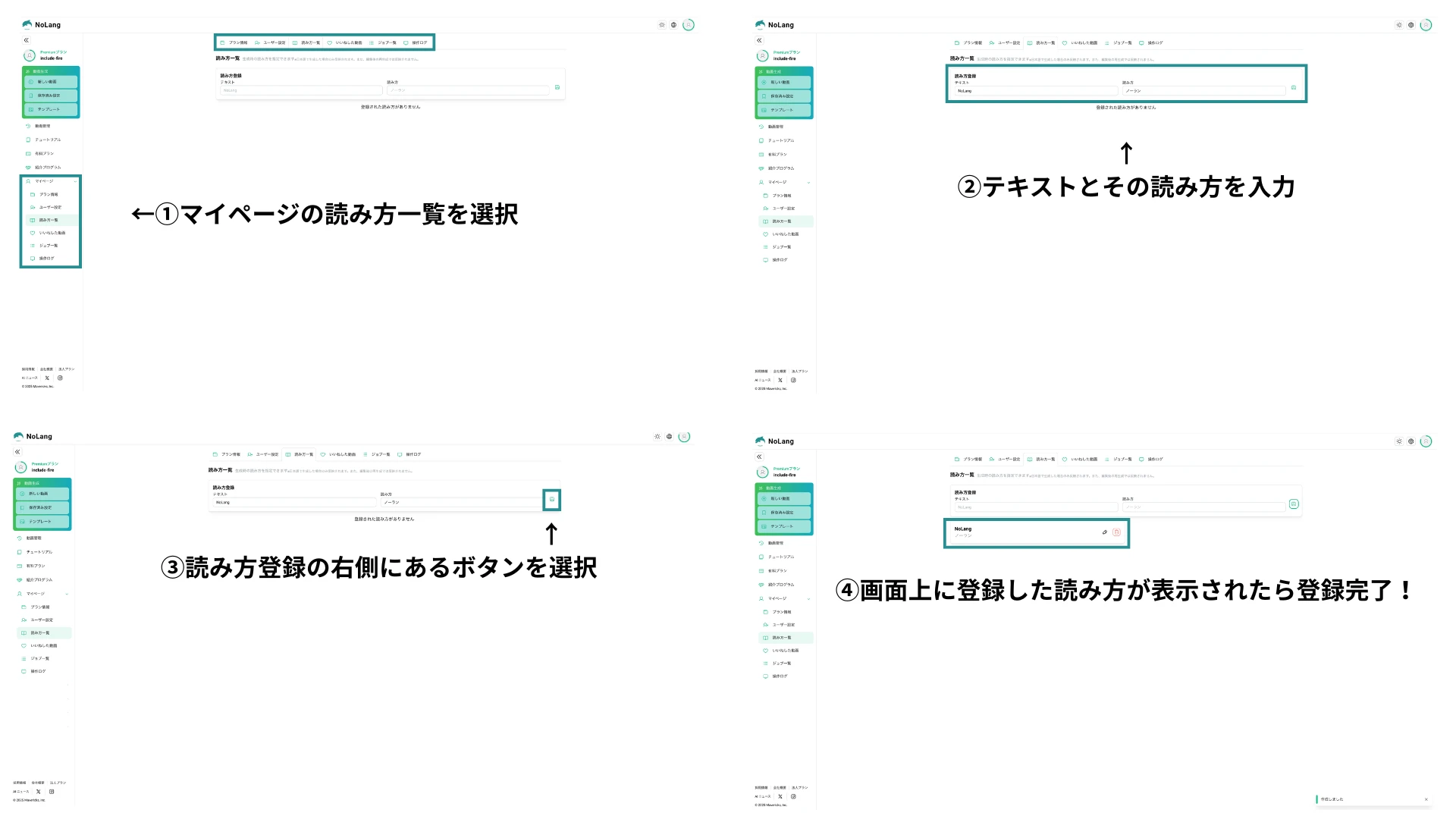
The feature is simple to use.
① Open My Page in NoLang and select the Reading list tab.
② On the screen that appears, enter the text and its correct reading.
③ Select the green button to the right of the Register readings fields.
④ When the registered reading appears on the screen, registration is complete.
Where it helps: specialist fields that demand accuracy
The dictionary feature gives full control over the business-specific misreadings that AI struggles with, and it pays off immediately in the situations below, where accuracy of information matters most.
IR and public relations
In IR videos that deliver accurate information to investors and stakeholders, executives’ names that AI tends to misread (for example, the surname 河野, read “Kono,” misread as “Kawano”) and alphabetic abbreviations (for example, “IR,” read letter by letter, misread as a single word) can be registered in the dictionary. Narration accurate enough to uphold the company’s credibility is then generated automatically.
Medical and pharmaceutical
In training videos for healthcare professionals and explanatory videos for patients, drug names and disease names that are difficult for a general audience — for example, 播種, read “hashu,” misread as “banshu” — can be pronounced correctly.
Manufacturing and IT
In internal operating manuals and customer training videos, in-house product model numbers, abbreviations such as “DX” (read “dee-ex” but misread as “dokkusu”), and specific technology names such as “Live2D” are all standardized to the intended pronunciation.
Finance, legal, and education
In compliance training and e-learning materials, technical terms whose reading changes with the context — for example, the financial term 市場, read “shijo,” which must not be read “ichiba” — are controlled precisely with the dictionary feature, making it efficient to produce video content that teaches well.
Outlook
Mavericks, Inc. will continue to improve the accuracy of the dictionary feature and expand the languages it supports. Through the AI video generation service NoLang, the company aims to support productivity and quality in every kind of corporate communication, and to become the infrastructure for transmitting knowledge that underpins individual reskilling and the sustainable growth of society.
Contact us
