
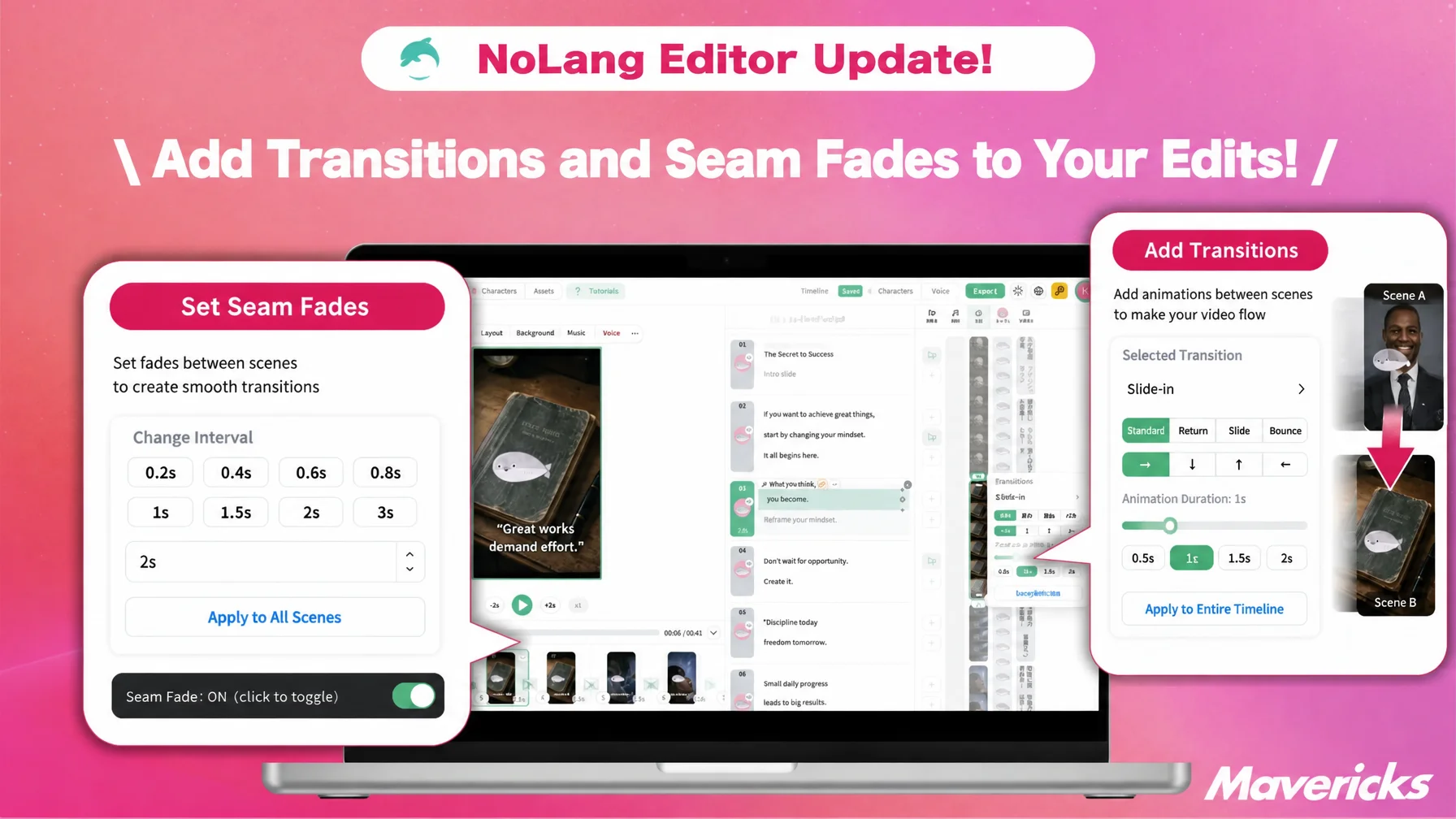
Mavericks, Inc., the company behind the AI video generation service NoLang, has added two adjustment features to the NoLang editor: a “Transition” feature that adds motion to scene changes, and a “Seam fade” toggle that works with the length of the “interval” between scenes. Users can pick from 18 transitions such as slides, zooms and wipes to match the tone of a video, and switch the smoothness of each seam with a single click, so scene changes can be finished inside NoLang without moving to separate editing software.
Contact usVideo production is moving in-house, while finishing edits become a new burden
Companies now use video well beyond advertising, extending it to sales promotion, e-commerce, recruiting, and education and training, which calls for continuous production in many variations. According to a survey by Yano Research Institute, the domestic market for video production services in fiscal 2024 is estimated at 423.8 billion yen, 106.2% of the previous year, and is forecast to grow to 458.0 billion yen in fiscal 2025 and 540.0 billion yen in fiscal 20271. A Vimeo survey likewise found that 65% of organizations increased their video output and 73% expect it to keep increasing, while 48% struggle to “scale production while maintaining consistent quality,” making volume and finish hard to reconcile2.
Even after production moves in-house, the editing work itself often becomes the bottleneck. In a survey by Hikaku Biz and Mteam, among respondents who produce entirely in-house, 44.7% said “introducing and operating shooting and editing tools is difficult” and 31.6% said “employee resources are insufficient, so we cannot spend time on production”3. An Appliv survey found that the most common complaint about video editing was “the controls are complicated” at about 41.1%, and the most used functions were basic finishing tasks such as adjusting length and trimming, which connect assets and smooth out the flow4.
The same pattern holds for video production with generative AI. After the first draft is generated, the work of shaping it into the intended presentation remains. In a survey by PRIZMA, 76.4% of respondents feel burdened by corrections and fine-tuning, and 60.8% revise their output four times or more on average5. Rather than exporting an AI-generated video as is, letting users adjust scene connections and pacing themselves in a short time is becoming important for balancing volume with quality. NoLang now offers two such adjustments, transition settings that add contrast between scenes and a seam fade that controls smoothness according to the length of the interval between scenes, in a form that is completed inside NoLang without separate editing software.
A new Transition feature adds motion to scene changes
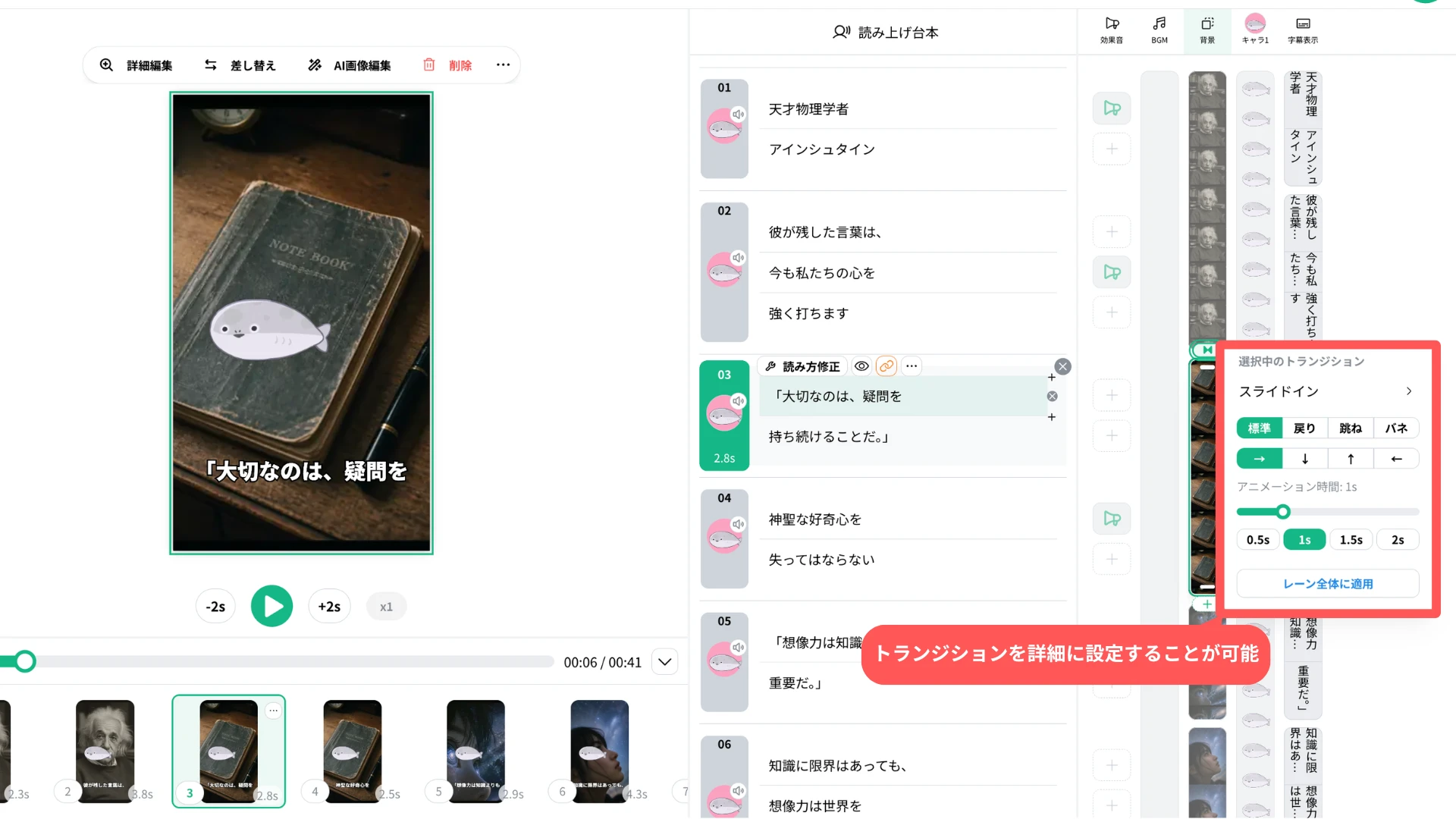
In the NoLang editor, users can now set a transition, or switching effect, at the boundary between adjacent scenes and assets on the timeline. Scene changes that used to look flat can now carry motion and pacing, so the presentation can be tuned to the theme and message of each video.
Because the motion itself can be previewed while the animation is applied, users with little editing experience can compare the actual movements and choose intuitively.
Eighteen effects, including slide, zoom, wipe and fade
The background lane offers 18 transitions to choose from, depending on the purpose of the scene change and the tone of the video.
The full set covers slide effects (“Slide In,” “Slide Out,” “Both slides”), zoom and rotation effects (“Zoom in,” “Zoom Back,” “Rotate Zoom In,” “Rotate Zoom Back”), line and clock wipes (“Line Wipe,” “Line wipe fade,” “Clock Wipe,” “Clock wipe fade”), circular wipes (“Inner Circle Wipe,” “Inner circle wipe fade,” “Outer Circle Wipe,” “Outer circle wipe fade”), and cross effects (“Crossfade,” “Blur,” “Mosaic”).
For adjacent assets on the image and video lanes, a separate “Slide” effect is available, which connects an image or video placed in part of the frame smoothly to the next asset so viewers can follow the flow of an explanation visually.
Each effect offers presets beyond “Standard” that change the feel of the motion, such as “Return,” “Bounce,” “Spring,” “Smooth,” “Sharpness,” “Weak / Medium / Strong,” and “Charge Weak / Strong pause.” The direction of slides and wipes is set with arrow buttons, rotation effects are set to clockwise or counterclockwise, and the line and clock wipe effects have a “Split count” that divides the screen into 1 to 12 parts. The same effect can therefore range from a simple one-way switch to a finely divided, more animated presentation.
Seam fade turns on and off with the scene interval
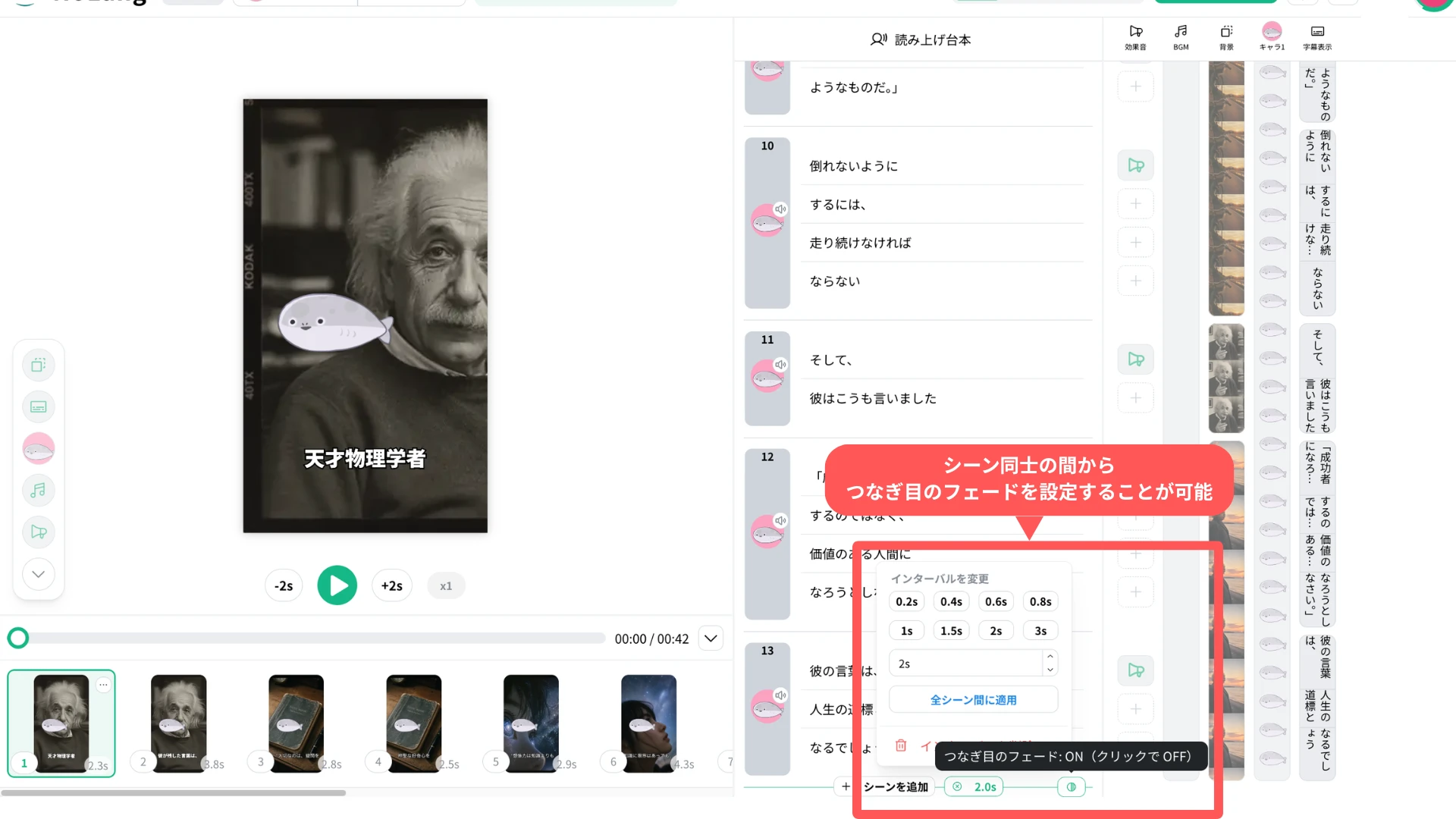
While a transition selects the type of visual effect at the moment of the switch, a separate adjustment has been added at scene boundaries in the script area, the screen where the scene structure is edited: a toggle that controls whether the “interval” placed between two scenes is smoothed out.
When an interval is set at a scene boundary in the script, a round toggle button appears at that boundary only. Hovering over the button shows a tooltip reading “Seam fade: ON (click to turn OFF)” or “Seam fade: OFF (click to turn ON),” and one click switches it. The seam fade combines a fade-out at the end of the previous scene with a fade-in at the start of the next one. When it is on, the fade runs across the whole interval; when it is off, the scenes on either side of the interval switch without a fade.
From training videos to short social videos
In training and manual videos, adding a crossfade or a wipe where a chapter or an explanatory item changes signals visually that a new topic is starting. Where an interval is used before an explanation, turning the seam fade on makes the passage before and after the interval look smooth.
In product and service introduction videos, a zoom can mark the move from the overall picture to the details, and slides can show several features in sequence, so the on-screen motion matches the content of the explanation. In short videos for social media, brief transitions set the pace and add visual change, which reduces the impression of one static scene change after another. In recruiting and PR videos, calm fades and blurs create connections that suit the overall tone of the video.
The distinguishing point of this update is that, starting from an AI-generated first draft, users can finish scene connections and the presentation of intervals in the NoLang editor without moving to separate video editing software.
Contact usLooking ahead
Mavericks, Inc. plans to keep expanding editing features that make the fine finishing work after video generation intuitive. The goal is an environment where users can reflect their own intent and expression in AI-generated video regardless of professional editing experience, and complete generation, review, adjustment and finishing inside NoLang.
Footnotes
-
Yano Research Institute, “Survey on the Domestic Video Production Services Market (2025)” (in Japanese) (July-September 2025; conducted with researchers combining direct interviews with video production companies, questionnaires and literature research. Fiscal 2024 market size of 423.8 billion yen, 106.2% of the previous year; forecasts of 458.0 billion yen for fiscal 2025 and 540.0 billion yen for fiscal 2027) ↩
-
Vimeo, “2025 State of Video at Work Report: Insights & Key Findings” (1,000 business leaders at large companies. 65% of organizations increased video output over the past two years, 73% expect it to increase over the next three years, 48% struggle to scale production while maintaining consistent quality) ↩
-
Hikaku Biz and Mteam, “Survey on In-house vs. Outsourced Video Production and Its Challenges” (in Japanese) (April 7-14, 2025; 111 people working in marketing, PR and brand strategy. Among the 38 who produce entirely in-house, 44.7% said introducing and operating shooting and editing tools is difficult and 31.6% cited a shortage of employee resources) ↩
-
Appliv, “Survey on Video Editing” (in Japanese) (November 13-20, 2023; 557 people with experience using video editing apps. “The controls are complicated” was chosen by 229 people, about 41.1%; the most used functions were adjusting video length (330 people) and trimming (257 people)) ↩
-
PRIZMA Inc., “Survey on how people revise output produced with generative AI” (in Japanese) (March 6-8, 2026; 1,003 men and women in their 20s to 50s who use generative AI daily at work and have created images or video with it. 76.4% feel burdened by corrections and fine-tuning, 60.8% revise four times or more on average) ↩

