
“We want to make videos for recruiting. But our employees don’t want to show their faces on camera.”
The answer Miyaki found to that very common problem was to systematize video production with NoLang.
Miyaki runs Off-Grid, Inc., an IT company that does both SES engineer staffing and in-house software development. Combining the NoLang API, avatars and voice cloning, he built a workflow that produces recruiting videos automatically — in three weeks.
That system now supports three automatic YouTube uploads a day.
We asked Miyaki, who uses NoLang to the fullest from an engineer’s point of view, how he makes his recruiting videos and what thinking lies behind them.
Using avatars so no one has to appear on camera
― What kind of work do you do?
I run an IT company, and we do both SES and our own in-house software development.
With SES we send engineers out to other companies’ system development sites, and on the in-house side we build and offer our own services, so it’s a two-track business.
― What do you use NoLang for?
Mainly recruiting. We post short recruiting videos, centered on YouTube.
We also use it a little in sales, as a kind of company introduction. People are more willing to listen when it’s a video.
― Were you already using video before that?
Yes, we were. From around the beginning of last year we were shooting live-action videos and posting them, but whenever things got busy it would get pushed back.
I was also bothered by the unevenness in quality.
The biggest problem was how hard it was to get employees to appear in the videos. Some people really don’t like being in front of a camera.
A lot of employees said “I don’t want to be in a video,” and that was the bottleneck.
― I see. And that’s what drew you to the avatar feature in NoLang.
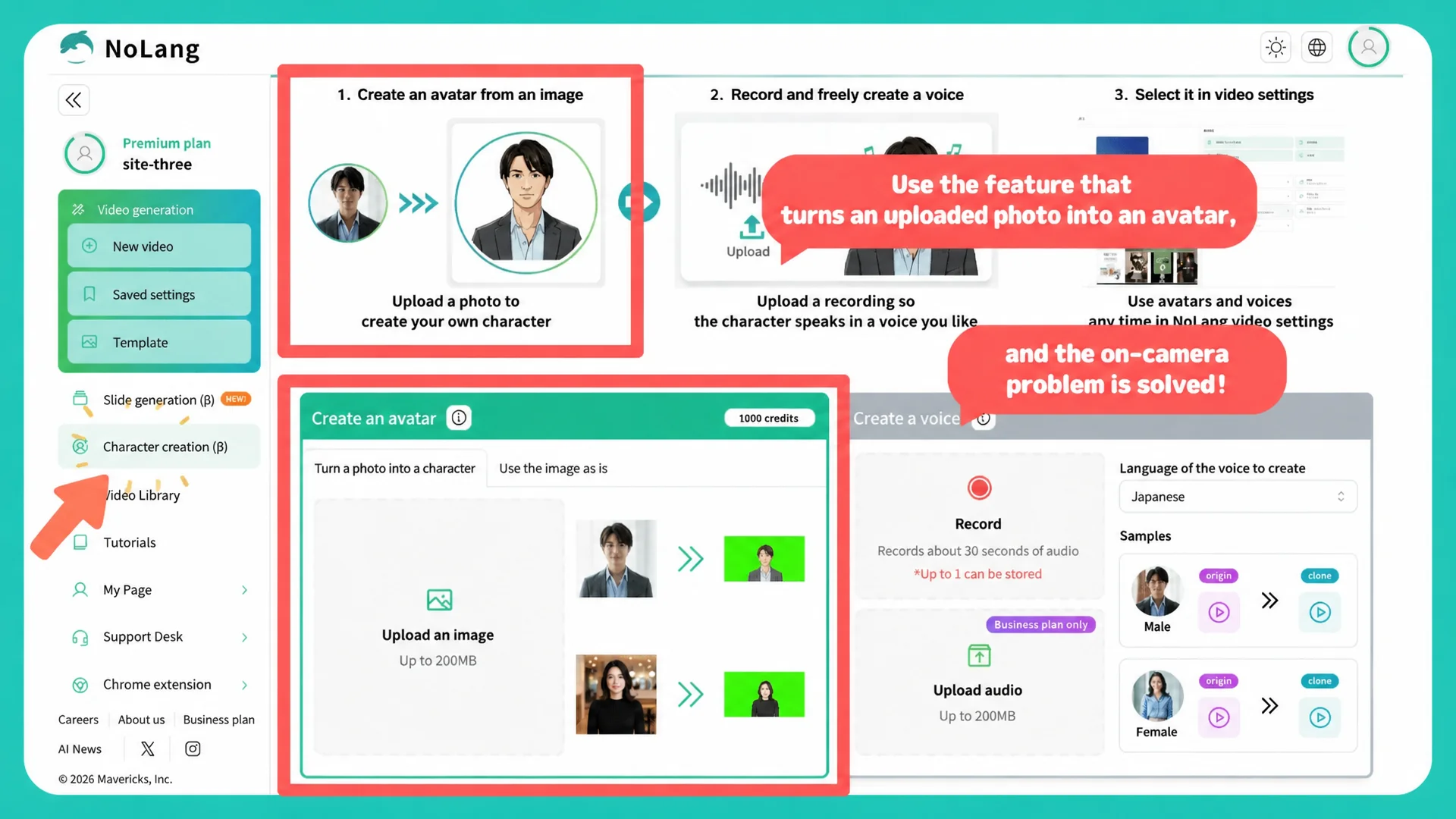
That’s right. With an avatar, employees don’t have to show their faces, so lately I’ve been making the videos with avatars.
Automating YouTube uploads with a workflow
― How often are you using NoLang now?
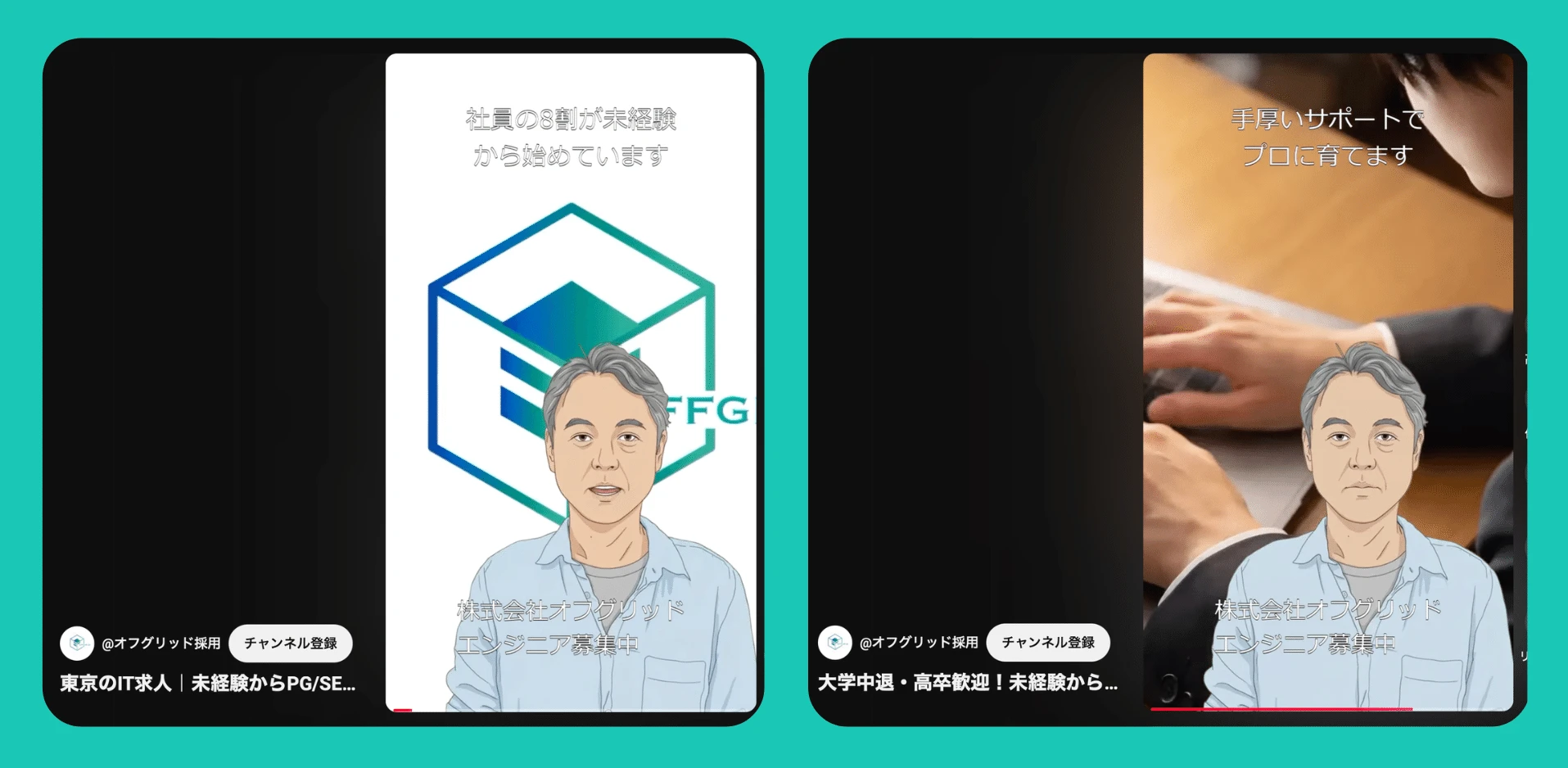
At this point I’ve built a system using the NoLang API so that three videos a day are posted to YouTube automatically.
▼ Here is the channel where the videos are actually posted


I’d been experimenting since around October last year, and it finally started running properly this month.
― How does the automatic posting work?
I create a large batch of videos in NoLang in advance, and the workflow posts them to YouTube automatically on a schedule.
It took me about three weeks to build the system.
― That’s a serious undertaking.
Recruiting costs money.
Listing on a job board costs money, scout emails don’t really land no matter how many you send, and if you exhibit at an event you never know whether the right person will show up at the right time.
We do use Hello Work and Indeed as well, but there’s a limit to how much of what makes our company appealing you can convey inside a fixed format.
With short videos, though, you can really convey the atmosphere of the company, and once you’ve built the system there’s no cost after that.
Not many companies are doing recruiting through video yet, so I think there’s a good chance it will work.
― I see, so it’s a rational decision on the cost side too. How are the short videos being received?
We only started this month, so measuring the results is still ahead of us, but some of the YouTube Shorts have started getting likes.
Compared with job boards it’s still nowhere near, but I do feel the potential.
Making full use of voice cloning with its clean Japanese pronunciation
― Could you walk us through how you make a video in NoLang?
Right now the flow is: write the script with an external AI such as ChatGPT, then copy and paste it into NoLang and turn it into a video.
I usually create them in script input mode.
I check the finished video once, and if there’s no problem I put it into the posting schedule.
At first I had everything automated, but some of them came out with slightly odd pronunciation mixed in, so now I always check once before using them.
― So rather than fully automating it from the start, you added a check step. How is the quality of the videos?
I do think the Japanese pronunciation sounds natural.
That said, when there’s a lot of punctuation or the sentence is complicated, it sometimes doesn’t read it well.
The way numbers are read can occasionally break in strange places too, and in those cases I feel I need to be careful about how I write the script.
There’s also the subtitles — sometimes they don’t display exactly as the script says, and that’s something I’ve been noticing.
― So the way you write the script matters. What about the audio?
I use the voice cloning feature, and I like that it reads the script in my own voice.
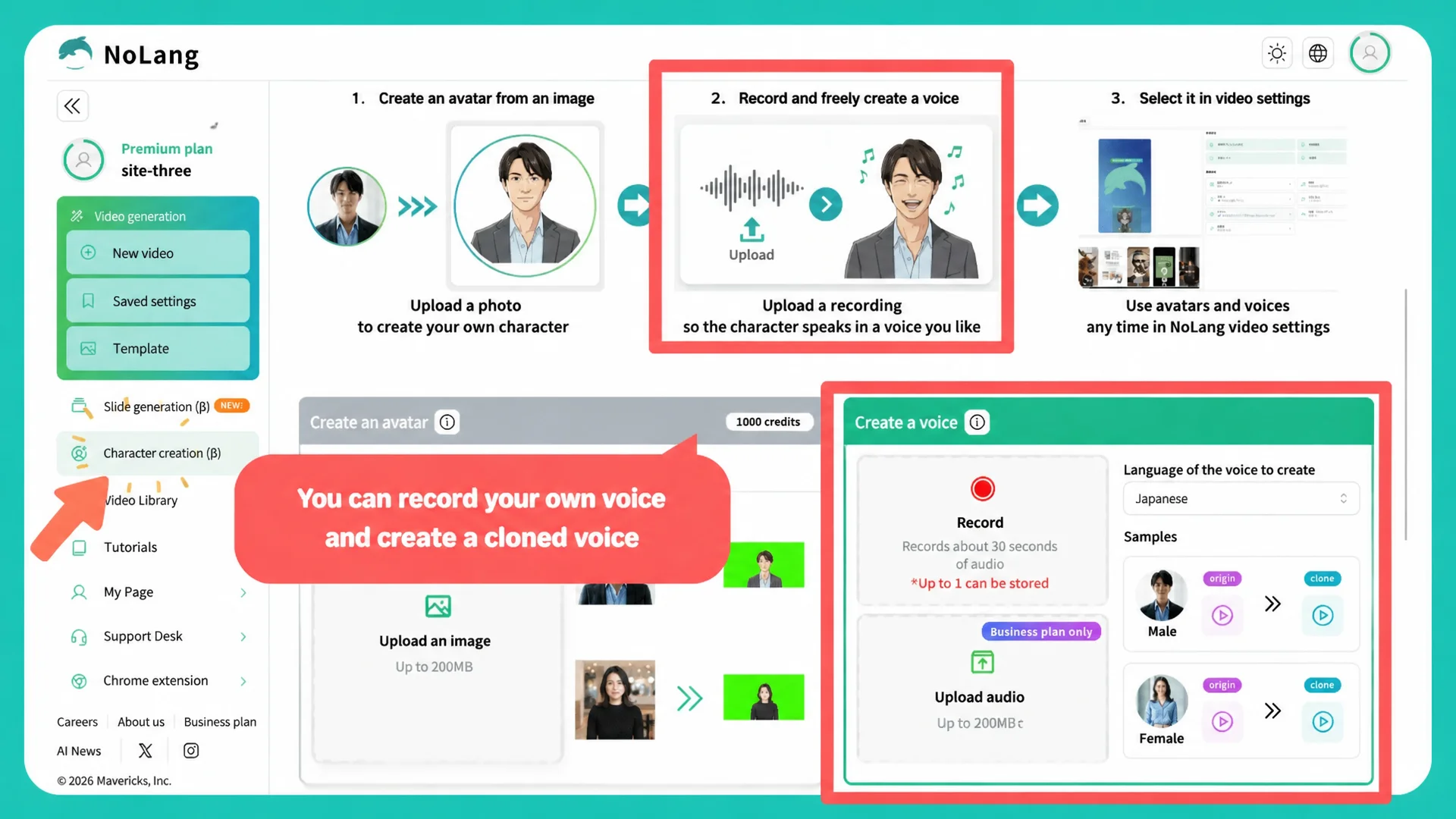
Right now, though, you can only register one voice, so it would be great if you could register several.
Also, after I created a character it was hard to tell where it was, and I once thought it had disappeared and ended up creating it twice (laughs).
Where NoLang could go beyond recruiting
― Do you use NoLang for anything besides recruiting?
One thing I’d like to use it for going forward is internal security training. Right now we use an outside training service and pay about 40,000 yen a month for the number of employees we have, and that feels like a waste.
I’ve been trying various things, thinking that if I put together the information published by organizations like the IPA myself and make a video with NoLang, we could do the same kind of training.
― So you’re also looking at using it to cut internal costs.
Yes. Apart from that, I use NotebookLM quite a lot — having it read English sites and summarize them in Japanese, or having it make slides.
There’s an issue where you can immediately tell which service the slide patterns came from, so I sometimes wish NoLang would rework them into something nicer.
And I’d like it if turning documents made in NotebookLM into videos with NoLang came naturally.
Right now I copy and paste what I made in NotebookLM over into NoLang, so it would be good if the two connected a bit more seamlessly.
If NoLang could connect through something like MCP, I think it would be a lot easier.
And being able to write the script inside NoLang would save me from going back and forth between outside tools, so I’d really appreciate that. It would be a big help if you’d consider updates along those lines.
― Thank you very much for sharing your story with us today! We’ll keep developing NoLang so we can support your use of video in recruiting, and in sales and internal training as well. We look forward to working with you!
[Editor’s note]
What stood out was how the wall you so often hit when making recruiting videos — employees not wanting to be on camera — was cleared using the avatar and voice cloning features in NoLang.
The idea that Miyaki himself finishes a video without shooting any footage or recording any audio is exactly the kind of thing you can only do with NoLang.
It was also striking that short videos, which would normally take several days to create, check and post, have been automated into a workflow built on the API.
We felt we were shown a new style of video posting for an age in which generative AI has become widespread.
Profile: Miyaki
My motto is the old saying “the old man lost his horse” — you never know what turns out to be a blessing.
I’ve been through all sorts of things, but I try to take both the good and the bad positively, and to move forward one step at a time without rushing.
Today I do AI-based system development for small and midsize businesses, along with consulting on improving their operations.
Unauthorized use, reproduction or reprinting of the text and specific content published in this article is strictly prohibited.

