AI voice cloning software turns a short recording of a voice into a model that can read any script in that voice. Which tool is best depends less on whose demo sounds most convincing and more on where the voice ends up: an audio file for your editor, an avatar video, a correction inside a recording you already made, or an app that has to answer in real time.
This guide compares seven tools on what they ask you to record, how they check consent, what their free plans allow and the first paid plan that includes cloning. Every figure comes from the vendor’s own pricing page, help center or terms, checked on November 10, 2026. Prices change often, so confirm them on the vendor’s site before you subscribe.
After the comparison come the five kinds of “free” voice cloning, how to record a sample that clones well, the US laws and YouTube rules that apply to cloned voices, and two ways to turn a cloned voice into a finished video.
The short answer: which voice cloning tool fits which job
Start from the job the voice has to do. The tools below overlap, but each is built around one kind of output.
- Narration as an audio file, or a voice inside your own app: ElevenLabs. Choose Cartesia if the voice has to respond in real time through an API.
- An avatar video or a dubbed video in your voice: HeyGen or Synthesia. Both let one clone speak in many languages.
- Fixing words in recordings you already made: Descript, whose clone works inside its text-based audio and video editor.
- Trying voice cloning for little or no money: Fish Audio or MiniMax Audio, whose free plans include cloning for personal use.
| Tool | Built for | What you record for a quick clone | Plans that include cloning |
|---|---|---|---|
| ElevenLabs | Narration, audiobooks, API | 1–2 minutes of clean audio | Starter and up, from $6/mo |
| HeyGen | Avatar videos, dubbing | 30–60 seconds | Free (1 clone); paid from $29/mo |
| Synthesia | Presenter videos with avatars | 20 seconds to 5 minutes | All plans; paid from $19/mo |
| Descript | Editing your own recordings | A consent statement, read by the speaker | Hobbyist, $16–$24/mo |
| Fish Audio | Low-cost cloning, many languages | 10 seconds or more | Free; paid from the Plus plan |
| MiniMax Audio | Cheap cloning with emotion tags | 10 seconds or more | Free (3 voice slots); Starter $5/mo |
| Cartesia | Real-time voice apps (API) | 10–60 seconds | Pro and up, from $5/mo |
The “built for” column reflects what each vendor’s documentation offers, not a listening test. How natural a clone sounds depends heavily on the recording you feed it, so try two or three tools with your own sample before you pay. The section on free options below shows which free plans let you do that.
Instant vs. professional clones, and how much audio each needs
Voice cloning tools offer two kinds of clone.
An instant clone imitates a voice from a short sample. It is ready in seconds or minutes and captures the pitch, tone and accent of the recording, but it can only learn what the sample contains. If you read flatly for 30 seconds, the clone reads flatly.
A professional clone is a model trained on a much larger set of recordings of one speaker. It takes longer: ElevenLabs says fine-tuning usually takes three to six hours, and Fish Audio says training takes 10 to 30 minutes after an upload of at least 10 minutes. It usually sits on a higher plan or an add-on and comes with a stricter check that the voice is yours.
| Tool | Instant clone | Professional clone |
|---|---|---|
| ElevenLabs | At least 1 minute; 1–2 minutes recommended; over 3 minutes adds little | At least 1 hour, ideally close to 3 hours (Creator plan, $22/mo) |
| HeyGen | 30 seconds (voice cloning page); up to 60 seconds (HeyGen Voice page) | 20+ minutes (voice cloning page); 30 minutes to 2 hours (HeyGen Voice page); add-on $29/mo per voice |
| Fish Audio | At least 10 seconds; a minute or two improves fidelity | At least 10 minutes, in clips under 1 minute each |
| Cartesia | 10 seconds; up to 60 seconds keeps the accent better | 30 minutes or more (Startup plan, $49/mo) |
For the other tools, the vendors give these figures. MiniMax Audio’s app advertises cloning from 10 seconds, and its API accepts 10 seconds to 5 minutes. Synthesia’s feature page says it can copy your voice in 20 seconds, while its help center asks for 1 to 5 minutes when you upload a file instead of recording. Descript creates the clone from a consent statement that the speaker reads aloud.
More audio is not always better for an instant clone. ElevenLabs advises against recording more than three minutes, saying it yields little improvement and can even hurt the clone. Clean, consistent audio matters more than length, and the recording section below covers what that means in practice.
The 7 tools compared
ElevenLabs
ElevenLabs is built around speech: text to speech, Studio for long-form narration (with a timeline for video, music and sound effects), dubbing and an API. Instant Voice Cloning asks for at least a minute of clean audio without reverb or background noise and is included from the Starter plan, at $6 a month or $5 a month billed yearly. The Free plan’s 10,000 monthly credits do not include Instant Voice Cloning, and ElevenLabs’ terms limit free users to non-commercial use.
Professional Voice Cloning starts on the Creator plan at $22 a month and asks you to verify that the voice is yours once the recordings are uploaded. For an instant clone, you confirm that you have the right and consent to clone the voice before saving it, and ElevenLabs says it blocks cloning of celebrity and other high-risk voices. In Studio you can regenerate a paragraph, adjust speed and stability, and apply pronunciation dictionaries. The pricing page lists 74 languages on paid plans.
HeyGen
HeyGen is an avatar video tool, and its voice clone is designed to drive avatars, lip-sync and translated versions of the same video. HeyGen says one English sample lets the clone narrate other supported languages without a second recording, and it counts more than 175 languages and dialects.
The free plan includes one voice clone, but HeyGen’s terms limit free-plan output to personal, non-commercial and evaluation use. Paid plans start with Creator at $29 a month. A Professional Voice Clone needs a paid plan plus an add-on at $29 a month or $288 a year per voice. To fix a line, you edit the text and re-render rather than re-record, and the result downloads as MP4 or MP3. HeyGen’s voice terms require the speaker’s permission in writing or another verifiable recorded form, and cloning a celebrity, public figure or political candidate also needs HeyGen’s prior written approval.
Synthesia
Synthesia makes presenter-style videos with AI avatars, and its help center says voice cloning is available on all plans. Recording a Personal Avatar also creates a voice clone automatically. Consent is spoken: after recording, the speaker reads a randomly generated passcode aloud, and Synthesia states that consent cannot be given on someone else’s behalf.
The clone can speak languages other than the one it was recorded in; the feature page counts 32. The free Basic plan includes 10 minutes of video a month with a Synthesia watermark, and Starter costs $19 a month after a $9 first month. After making a video with your cloned voice, you can download its audio and use it in another editor.
Descript
Descript edits audio and video by editing a transcript, and its voice clone exists mainly to change what was said. Type a correction and the clone speaks it; Regenerate repairs audio and smooths awkward cuts so the new words match the surrounding tone. For podcasters and YouTubers who record themselves, this is the most direct use of a clone: fixing a misspoken word without setting up the microphone again.
A clone is created when the speaker reads a designated consent statement, and Descript’s terms prohibit reading a statement on behalf of another person. Custom voices that sound like native speakers are available in 14 languages. Custom voice clones are listed on the Hobbyist plan, which costs $16 to $24 per person a month depending on how you are billed.
Fish Audio
Fish Audio offers a web app and an API. An instant clone works from at least 10 seconds of audio, and its documentation suggests recording two or three clips of 15 to 20 seconds that form a complete paragraph. A Professional Voice Clone, made in the web app, needs at least 10 minutes of clean audio from one speaker, and you verify ownership by reading on-screen text aloud so Fish Audio can compare it with your uploads.
The free plan includes 8,000 credits a month and voice cloning, but the pricing page’s FAQ says free users can use generated content only for personal, non-commercial projects; commercial use is for paid subscribers with a verified voice they own. Paid plans start with Plus, which was on a first-year discount when we checked. Text markers control more than 64 emotions and styles, and pronunciation dictionaries are available. Its S2.1-Pro model supports 83 languages.
MiniMax Audio
MiniMax Audio is the web app for MiniMax’s speech models, which are also sold through an API. The app advertises cloning from 10 seconds of audio; the API accepts 10 seconds to 5 minutes in MP3, M4A or WAV. Before uploading, the app asks you to confirm that you have all necessary rights and authorization for the voice samples.
The free plan comes with 10,000 credits and three voice slots for cloned or designed voices. MiniMax’s FAQ says free plans are for personal use, with a credit to MiniMax when you post, and that commercial rights start with the Starter plan at $5 a month ($4.50 a month billed yearly). In the editor you can insert emotion, pause and sound tags and change speed, pitch and volume. MiniMax lists more than 40 languages and accents.
Cartesia
Cartesia sells its voice models mainly through an API to developers building voice agents and apps, and describes its latest model as built for real-time conversation. Its instant clone needs 10 seconds of audio, and up to 60 seconds helps keep the speaker’s accent on its newer models. Each clone is built in one language; to have it speak others, you clone it in its own language first and add languages through Cartesia’s accents API.
Cartesia lists instant cloning and a commercial license as Pro plan features, at $5 a month. A Pro Voice Clone, trained on 30 minutes or more of audio, starts with the Startup plan at $49 a month. Cartesia’s acceptable use policy says you may only submit your own voice, or the voices of others with explicit consent.
Names you may still see in older lists
Several “best voice cloning” lists still feature tools whose offers have changed:
- Murf lists custom voice clones only as an add-on to its Enterprise plan, which is priced on request.
- WellSaid states that it has never allowed users to clone voices on their own. Its voices are trained on recordings of actors who gave written consent.
- Resemble AI no longer sells voice cloning or text to speech and now builds deepfake detection. Its open-source Chatterbox model remains public under the MIT license, but it has not been maintained since August 2026.
Free AI voice cloning: what each kind of free gets you
“Free voice cloning” covers five different things. The question that separates them is usually not whether you can make a clone, but what you may do with the audio afterward.
| Kind of free | Examples | Using the output commercially |
|---|---|---|
| Free plan that includes cloning | HeyGen (1 clone), Fish Audio, MiniMax Audio (3 voice slots), Synthesia (watermarked videos) | HeyGen, Fish Audio: personal, non-commercial only. MiniMax Audio: personal use with credit |
| Free plan, with cloning on paid plans | ElevenLabs, Cartesia | Cloning and a commercial license are listed from $6 and $5 a month |
| Web tools with a small free tier | KikiVoice (no sign-up, credits reset weekly), Vocloner (3 voices, 1,000 characters a day) | KikiVoice: allowed, crediting “Generated with KikiVoice” on published free output. Vocloner free: personal use |
| Runs in your browser | SoundTools (F5-TTS, desktop browsers) | F5-TTS’s pretrained models are licensed CC BY-NC (non-commercial) |
| Open-source models you run yourself | OpenVoice, Coqui XTTS-v2, F5-TTS, Chatterbox | OpenVoice: MIT, free for commercial use. XTTS-v2: non-commercial license. Chatterbox: MIT, no longer maintained |
A free plan is a good way to hear your own voice cloned before paying. If the video will earn money, promote a business or go to a client, check the license before you publish: several free plans above rule that out in their terms.
The web tools and the in-browser tool trade convenience for limits. Vocloner’s free tier caps each request at 200 characters, roughly two sentences. SoundTools keeps your recording on your computer, but it downloads its models on the first visit and generates in a desktop browser, which takes longer than a hosted service.
Open-source models give you the most control, provided you can run Python and a GPU. Coqui XTTS-v2 clones from a 6-second clip in 17 languages, but its license allows only non-commercial use of the model and its outputs. OpenVoice’s V1 and V2 have been released under the MIT license since April 2024 and are free for commercial use.
To compare tools for free, keep everything but the tool the same:
- One sample: record one clean clip of about a minute using the tips in the next section, and use it everywhere, trimmed to each tool’s limit.
- One script: paste the same paragraph you would actually narrate, including a name, a number and a question.
- Same playback: listen on the device your audience uses, such as a phone speaker or earbuds, not only on studio headphones.
- Check the license last: before you publish, confirm that the plan allows the use you have in mind.
How to record a voice sample that clones well
The vendors’ help pages describe the same few conditions, even when they ask for different lengths:
- One speaker only. Fish Audio, ElevenLabs and Cartesia all ask for a single voice. Cut out interviewers, laughter from others and crosstalk.
- A quiet, dead room. Cartesia asks for no music and no echo off bare walls; ElevenLabs asks for no reverb or background noise. A closet full of clothes beats an empty office.
- Steady volume and tone. Fish Audio lists steady volume and consistent tone and emotion as musts. Keep the same distance from the microphone throughout.
- Read the way you want the clone to speak. The clone copies your delivery. Synthesia’s guidance is to read in a positive tone, pause between paragraphs and breathe naturally.
- Connected sentences, not word lists. Fish Audio suggests clips that form a complete paragraph.
- A clean file. Record in an uncompressed format such as WAV, and if a tool takes MP3, export at 128 kbps or higher, as ElevenLabs advises. Skip heavy noise reduction, which leaves artifacts the clone will copy.
- The length the tool asks for. Use the range in the table above. For an ElevenLabs instant clone, more than three minutes adds little.
The video below walks through the same steps. It was made in NoLang and registered as a template, so you can reuse its layout to turn your own checklist into a narrated explainer.
How to Record Your Voice for AI Voice Cloning: 6 Tips
Make a short English explainer with six tips for recording a clean voice sample for AI voice cloning.
Consent and the law: whose voice you can clone
Every tool in this guide lets you clone your own voice, and most also accept another person’s voice with that person’s permission; Synthesia requires the speaker to give consent themselves, by voice. The tools differ in how they check.
| Tool | What the tool asks for |
|---|---|
| ElevenLabs | A confirmation that you have the right and consent; voice verification for professional clones |
| HeyGen | The speaker’s permission in writing or another verifiable recorded form; consent recordings on request |
| Synthesia | The speaker reads a randomly generated passcode aloud |
| Descript | The speaker reads a designated consent statement |
| Fish Audio | Reading on-screen text that is matched to your uploads, for professional clones |
| MiniMax Audio | A confirmation that you have the rights and authorization for the samples |
| Cartesia | Explicit consent from anyone whose voice you submit, under its acceptable use policy |
If the voice belongs to a colleague, a hired narrator or a client, get the permission in writing and say what it covers: which videos, which channels, for how long, and whether the voice may be used for new scripts later.
In the United States, there is no single federal law on voice clones yet, but several rules already apply:
- AI voices in calls. In February 2024, the FCC confirmed that the Telephone Consumer Protection Act’s limits on “artificial or prerecorded voice” calls cover AI-generated voices, such as voice cloning (FCC 24-17). Robocalls in a cloned voice need the recipient’s prior express consent.
- Tennessee. The ELVIS Act, in force since July 1, 2024, gives every individual a property right in the use of their voice, which the law defines to include a simulation of it. It creates liability for knowingly publishing someone’s voice without authorization, and for distributing a tool whose primary purpose is producing a particular person’s voice without authorization (Public Chapter 588).
- California. AB 2602 makes a contract term unenforceable for new performances fixed on or after January 1, 2025 when it lets a digital replica of a person’s voice replace work they would have performed in person and meets the law’s other conditions, including the lack of a reasonably specific description of the intended uses (AB 2602). AB 1836 makes anyone who produces, distributes or makes available a digital replica of a deceased personality’s voice in an expressive audiovisual work or sound recording without prior consent liable for $10,000 or the actual damages, whichever is greater, with exceptions such as news, commentary, criticism, satire and parody (AB 1836).
- New York. Two laws signed in December 2025 require advertisements to disclose synthetic performers and require consent before a digital replica of a deceased personality’s voice is used in an expressive audiovisual work (S8420, S8391).
- Federal. As of November 2026, the NO FAKES Act, which would create a federal right over digital replicas of a person’s voice and likeness, has not been enacted. The Senate Judiciary Committee reported the 2026 version (S. 4591) in June 2026.
If your videos reach viewers in the EU, Article 50 of the EU AI Act has applied since August 2, 2026: deployers of AI systems that produce deepfake audio or video must disclose that the content was artificially generated or manipulated, with a lighter duty for evidently artistic, satirical or fictional works (Regulation (EU) 2024/1689).
Platforms have their own rules. YouTube requires creators to disclose realistic AI-generated or altered content, including content that makes a real person appear to say something they did not say. Its examples of what does not need disclosure include cloning one’s own voice to create voice overs or dubs (YouTube Help).
This section summarizes official texts so you know what to check; it is not legal advice.
From a cloned voice to a finished video
Once the clone sounds right, there are two ways to get it into a video. The difference shows up the first time you change a sentence.
| Route | How it works | When you change a line |
|---|---|---|
| Export audio, edit elsewhere | Generate MP3 or WAV in a voice tool, then place it on the timeline of your video editor with visuals and captions | Regenerate the line, export it, replace it on the timeline and re-time the captions and visuals around it |
| Clone as the narrator in a video tool | The clone reads the script inside the tool that builds the video, such as HeyGen, Synthesia, Descript or NoLang | Edit the text and regenerate; the voice and captions follow the script |
Exporting gives you any voice tool and full control in your own editor, which suits a channel with an established editing workflow. Keeping the clone inside a video tool suits videos that change often, such as tutorials, training and product updates, because a revision starts from the script instead of the timeline.
NoLang, the AI video generator that publishes this guide, works the second way. On the Create Character page, Create Voice opens How to create a voice, where you choose Record or From an Audio File. With Record, you pick the language, check the microphone and read short sentences shown on screen one at a time, re-recording any sentence before the voice is made; NoLang checks that the reading matches the text. From an Audio File takes an MP3, WAV or M4A recording of at least 30 seconds. Voices can be made in 30 languages, and an English voice is made from English speech. Before your first AI generation or edit, NoLang asks you to agree not to use real people’s images, videos or voices without their consent.
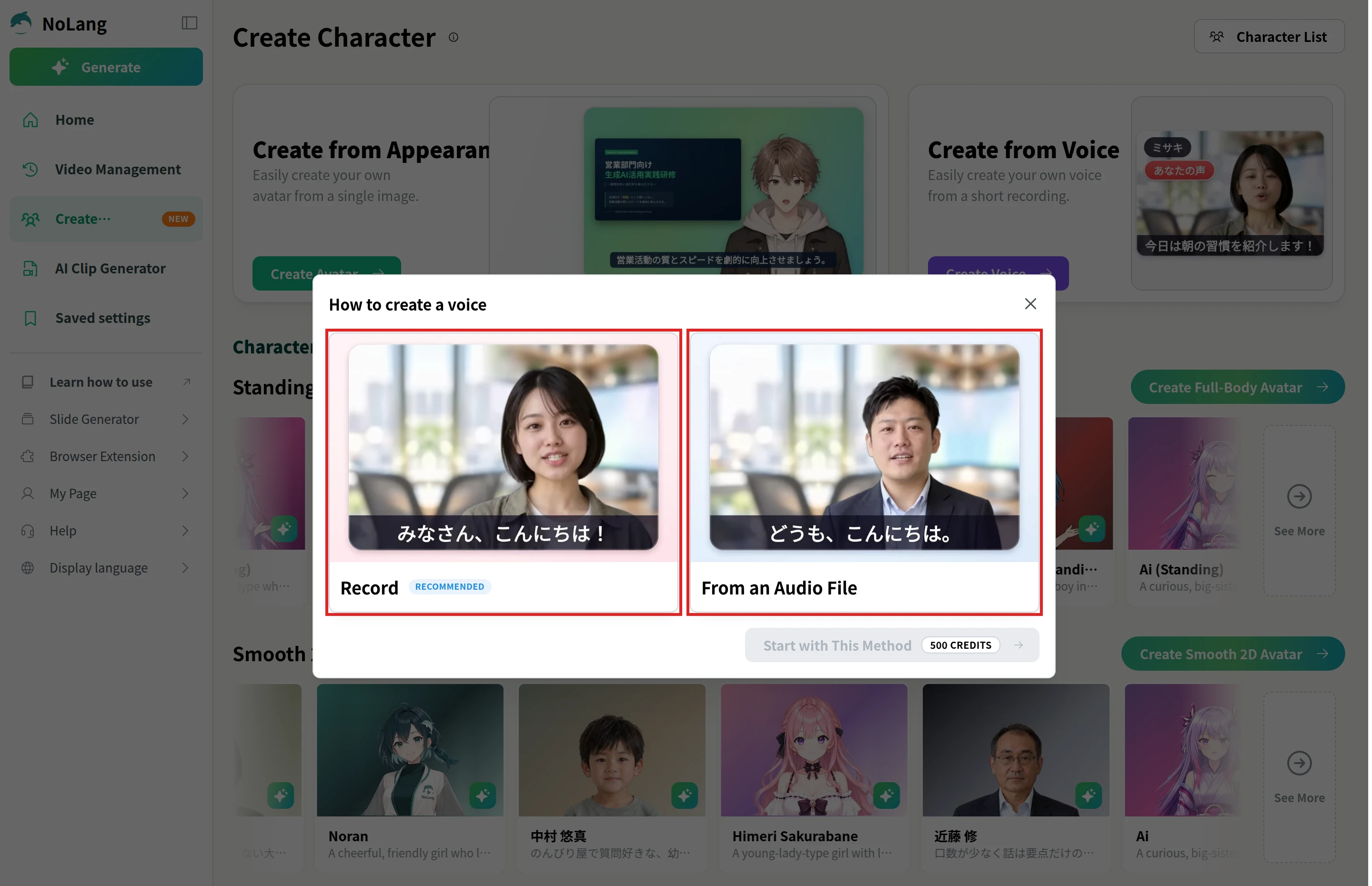
The finished voice is set as that character’s voice, and it can also narrate videos. When you generate a video from a script or a document, it speaks in that voice, and the script, subtitles and visuals can be edited in the timeline editor before you export an MP4. The voice cloning page shows sample videos narrated by registered voices.
For companies, NoLang can register the voice of a trainer or spokesperson who has agreed to its use, then turn slide decks and documents into narrated training or internal videos in that voice. To see how teams use it, download the brochure or contact us.
Download the brochure