ISO/IEC 27001:2022 (ISMS) certified

Used by 500+ companies, local governments, and public agencies

AI video generator for e-commerce and retail product videos

Turn product pages andphotos into product videoswith AI, from a URL

NoLang is a Japan-made AI video generator that turns product page URLs and product photos into videos with narration and subtitles. E-commerce and retail companies use it for product pages, social media, in-store screens, and store staff videos.

  • Makes product videos from page URLs and photos
  • Makes versions for product pages, social, and stores
  • Keeps one format across products with a reference video
  • Companies using NoLang 500+
  • Users 200K+

Get the service overview by email

Free Download Materials

Ask if it works for your products

Contact Us

Try It for Free

URL Photos Into product videos

Sample screen of a NoLang video introducing a linen shirt Sample screen of a NoLang video introducing a canvas tote bag Sample screen of a NoLang video explaining a new product guide to store staff

500+ companies, local governments, and public agencies use NoLang

PROBLEM

Making product videos?
Do you face challenges like these?

  • Not enough hands to make a video per product

  • Videos cannot keep up with seasonal changes

  • Social and product-page versions mean making it twice

  • New product briefings vary by store

With NoLang,

Just add a product page or photos,
and AI turns them into product videos.

  • Start from a URL or photos

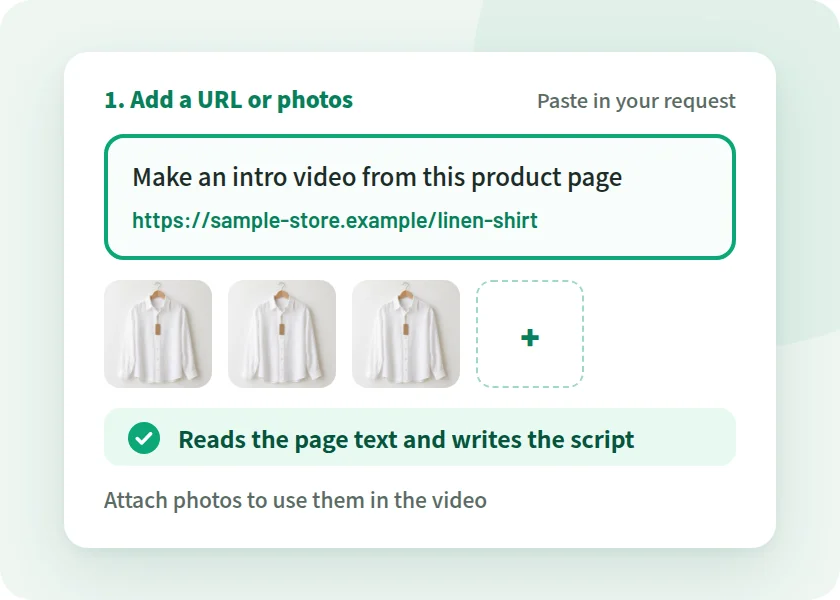
    Start by pasting a product page URL into your request, or by attaching product photos.

  • Vertical and horizontal

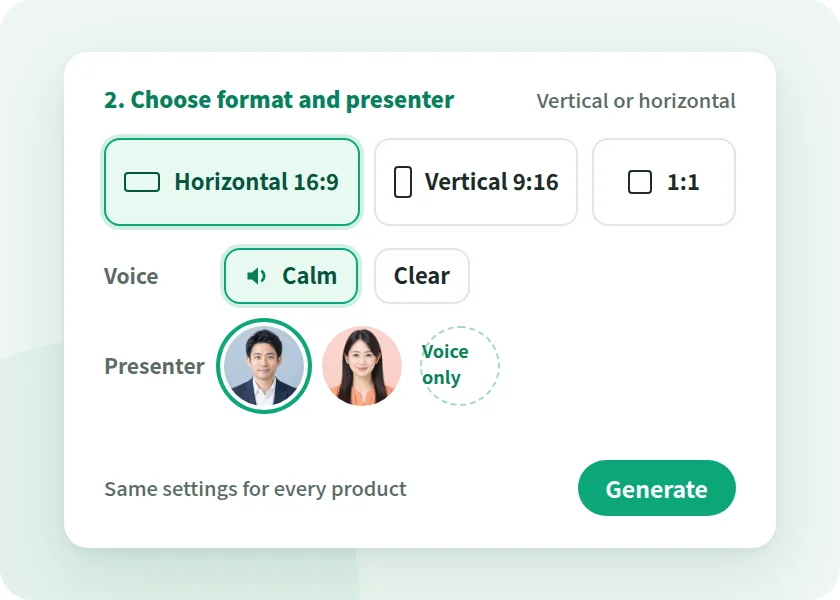
    Choose from horizontal 16:9, vertical 9:16, and more to match the channel.

  • Fix it later

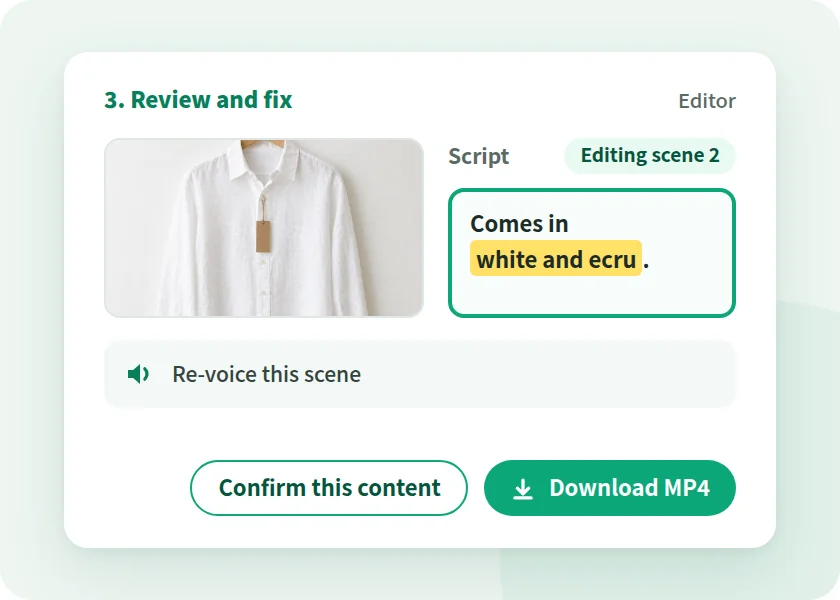
    Fix the script or subtitles and confirm, and it becomes a new version at the same URL.

  • Foreign-language versions too

    Create English and other language versions from the Japanese video.

HOW IT WORKS

From product page to export
in 3 steps

Add a product page URL or product photos, choose the shape and voice, and turn them into a video. You can also start from a new product guide or customer service manual (PDF or PPTX).

  1. Illustration of a screen for pasting a product page URL into the request and attaching product photos

    STEP 01

    Add a URL or photos

    Paste the product page URL into your request, or attach product photos. Add a note in text if there are features you want to highlight.

  2. Screen for choosing the aspect ratio, voice, and presenter

    STEP 02

    Choose the shape and voice

    Horizontal for product pages, vertical for social media. Choose the aspect ratio for the channel, then pick the narration voice and presenter.

  3. Illustration of reviewing the finished video, fixing the script, and downloading it as MP4

    STEP 03

    Review, fix, and export

    Check and fix the script and subtitles of the finished video. Export it as an MP4 and use it on product pages, social media, and in-store screens.

ONE PRODUCT, MANY VIDEOS

From one product page,
make a video for each channel

Product pages, social media, in-store screens, and store staff. Even for the same product, the right shape and length depend on where it is shown. From the text and photos of a product page, you can make a video for each channel.

Source

Sample product page for a linen shirt on an e-commerce site

One product page

What you prepared for the product page becomes the source for your videos.

  • Product description
  • Product photo
  • New product guide
  • For customers
    Sample horizontal video screen introducing the features of a linen shirt

    Product page video

    Shows features and use scenes on the product page.

    What do you create from? Description, photos

  • For customers
    Sample vertical video screen announcing a newly arrived linen shirt

    Vertical social video

    Announces new products and sales in a short clip.

    What do you create from? Photos, a tagline

  • For customers
    Sample screen of a linen shirt video for a vertical sales-floor display

    In-store screen video

    Loops product features on a sales-floor screen.

    What do you create from? Photos, features

  • For store staff
    Sample video screen showing a new product guide and explaining the selling points

    Product knowledge video

    Shares new product features and selling points with every store.

    What do you create from? New product guide (PDF, PPTX)

The store and products shown are fictional examples. You can also convert a finished video to a version in another aspect ratio. Posting the video is done on each channel.

ONE FORMAT, EVERY PRODUCT

From one reference video
to a video for every product

Whether your catalog grows or changes with the season, NoLang can use a video you already made as the reference and make new videos with different content while keeping the design and structure.

Reference
Sample screen of the reference video introducing a linen shirt

Make your first video

Make your first video from the product page and photos of a best seller. That video becomes the reference for your other products.

Use it as the reference and change the content
  • Sample video screen introducing a canvas tote bag

    Tote bag

    What changed

    • Photos
    • Product name
    • Features
  • Sample video screen introducing a room mist

    Room mist

    What changed

    • Photos
    • Product name
    • Features
  • Sample video screen introducing a linen shirt in a new fall color

    New fall color

    What changed

    • Tagline
    • Color name

Inside one video

  • As written
  • Changes per product
  1. Store name and greeting Store introduction As written
  2. Product name and tagline Product page headline Changes per product
  3. Features Product description Changes per product
  4. Size and material Product specs Changes per product
  5. Where to buy Stores, online store As written

The store and products shown are fictional examples. You can choose how closely to follow the reference video, from "Bold" to "Close to the reference." Videos are made one product at a time.

For teams evaluating NoLang internally

Download the NoLang service overview
for free

Get an overview of NoLang and its Business plan by email.

Cover of the NoLang Service Overview

3-minute
overview

Free Download Materials

CONCERNS, ANSWERED

Concerns about product videos,
answered by NoLang

How photos look, vertical and horizontal, product name pronunciation, presenters. Here are NoLang's answers to common concerns when making product videos in-house.

Will the product photos be altered?

We cannot have colors or shapes look different from the real product.
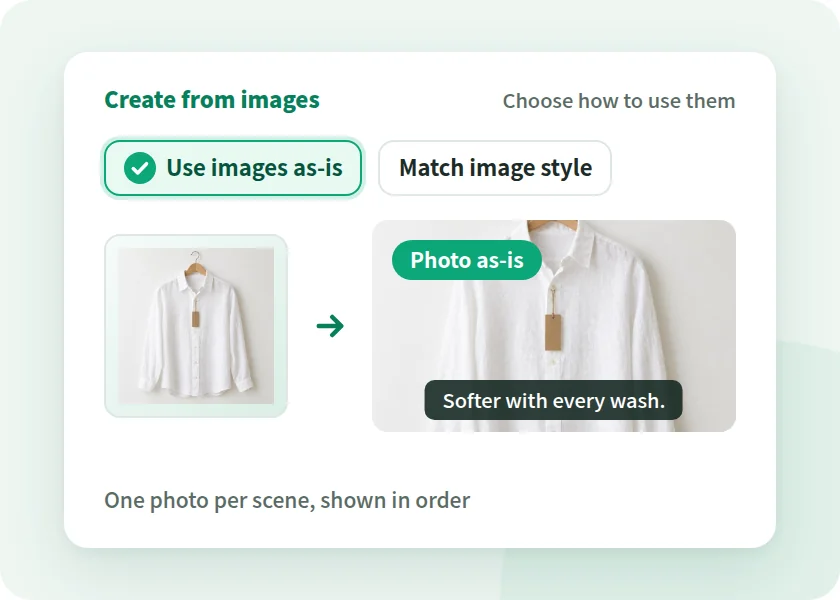
Illustration of choosing "Use images as-is" to show product photos in the video exactly as they are

With NoLang

Photos can be shown exactly as they are

Choose "Use images as-is" and the photos you add are shown as-is. This suits scenes where you want to show the product's shape or logo.
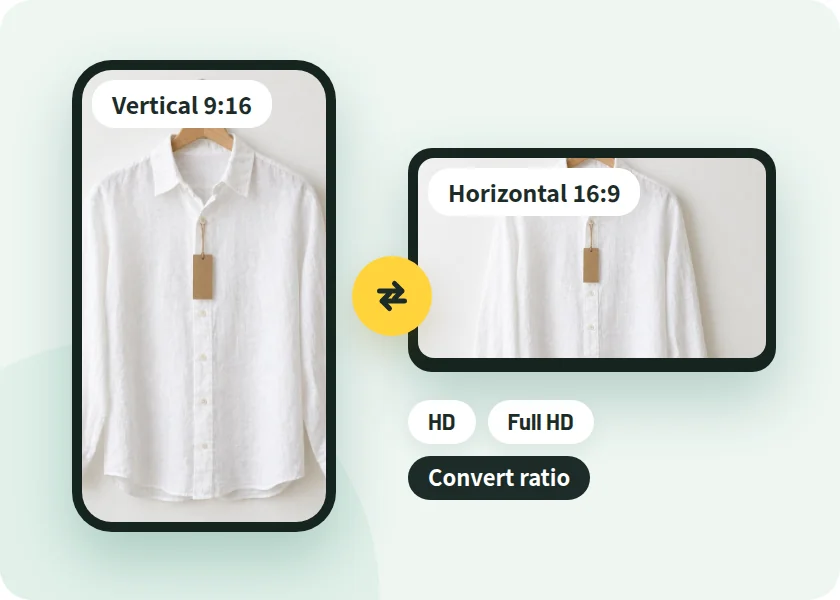
Product pages and social need different shapes

Product pages are horizontal, social is vertical. We do not have the hands to make both.

Illustration of making the same video in vertical 9:16 and horizontal 16:9

With NoLang

Horizontal and vertical, with the same content

Choose an aspect ratio such as horizontal 16:9 or vertical 9:16, and export as HD or Full HD MP4. You can also convert videos you make into versions in other aspect ratios.

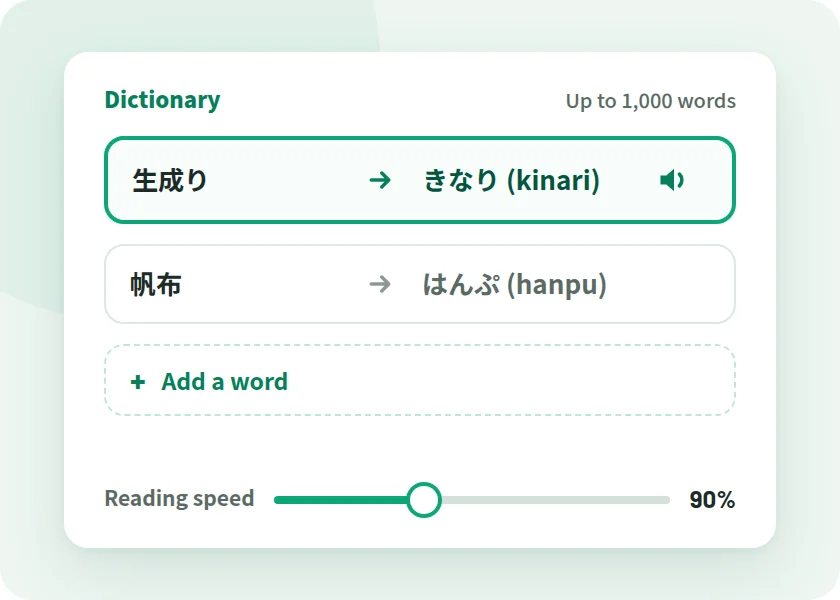
Will it misread product names?

Can an AI voice read brand and product names correctly?

Illustration of the screen for registering pronunciations of technical terms in the dictionary and changing the narration speed

With NoLang

Readings can be fixed word by word and saved in the dictionary

Fix the reading of technical terms word by word in hiragana or katakana. Register up to 1,000 words in the dictionary, and set the reading speed from 50% to 300%.

No one available to present

No one in-house can explain on camera.

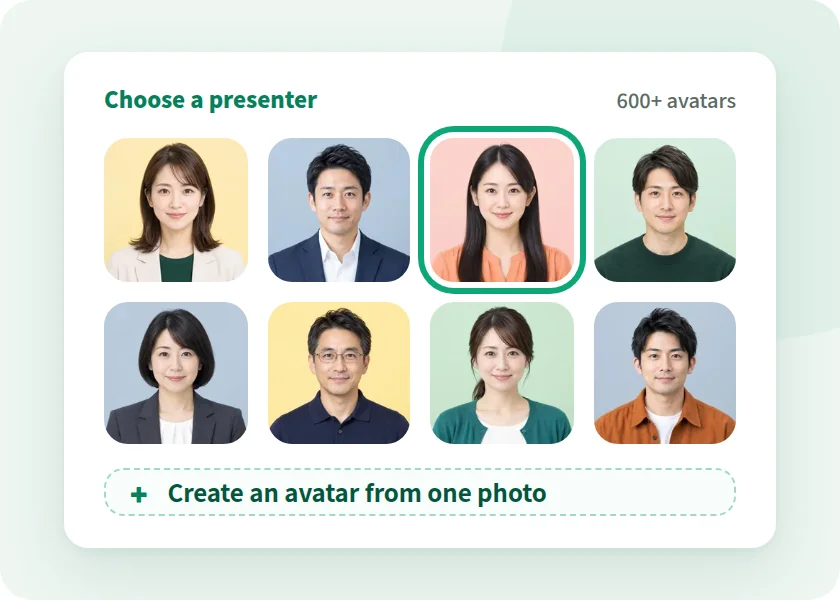
Illustration of choosing a presenter from more than 600 avatars

With NoLang

Presenters from more than 600 avatars

Choose a presenter from more than 600 avatars. You can also create your own avatar from a single photo of a staff member. Avatars of real people require the person's consent.

CHECK POINTS

8 points to check
when choosing a product video tool

These are points worth checking before adoption, whichever tool you choose. We've added NoLang's answer to each.

  1. CHECK 01 What do you create from?

    Make videos from text, PDF and PowerPoint (PPTX) documents, article URLs, scripts and images. PPT, Keynote and Word files can be used once exported to PDF or PPTX.

  2. CHECK 02 Whether product photos can be used as they are

    Choose "Use images as-is" and your photos are shown in order, one per scene.

  3. CHECK 03 Whether you can make both vertical and horizontal

    Choose an aspect ratio such as horizontal 16:9 or vertical 9:16, and export as HD or Full HD MP4. You can also convert videos you make into versions in other aspect ratios.

    See the by-channel example
  4. CHECK 04 Whether the format stays consistent as products grow

    Choose a video you already made as the reference, and NoLang makes a new video with different content while keeping the design and structure.

    See the reference-video example
  5. CHECK 05 How much needs fixing when details change?

    Fix the script and confirm, and the video becomes a new version. Narration audio can be regenerated scene by scene, and the video URL stays the same.

  6. CHECK 06 Who checks the claims and labeling

    You can check and fix the script and visuals in the editor. Before publishing, please review efficacy claims and price or sale information under your internal rules.

  7. CHECK 07 Whether commercial use is allowed

    Videos you generate can be reused commercially, including in web ads and social media ads. Before running ads, please check the rights to the photos, people, and voices used in your videos yourself.

  8. CHECK 08 Can the team manage it?

    The Business plan supports inviting and suspending users, Microsoft Entra ID single sign-on and IP address restrictions, and admins can view operation logs.

    View Admin and Security

If you are unsure, the surest way is to pick one best seller and make one video from its product page.

Try It for Free

SECURITY

Administration and security for business use

NoLang is a Japan-made AI video generator developed and operated in-house by Mavericks, Inc. Here is what IT departments and those handling internal approval will want to confirm.

Third-Party Certification

Certified to ISO/IEC 27001:2022 (ISMS)

ISO/IEC 27001 is the international standard for information security management systems (ISMS). Mavericks, Inc., which develops and operates NoLang, is certified to this standard.

ISO/IEC 27001:2022 certification mark
Registration No. GIJP-2064-IC
  • SSO

    Single sign-on with Microsoft Entra ID

  • IP Address Restrictions

    Restrict which IP addresses can be used for each tenant

  • Activity Logs

    Admins can filter activity logs and download them in bulk as CSV

  • User Management

    Invite and suspend users, with credits shared across the company

  • No AI Training on Your Documents

    Uploaded documents are never used to train generative AI

  • Pay by Invoice

    The Business plan accepts bank transfer (invoice) as well as credit card

  • REST API

    Generate videos from PDF or PPTX files via your own systems

  • Developed in Japan

    Developed and operated in-house by Mavericks, Inc.

Business Plan Features

  • Unlimited video generation (excluding some types, such as avatars)
  • Custom avatar and voice creation
  • Higher slide generation limits

For teams considering product videos

Wondering if it works for your products?
Ask us

TRACK RECORD

Over 500 companies, local governments,
and public agencies use NoLang

  • Companies using NoLang(businesses and public sector) 500+
  • Users 200K+

Some of the companies using NoLang (in no particular order)

CASE STUDY

Case studies from companies, local governments, and public agencies

NoLang videos are used by companies, local governments, and government agencies. You can play the published videos right here.

Horizontal Video YouTube

Vertical Short YouTube Shorts

Public Agency

Ministry of Defense

  • PR
  • Communications

PR videos on its initiatives and activities, published as a horizontal video and a vertical Short

Produces PR videos that clearly communicate its initiatives and activities. Both the horizontal video for YouTube and the vertical Short are created in NoLang alone.

  • Company 17LIVE

    Its own character delivers corporate messages in an approachable way

    Highly entertaining videos convey company information in an approachable way and help strengthen the brand image.

    • Business Overview
    • Company Profile
  • Local Government Hatsukaichi City, Hiroshima

    Complex administrative information, brought to residents through explainer videos

    Produces explainer videos about plans and programs with NoLang and publishes them on the web, reaching more residents with municipal information.

    • Tourism PR
    • Municipal Communications
  • Company WriteUp Co., Ltd.

    Sharing practical AI know-how to reach more new customers

    Shares practical, easy-to-understand information about AI on YouTube and other channels, building its expertise and credibility.

    • Marketing
    • New Customer Acquisition

FLOW

From inquiry to rollout

Here is the flow from your inquiry to making your first product video.

  1. 01

    Contact Us

    Submit the form and we'll send materials or a reply to the email address you entered.

  2. 02

    Consultation and Quote

    Talk with us about Business plan details, API integration, and customization.

  3. 03

    Sign Up

    To pay by card, sign up through the web form in about 5 minutes. For invoice payment (bank transfer), contact us and we will guide you through it.

  4. 04

    Go Live

    You can use the Business plan from your start date. An admin invites the team members in charge, and they start creating videos.

FAQ

FAQ

Questions we hear from e-commerce, marketing, sales promotion, store operations, and IT teams at e-commerce and retail companies considering video.

Can an e-commerce or retail company make product videos in-house?

Yes. NoLang is a Japan-made AI video generator that turns product page URLs and product photos into videos with narration and subtitles.

Start by pasting a product page URL into your request, or by attaching product photos.

How can e-commerce and retail companies use video?

You can use it for product introductions on product pages, vertical social videos, in-store screen videos, new product and sale announcements, and product knowledge videos for store staff.

All of these can be made from what you already have: product pages, product photos, and new product guides.

Can I make a video from a product page URL?

Yes. Paste the product page URL into your request and NoLang reads the page text to write the script. If a URL cannot be read, it does not fill in the gaps by guessing.

You can attach product photos to use them in the video.

Can I use product photos in the video as they are?

Yes. Upload product photos with "From images" and choose "Use images as-is," and you get a video with your photos inserted in order, one per scene.

Supported image formats are JPEG, PNG, GIF, WEBP, and HEIC.

With many products, can I keep the videos in one consistent format?

Yes. Choose an introduction video you have made as the reference, and you can create videos with different content for each product or model while keeping the same design and structure.

There is no feature to make videos in bulk from a spreadsheet. Videos are made one product at a time.

Can I make both a vertical video for social media and a horizontal one for product pages?

Choose an aspect ratio such as horizontal 16:9 or vertical 9:16, and export as HD or Full HD MP4. You can also convert videos you make into versions in other aspect ratios.

You can prepare videos of the same product to fit product pages, social media, and in-store screens.

If a price or sale period changes, do I have to remake the video?

You don't have to start over. Fix the script or assets and confirm, and the video becomes a new version at the same URL.

Narration can be regenerated for only the scenes you fixed.

Does NoLang check claims for products such as cosmetics?

No. Before publishing, efficacy claims and price or sale information are for you to review on your side under your internal rules.

For explanations whose wording must be fixed, "Specify script" has NoLang read your script exactly as written.

Can I use the generated videos in ads and on online marketplaces?

Yes. Videos and slides generated with NoLang can be reused commercially, including in web ads and social media ads.

Before publishing, please check the rights to the photos, people, and voices in your video, and the rules of the place where you post it.

Can product and brand names be pronounced correctly?

Readings can be fixed word by word in hiragana or katakana. Register up to 1,000 frequently used terms in the dictionary.

The reading speed can be set from 50% to 300%.

Can I also make videos for store staff?

Yes. From a new product guide or customer service manual (PDF or PPTX), you can make a video that shows each page and explains it.

On the Business plan, sharing a video within your organization lets its members view and download it.

Can I make videos in other languages?

Yes. "Convert language" creates a video in another language with the script and on-screen text translated. 34 languages are supported.

Text in images on document pages and inside slides is not translated. Before publishing, have someone who knows the language check the translation. Check the pricing page for the plans that include "Convert language."

How do we set up a presenter?

Choose a presenter from more than 600 avatars. You can also create your own avatar from a single photo of a staff member.

Using the avatar or voice of a real person requires that person's consent.

Are uploaded documents used for AI training?

On every plan, uploaded materials are never used to train AI. Deleting your account deletes everything, including the videos you created.

Our brochure covers the Business plan's administration and security.

Where can we check pricing?

Pricing and plans are on the pricing page.

For a Business plan quote, or to ask whether it works with your documents, contact us.

Ask Another Question

CONTACT

See if it works for your products.
Start with our materials and a consultation

Choose the option that fits your stage of evaluation.

For teams evaluating NoLang internally

3-minute overview

Service overview

An overview of NoLang and its Business plan.

  • Details of the Business plan
  • Sent by email after you submit the form
  • Easy to share internally as a PDF
Cover of the NoLang Service Overview
Free Download Materials

We'll send the materials to the email address you enter.

Want to talk about product videos?

Feel free to reach out

Contact Us

Ask us about making videos from product pages, making a video for each channel, and how to run this as a team.

  • Quotes and rollout planning
  • Questions about paying by invoice (bank transfer)
  • API integration and customization
Contact Us

We will reply to the email address you provide.

For teams who want to try it first

Try for Free

Before requesting materials or a consultation, try the actual app for yourself.

Try It for Free