Nonprofit Video Production: 8 Steps to Make Your Own Fundraising Videos
Key takeaways
You can make most nonprofit videos in-house in 8 steps, from one clear ask and signed releases to captions, publishing and measuring gifts.
Studios that publish nonprofit rates quote $5,000–$40,000 and 4–12 weeks per video, so save them for a flagship film or sensitive interviews.
GoFundMe takes a public YouTube link, while Kickstarter takes an uploaded file and requires creators to be transparent about how AI is used.
The example winter appeal was made in NoLang from a one-page fact sheet, and you can use it as a template for your own campaign.
SHARE
Nonprofit video production usually starts with a quote from a studio: several weeks of interviews and filming, and a price that, among studios publishing their rates, runs from $5,000 to $40,000. For a flagship film, that can be money well spent.
Most of the videos a nonprofit needs in a year are smaller and come more often, though: a year-end appeal, a thank-you to new donors, a short explainer on how to get help, a video for a crowdfunding page. Your own staff can make those from the facts, photos and footage you already have.
This guide covers the main types of nonprofit video and what each one asks the viewer to do, when a production company is worth hiring, eight steps to make a video yourself, and what changes on a crowdfunding page, followed by an example appeal made from a one-page fact sheet and how to make one in NoLang.
What nonprofit videos are for
Most nonprofit videos ask the viewer for one thing. Choosing a type of video is really choosing who you are talking to and what you want them to do next.
Common nonprofit videos and the one thing each asks for
Video
Who watches
The one ask
Where it runs
Fundraising appeal
Current and prospective donors
Give to this campaign by a date
Donation page, email, social posts
Mission story
New audiences, grant reviewers
Understand what you do
Homepage, About page, grant applications
Impact update
Current donors, board members
Keep giving
Donor emails, annual report page, board meetings
Thank-you video
People who just gave
None; it says thank you
Thank-you email, donation receipt page
Program explainer
People who could use your services
Use the service
Website, social posts
Volunteer recruitment
Local supporters
Sign up for a shift
Social posts, volunteer page
Event video
Guests at a gala or event
Give in the room, or register
On screen at the event, then online
Crowdfunding video
Your supporters and their networks
Give and share the page
GoFundMe or Kickstarter page, social posts
If you are starting from nothing, make the appeal for your next campaign first, then a thank-you video for the people who respond to it. Both draw on the same facts (what you do, what a gift pays for, who does the work), so most of the preparation for the first carries over to the second.
Hire a production company or make it yourself?
Some studios that specialize in nonprofit work publish their prices. These are the figures on their own pages as of November 2026.
That money pays for a crew, directed interviews, location shoots and rounds of editing. Our guide to video production cost breaks down what sits inside a quote and what moves the number.
Decide video by video: some need a studio’s craft, others need speed.
When to hire and when to make it yourself
Situation
Better choice
Why
A flagship mission film you will show for years
Hire a studio
The craft pays off over a long shelf life
Interviews with people in crisis, children or survivors
Hire a studio or an experienced partner
Sensitive direction and editing protect the people on camera
A grant that funds production
Hire a studio
The funder’s dates, logo and invoicing rules are part of the job
Appeals and updates for a running campaign
Make it yourself
Speed and easy revisions matter more than polish
Thank-you videos and event recaps
Make it yourself
They work best within days, not weeks
Program explainers
Make it yourself
They change whenever your services do
A second-language version
Make it yourself
The facts and structure stay the same
If you do hire a studio, compare quotes on more than the price:
Deliverables: how many cuts you get (for example, a full version, a 60-second social cut and a vertical version), and whether captions are included.
Usage rights: where and for how long you may use the finished video, and who keeps the raw footage.
Permissions: who collects signed releases from the people on camera, and who keeps them.
Schedule: how the timeline fits your campaign or grant deadline. Demo Duck notes that grantor reviews can stretch its 6–12 week timeline, and recommends scheduling testimonial participants at the start of the project.
Revisions: how many rounds of changes the price includes.
How to make a nonprofit video yourself in 8 steps
Decide the ask first and collect facts and permissions before you write, so the script never depends on a number or a face you cannot use. Then gather visuals, edit, publish and measure.
1. Pick one goal, one viewer and one ask
Before anything else, finish this sentence: “This video asks [who] to [do what] by [when].”
For the example later in this guide, it reads: “This video asks neighbors and past donors to fund a Winter Pantry Box by January 31.”
If you cannot finish the sentence, the video is not ready to script. If you also want volunteers or followers, keep the one that matters most for this campaign as the main ask, and put the others after it, in the closing seconds or in the post around the video.
2. Gather the facts you can stand behind
Donors respond to specifics: what happens, where, when, and what their gift pays for. Collect these on one page before you write a word of script.
What you do, in one sentence, with the place and the schedule.
The campaign: its name, start and end dates.
What one gift pays for, as a unit with a price.
The goal, as a number of units and an amount.
How to give: one short web address.
Who does the work.
Take every number from your own records, such as receipts, sign-in sheets or the campaign budget, and note where each one came from. If a donor asks “where does $35 come from?”, you should be able to answer in one sentence. Leave out anything you cannot show.
Here is the fact sheet behind the example video in this guide. Larkwood Community Pantry is a sample organization created for this example, and the example video later in this guide was made from this fact sheet.
Example fact sheet for a winter appeal (sample organization)
Item
Fact
Organization
Larkwood Community Pantry, a volunteer-run food pantry
What we do
Neighbors pick up groceries every Saturday, 9 a.m. to noon, at the Larkwood Community Center
Campaign
Winter Pantry Boxes, November 15 to January 31
Why now
In winter, heating bills compete with groceries in many household budgets
What a gift does
$35 fills one Winter Pantry Box with a week of staples: rice, dried beans, oats, canned vegetables, peanut butter and shelf-stable milk
Goal
400 boxes ($14,000) by January 31
How to give
example.org/winter
Other ways to help
Pack boxes on a Saturday morning (sign up at example.org/volunteer)
Who packs the boxes
Volunteers from the neighborhood
3. Get written permission from everyone on camera
The people you serve owe you nothing for appearing in your fundraising videos. Treat their permission as part of the production, not an afterthought.
Get a signed media release from anyone who can be identified, whether by face, voice, name or location. For a minor, a parent or guardian signs.
Say on the form where the video will appear (your website, social media, paid ads, events) and for how long you plan to use it.
State in writing that saying no will not affect the services the person receives.
For people at risk, such as survivors of violence or people without stable housing, show hands, backs, the work being done, or illustrations instead of faces and recognizable places.
Let people describe their situation in their own words, and avoid scenes that show someone only at their lowest moment.
Keep the signed forms with the project files, so that whoever reuses the footage next year can check what was agreed.
4. Write a script that opens on the need
Open on the tension your campaign answers, in words a viewer can feel, rather than on your mission statement. Then follow this order, and write each line for the ear: short sentences, one idea at a time.
A script structure for a fundraising appeal, with lines from the example video
Beat
What it does
Line from the example
Opening
Names the tension in a few words
“Heat… or eat?”
The need
Explains why now
“In winter, the heating bill and the grocery bill compete for the same budget in many homes.”
Who you are
Shows the work, where and when
“Every Saturday, from 9 a.m. to noon, neighbors pick up groceries at the Larkwood Community Center.”
What a gift does
Names a unit and its price
“$35 fills one box with a week of staples.”
The goal
Gives the total and the deadline
“Our goal: 400 boxes. That’s $14,000 by January 31.”
The people
Shows who does the work
“Every box is packed by volunteers from the neighborhood.”
The ask
One action, one address
“Give a box today at example.org/winter.”
Every fact in those lines comes from the fact sheet. If a line needs a fact you do not have, go back to step 2 rather than filling the gap with an estimate.
A phone camera is enough for most nonprofit videos. Work from a shot list made from the script, so every line has something to show.
Shot list: for the example script, that means a thermostat and a kitchen cupboard for the opening, the Saturday pickup at the community center, each of the six staples, volunteers packing boxes, and the web address on screen.
Orientation: horizontal for your website and YouTube, vertical for Reels, Shorts and TikTok. If you need both, shoot horizontal with room around the subject, or shoot the key moments twice.
Photos you already have: event and program photos count, as long as you have releases for the people in them.
Narration: record in a small, quiet room with the phone close to the speaker, or use AI narration if no one on staff wants to be the voice.
Music: use only tracks you have the right to use, such as licensed music or a library that allows it.
6. Edit for silent viewing and a clear ending
Some people will meet your video in a muted feed, so it has to make sense without sound.
Turn on captions. Kickstarter’s Creator Handbook recommends captions and subtitles so that more people can follow, whatever their language or hearing.
Keep on-screen text to one idea per screen, large enough to read on a phone.
End on a card with the web address, the deadline and your logo, and hold it long enough to type the address.
Watch the whole video once with the sound off, and once on a phone, before you publish.
7. Publish where your donors already are
Put the video where a viewer can act on the ask in the next click.
Your donation page: place the video at the top of the campaign page.
Email: link a still image from the video to the page where it plays, and put the ask in the email text as well.
Social posts: upload the video directly to each platform rather than posting a link, and use the vertical cut for Reels, Shorts and TikTok.
YouTube: if your organization qualifies, join the YouTube Nonprofit Program (see the table below).
Facebook and Instagram: Meta’s fundraising tools add donation features to your Page and posts (see the table below).
Nonprofit features on YouTube and Meta (from their official pages, November 2026)
A Donate button on your Facebook Page and posts, nonprofit fundraisers, the Instagram donation sticker
Nonprofits in the US, UK, Canada and Australia
To join the YouTube Nonprofit Program, you activate it from your Google for Nonprofits account, and Google reviews the request within 2–14 business days. In the US, a Google for Nonprofits account requires 501(c)(3) status with the IRS (or a group exemption under a 501(c)(3) parent), according to Google’s eligibility guidelines. Fiscally sponsored projects without their own 501(c)(3) status are not eligible, and neither are government entities, hospitals or schools, although their charitable foundations are.
With YouTube Giving, a channel adds a Donate button that raises money for your organization. Your organization must be a US 501(c)(3) public charity, a Google for Nonprofits member and opted into online fundraising via GuideStar. The channel that runs the fundraiser needs at least 10,000 subscribers and membership in the YouTube Partner Program, and cannot be set as made for kids.
On Instagram, your organization must be approved for Facebook fundraising tools, switch to a professional account, and link its Instagram business account to its verified Facebook Page.
8. Measure the ask, not the views
Views tell you whether people started watching. Gifts and sign-ups tell you whether the video worked.
Give each placement its own link to the donation page, with tracking parameters such as utm_source=email and utm_source=instagram, so your analytics show which placement brought each gift.
Count what the ask asked for: gifts and amounts, volunteer sign-ups, replies to the email.
Use watch time to decide what to change next time. If most viewers leave before the ask, move the ask earlier or shorten the opening.
Keep a one-line log per video: where it ran, for how long, and what it brought in. Next campaign, compare against it.
Crowdfunding videos for nonprofits
Crowdfunding platforms differ in what a campaign is for, and that changes what your video has to say. On GoFundMe, people give to a fundraiser for a person or a cause. On Kickstarter, people back a project that creates something new.
GoFundMe and Kickstarter compared for a nonprofit video (from their official pages, November 2026)
Item
GoFundMe
Kickstarter
What it is for
Personal or nonprofit fundraisers
Projects that “create something new to share with others”
How the video is added
A link to a public YouTube video
An uploaded file (MOV, MP4 and other formats, up to 5,120 MB)
What to show
What the funds are for, how they will be used, and the person or cause
Who you are, what you are raising funds for, why it matters to you, and how you will bring the project to life
Length
20 seconds to three minutes
For the optional vertical video in its apps: 60–90 seconds
Good to know
Change a YouTube Shorts link from /shorts/ to /watch?v= before adding it
For a donation drive, GoFundMe’s nonprofit fundraiser is built for the purpose. On the fundraiser creation page, a nonprofit fundraiser is set up by choosing “Charity” and filling in the organization’s details, and GoFundMe asks staff creating one for the organization they work for to sign up for a GoFundMe charity account. Funds on a nonprofit fundraiser go to the organization through PayPal Giving Fund, or through GoFundMe Pay for enrolled US nonprofits, and donors can claim tax benefits.
Kickstarter’s rules require every project to create something new to share with others. They allow up to 10% of campaign funds to be donated to charity, provided this is disclosed when the project is submitted. Read those rules before you plan a nonprofit campaign there.
The script order from step 4 works on both platforms. Add these beats for a crowdfunding page:
A real person asking. For the vertical video in its apps, Kickstarter suggests real people holding or talking about the project instead of a highly produced edit or voiceover. A staff member or volunteer can open and close the video.
The use of funds, in amounts. Say exactly what the goal pays for, line by line if you can.
Rewards. If your Kickstarter project offers rewards, show the main ones.
The deadline. If the campaign has an end date, say it.
Example: a winter appeal made from a one-page fact sheet
This is the appeal we made in NoLang from the fact sheet in step 2, for the sample organization Larkwood Community Pantry. It runs 64 seconds, with English narration and captions.
The video opens on “Heat… or eat?” and sets a heating bill beside a grocery bill. It then introduces the pantry with its Saturday hours and place, names the Winter Pantry Boxes campaign and its dates, shows what $35 buys item by item, and builds to the goal of 400 boxes and $14,000 by January 31. It closes on the volunteers who pack the boxes, the main ask to give a box at example.org/winter, and a second, smaller ask to sign up for a packing shift.
Winter pantry box donation appeal
From a one-page campaign fact sheet, a donation appeal for a neighborhood food pantry’s winter box campaign that asks viewers to fund a $35 box by January 31.
Select Create a Video with This Template to open this video in NoLang as a model, then replace the facts with your own campaign’s: the organization, the dates, what one gift pays for, the goal and the web address.
Making a nonprofit video in NoLang
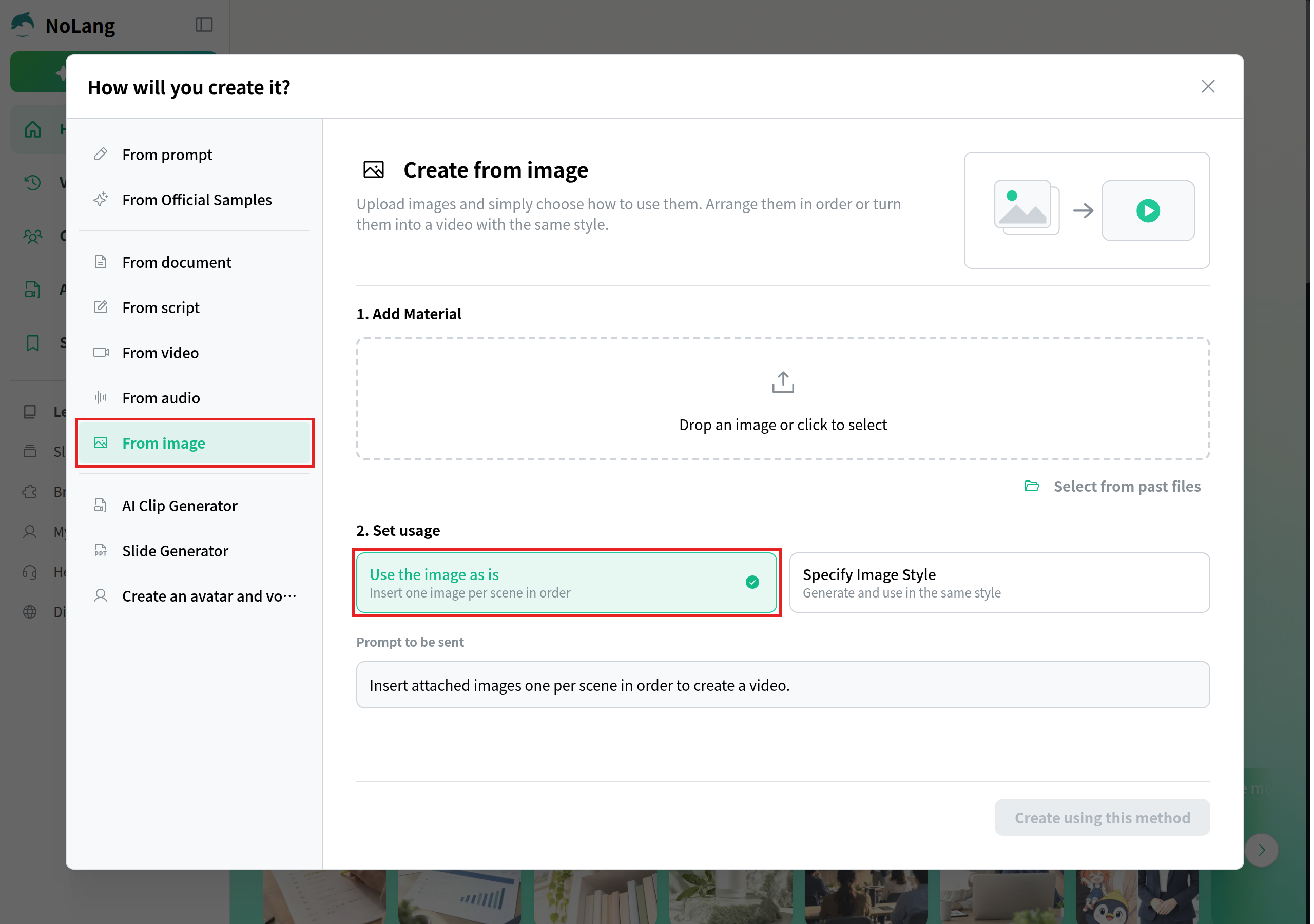
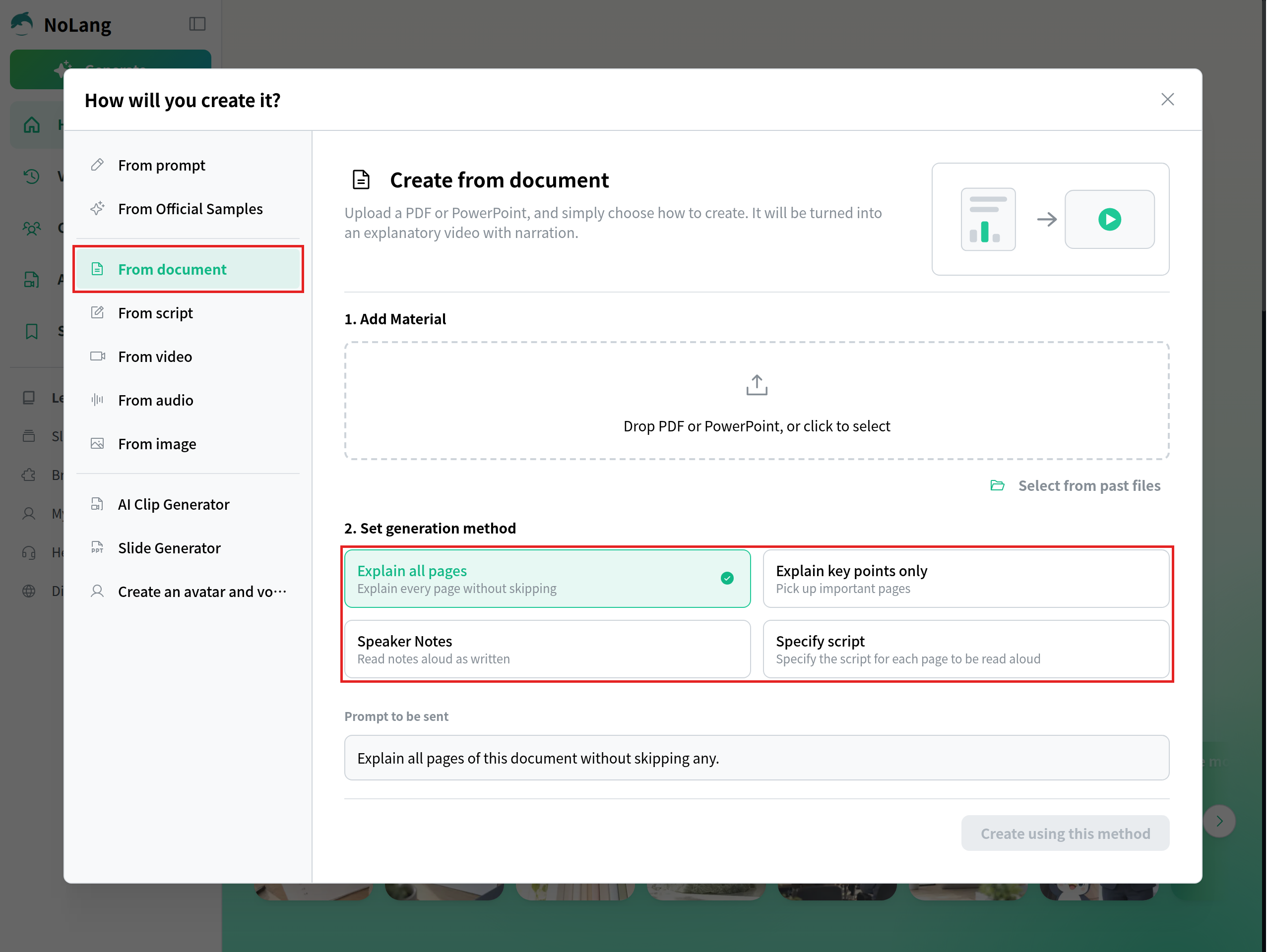
NoLang is an AI video generator from Mavericks, Inc. It builds a narrated video from material you already have: photos, a document, footage, a script or a short description. Choose Generate in the left menu, and the How will you create it? window lists the starting points.
Where to start in NoLang, by what you have
What you have
Choose
Then
Photos of your programs or an event (JPEG, PNG, HEIC and more)
From image
Use the image as is puts one image per scene, in order
A campaign one-pager, annual report or grant deck (PDF or PowerPoint)
From document
Explain key points only for a long report, Explain all pages for a one-pager, Speaker Notes if the deck’s notes are your script
Footage you shot
From video
Add narration lays AI narration over the footage; Transcribe and add subtitles turns the speech in an interview into subtitles
A finished script
From script
The script is read aloud as written
Only an idea
From prompt
Describe the video you want in a few sentences
If you are starting from phone photos, choose From image, add the photos in the order you want them shown, and keep Use the image as is selected.
If your campaign facts already live in a PDF or a PowerPoint deck, start from From document and choose how much of it to explain.
Once the video is finished, open it and choose Other to find two options that help a nonprofit reach more people with the same video. Convert language produces a version in another language, such as Spanish, and Change aspect ratio gives you a vertical 9:16 version for Reels, Shorts and TikTok.
Organizations that make videos across several teams, such as development, programs and volunteer coordination, can use NoLang to turn their own documents, photos and footage into appeals, thank-you videos and program explainers. To talk about using it across your organization, use our contact form, or download an overview below.
Q
How much does nonprofit video production cost?
⌃
Studios that publish nonprofit pricing quote from about $5,000 up to $40,000 per finished video, with 4 to 12 weeks from the first call to delivery. A video you make yourself costs mainly staff time: collecting facts and permissions, writing the script, and gathering photos or footage.
Q
What equipment do I need to film a nonprofit video?
⌃
A phone or digital camera is enough, as GoFundMe's video tips also point out. Add a way to keep the camera steady, film where the light falls on the speaker's face, and record in a quiet room so the voice is clear. If no one on staff wants to be filmed or recorded, you can build the video from photos and AI narration instead.
Q
Can I make a nonprofit video from photos alone?
⌃
Yes. In NoLang, choose From image and keep Use the image as is selected, and each photo becomes one scene in the order you add them. Check that you have signed media releases for anyone who can be identified in the photos.
Q
How do I make a Spanish version of the same video?
⌃
Open the finished video in NoLang, choose Other, then Convert language, and select Spanish. The languages you can choose depend on the voice the video uses; if the language you need is unavailable, change the voice in the editor first.
Q
Can a nonprofit add a Donate button to its YouTube videos?
⌃
Yes, through YouTube Giving, if your organization is a US 501(c)(3) public charity that is a Google for Nonprofits member and has opted into online fundraising via GuideStar. The channel that runs the fundraiser must also meet YouTube's conditions, including at least 10,000 subscribers and membership in the YouTube Partner Program.
Q
Can I use a video made with AI tools on Kickstarter?
⌃
Kickstarter's rules allow AI use as long as there is human creativity and involvement, and they require creators to be transparent about how AI is used, so say in your project how AI helped make the video.