Animated Video Production: Process, Styles and 3 Marketing Examples
Key takeaways
Animated video production runs in seven stages, from the brief and script to animation and review. Studios that publish their schedules put a typical project at four to eight weeks.
Choose the style by what the viewer has to see: motion graphics for data and interfaces, character animation for stories, 3D for physical products. The style also sets the price.
Lock the script before anyone draws and the storyboard before anyone animates. A change after approval sends every later stage back to be redone.
A studio suits a brand-defining film, custom characters and 3D. Online animation makers and AI video generators suit explainers, ads and videos you update often.
NoLang turns a written description into a narrated animated video, and the three marketing examples in this guide are templates you can reuse.
SHARE
Animated video production is the work of turning one message into a short film made of illustration, moving graphics, type, voice and music instead of camera footage. Studios run it in about seven stages, from the brief to the final files, and the ones that publish their schedules put a typical project at four to eight weeks. You can hire a studio or a freelance animator, build the video yourself in an online animation maker, or generate it with an AI video tool. Which of those fits depends mostly on the animation style the video needs.
This guide covers the main animation styles and who can make each one, the production process with what you sign off at every stage, how to choose who makes your video, and where animated videos earn their place in marketing. It ends with three animated marketing videos made with NoLang, each shown with an example prompt and a template you can reuse.
What animated video production involves
An animated video is built rather than filmed. Every frame is drawn, designed or generated, so the production is a sequence of decisions about words, pictures and timing that ends in a single video file.
Businesses use animation for the jobs a camera handles badly:
Showing what cannot be filmed: software that changes every release, data, the inside of a product, or a process that takes weeks.
Making one idea easy to follow: a viewer’s attention can be led from point to point, with nothing in the frame that the message does not need.
Skipping the shoot: no locations, actors, crew days or weather to schedule around.
Updating and translating: a changed price or a new market means editing a scene, not booking another shoot. Broadcast2World, an animation studio, notes that a narrated film needs a new voiceover and caption file for each language, while a text-led one only needs new text layers.
In marketing, an animated video usually does one of four jobs: announce a launch, explain a problem and its solution, promote an offer, or build trust in the brand. Deciding which job your video does comes before choosing a style.
Animation styles and what each is for
“Animation” covers styles that differ more in production effort than in look. The table sorts them by what they show best and by who can realistically make them.
Animation styles for business video
Style
Shows best
Typical marketing use
Who can make it
2D character animation
People, emotion, a customer’s story
Ads, brand stories, service explainers
Acted, frame-by-frame scenes: a studio. A presenter character who talks the viewer through: online makers and AI tools
Motion graphics and infographics
Data, interfaces, systems, step-by-step processes
Product and SaaS explainers, launch teasers
Custom work: a studio. Diagram-led scenes: online makers and AI tools
Kinetic typography
The words themselves: a claim, an offer, a statistic
Short social ads, promos, event teasers
Any route
Whiteboard animation
An idea drawn line by line as it is explained
Processes, training, thought leadership
Specialist studios and whiteboard software
3D animation
A physical product from any angle, its internal parts
Hardware, devices, technical demos
A studio or 3D artist, on the longest schedule
Mixed media
Photos or footage combined with animated graphics
Awareness campaigns, brand origin stories
A studio, or an online maker with your own footage
Choose the style by what the viewer has to see, then check who can make that style within your budget and deadline. A software product usually needs its interface and data shown, which points to motion graphics. An offer for a local service lives or dies on a relatable person, which points to character animation. A device with a clever mechanism inside points to 3D.
The style also sets the price and the schedule. Vidico, a video agency, publishes ranges per finished minute: about $1,500–$6,000 and three to six weeks for 2D motion graphics, $5,000–$15,000 and four to eight weeks for 2D character animation, and $6,000–$12,000 and six to twelve weeks for 3D.
The animated video production process
Whoever makes the video, the work follows the same order. The table lists what each stage produces, what you do as the client, and where the studio needs your sign-off before moving on.
Animated video production, stage by stage
Stage
What gets produced
What you do
Sign-off
1. Brief
Goal, audience, one message, where it will run, length, reference videos
Write the brief and name everyone who approves
Yes
2. Script
Narration and on-screen text, timed to the target length
Supply the facts and check every claim
Yes, before any drawing
3. Storyboard
A sketch for every few seconds, with the line and the action
Check the order and what each scene shows
Yes
4. Style frames and design
A few finished frames, characters, colors, icons
Check that it looks like your brand
Yes
5. Voiceover and music
Recorded narration, music, sound effects
Pick a voice from the auditions
Yes, for the voice
6. Animation
Movement, transitions and timing, often as a rough animatic first
Review the animatic or first cut
Review
7. Review and delivery
Revisions, captions, extra aspect ratios, final files
Send one consolidated set of changes
Final
Three numbers help you plan before you talk to anyone.
Script length: MiniMatters, a video production company, counts 120–130 words as about one minute of voiceover, and Vidico works to 150 words per minute. A 60-second video therefore has room for roughly 120 to 150 words, and most first drafts are longer than that.
Storyboard density: MiniMatters draws a separate frame for roughly every five seconds of video, so a 60-second storyboard runs to about a dozen frames.
Schedule: MiniMatters puts animated videos at four to eight weeks depending on length and style. Broadcast2World quotes about four to six weeks from brief to delivery, with rush jobs of around two weeks for short videos. Demo Duck, an explainer studio, allows about a week each for the script and the storyboard and about four weeks for style frames and animation, six to ten weeks in all.
Lock the script before anyone draws, and the storyboard before anyone animates. Every later stage is built on the one before it, so a script change after approval sends the storyboard, the voiceover and the animation back to be redone, adding time and cost. Changes at the storyboard stage are cheap; the same change during animation is not.
Maverick-kun
Read your script aloud with a timer before you send it. If it runs long now, it will run long in the video.
Who should make your animated video
There are four ways to get an animated video made. They differ in what they produce well, how long they take and what you are left holding afterwards.
Four ways to make an animated video
Route
Good fit
Time
Cost
What you keep
Animation studio
A brand-defining film, custom characters, 3D
Weeks
Per project
Final files; project files if agreed
Freelance animator
One style, a clear scope, a project you can manage
Narrated explainers and ads from a text or document, many versions
Minutes to generate, then editing
Subscription
An editable project in the tool
For a studio, Vidico puts a professional animated video at about $5,000–$25,000, with complex 3D or enterprise work at $100,000 or more, and freelance animators at $25–$150 or more an hour. Broadcast2World’s custom animated marketing videos start at $2,400 for 60 seconds. These are the suppliers’ own published prices, not survey averages. For what sits inside a quote and how video types compare, see video production costs.
A studio earns its fee on the video that defines the brand; the explainers, ads and updates around it are where tools and AI save the most. Many teams do both: one commissioned film, and a steady run of shorter videos made in-house.
What to prepare before you brief a studio
The job: launch, explain, promote or build trust, and the one action the viewer should take afterwards.
The viewer: who they are and what they believe before watching.
One message: the sentence you want them to remember.
Where it runs: the placements, and therefore the aspect ratios and lengths you need.
Reference videos: two or three you like, and what exactly you like about each.
Brand assets: logo files, colors, fonts, product screenshots.
Approvers: everyone who must sign off, named at the start.
Budget and deadline: including when the video has to be live, not just delivered.
Questions to ask before you sign
How many revision rounds are included, what counts as a revision, and what does an extra round cost? Vidico lists extra rounds at $50–$200 or more each.
Are voiceover talent, music licensed for paid ads, captions, extra aspect ratios and language versions in the quote? These are the costs most often quoted separately.
What are the milestones: script, storyboard, style frames, animatic, final?
Will you hand over the editable project files and illustrations, so the video can be updated later?
Can you show finished work in the style we need, and what it achieved?
How to make an animated video yourself
Making it yourself follows the same process with fewer people. Online animation makers such as Canva, Adobe Express, Powtoon and Animaker start you from a template or a ready-made character and let you swap in your own text, colors, images and voice, so no drawing is needed. Frame-by-frame character animation and 3D are a different matter: they are done in dedicated animation software and take real practice.
Decide the job: one viewer, one message, one action. Write them down before opening any tool.
Write the script out loud: aim for 120–150 words per minute and cut anything that does not serve the message.
Split it into scenes: one idea per scene, a few seconds each, and note what the viewer sees while each line is spoken.
Pick the style and the tool: match the style to what the viewer has to see, then choose a template, a character or an AI generator that can produce it.
Add voice and sound: record or generate the narration, then add music quietly enough that the words stay clear.
Export for each placement: a horizontal version for the website, a vertical one for Reels and Shorts, with captions for muted playback.
Animated videos for marketing
Where an animated marketing video runs decides its shape and length, and the opening seconds have to suit the place. Broadcast2World plans its client videos to these formats:
Formats by placement
Where it runs
Shape and length
Landing page, website, YouTube
16:9, 60–120 seconds
LinkedIn feed
1:1 or 16:9, 30–60 seconds
Instagram Reels, YouTube Shorts
9:16, 15–30 seconds
Paid social and pre-roll
15 seconds, plus 5-second bumpers
Launch day
A 30–45 second teaser plus the full product video
Three habits separate the animated marketing videos that work from the ones that are merely pleasant to watch:
One job per video: a launch teaser, a product explainer and an offer ad are three videos. Trying to make one video do all three blurs the message.
Start in the viewer’s world: open on their problem or their day, then bring in the product.
End on one action: the same next step as the page or ad around the video.
Planning the formats before animation starts matters as much as the story. A vertical cut requested after delivery often means rebuilding scenes, while one planned into the storyboard costs little.
Three animated marketing videos made with NoLang
The three videos below were made with NoLang for fictional brands, one for each kind of placement above: a product explainer for a landing page, a service introduction presented by a character, and a vertical ad for social feeds. Each was built in NoLang from a short brief and then turned into a template, so the same structure can be reused with your own product.
Product explainer with animated diagrams (16:9)
Where it runs: a landing page, a product page or a sales follow-up email
Style: motion graphics and infographics
Stocklark is a fictional inventory app for small shops. The video opens on the problem, a regular who finds the oat milk shelf empty on a Saturday morning, and a bar chart shows why it happens: stock runs down for days and nobody notices until the shelf is bare. After the logo, four numbered steps (Count, Learn, Calculate, Order) stay in the top corner so the viewer always knows where they are, and the reorder point is built one line at a time: 12 cartons a day for a 3-day delivery, plus a 12-carton buffer, makes 48. It closes on a second chart that answers the first one and the line “Know before you run out.”
Animated Product Explainer with Diagrams
Make a 16:9 animated product explainer with English narration and subtitles. Use moving charts and icons to show how Stocklark, an inventory app for small shops, keeps shelves from running out.
To reuse the structure, keep its three parts, a chart of the problem, numbered steps and a chart of the result, and replace the figures with your own. A diagram-led explainer is only as convincing as its numbers.
Service introduction with a character guide (16:9)
Where it runs: a landing page, an app store listing or an onboarding email
Style: 2D illustration with a character who narrates
Snugpaw is a fictional app for booking pet sitters, and the video is presented by Biscuit, an illustrated puppy who talks to the viewer. It opens on the owner packing for a trip and working late, then Biscuit introduces the app and walks through three steps, creating a pet profile, picking the care you need and choosing a sitter, with the phone screen and labels changing on each line of narration. Short animated scenes show the walk in the park and the homecoming, and the video ends on a three-step recap and the call to action “Book your first visit.”
Service Intro with a Character Guide
Make a 16:9 animated service introduction with English narration and subtitles. An illustrated puppy guides first-time users through Snugpaw, an app for booking pet sitters.
A character guide works best when it speaks from the customer’s side of the story, here the pet that needs looking after, and steps aside for the product screens at the moments the viewer needs to see them. For more on explaining a service on video, see how to make a service explainer video.
Vertical product ad for social feeds (9:16)
Where it runs: Instagram Reels, YouTube Shorts, TikTok and paid social
Style: AI-generated product images and short clips with bold captions
FLOE is a fictional brand of laundry detergent sheets. The ad shows what the product does instead of describing it: a sheet dropped into water disappears, a close-up of fabric shows grass, coffee and grime lifting out, and a clean white T-shirt follows. Short captions in large type, such as “1 FULL LOAD = 1 SHEET” and “MELTS IN SECONDS”, carry the message for viewers who watch with the sound off, and it closes on “Drop. Melt. Done.”
Vertical Animated Product Ad
Make a 9:16 animated product ad for social feeds with English narration and subtitles. Show FLOE laundry detergent sheets melting in water and lifting stains out of fabric.
In a feed, the first seconds decide whether anyone watches the rest, which is why this ad opens with the sheet already touching the water. For the other kinds of video a product needs, see how to make a product video.
How to make an animated video with NoLang
NoLang, an AI video generation service from Mavericks, Inc., turns a description of the video you want into a narrated animated video. It writes the script and narration, builds each scene from illustrations, text, icons and movement, and adds captions. Everything it generates stays editable afterwards.
Start from a template
The three examples above are templates. Using one keeps the structure and the look of the example and replaces the subject with yours.
Open the template
Click Create a Video with This Template under an example. NoLang opens with the example attached to the input box as a Reference Video.
Describe your product and message
Write what you are promoting, who it is for and the one thing the viewer should remember.
Choose the format and generate
Check the orientation (Desktop for 16:9, Mobile for 9:16) and the length, then click the arrow button at the bottom right of the input box to generate.
Generate from text and choose a character
You can also start from a description alone. To have a character host the video, choose one before generating.
Describe the video
On the home screen, write who the video is for and what it should explain or promote.
Open the character list
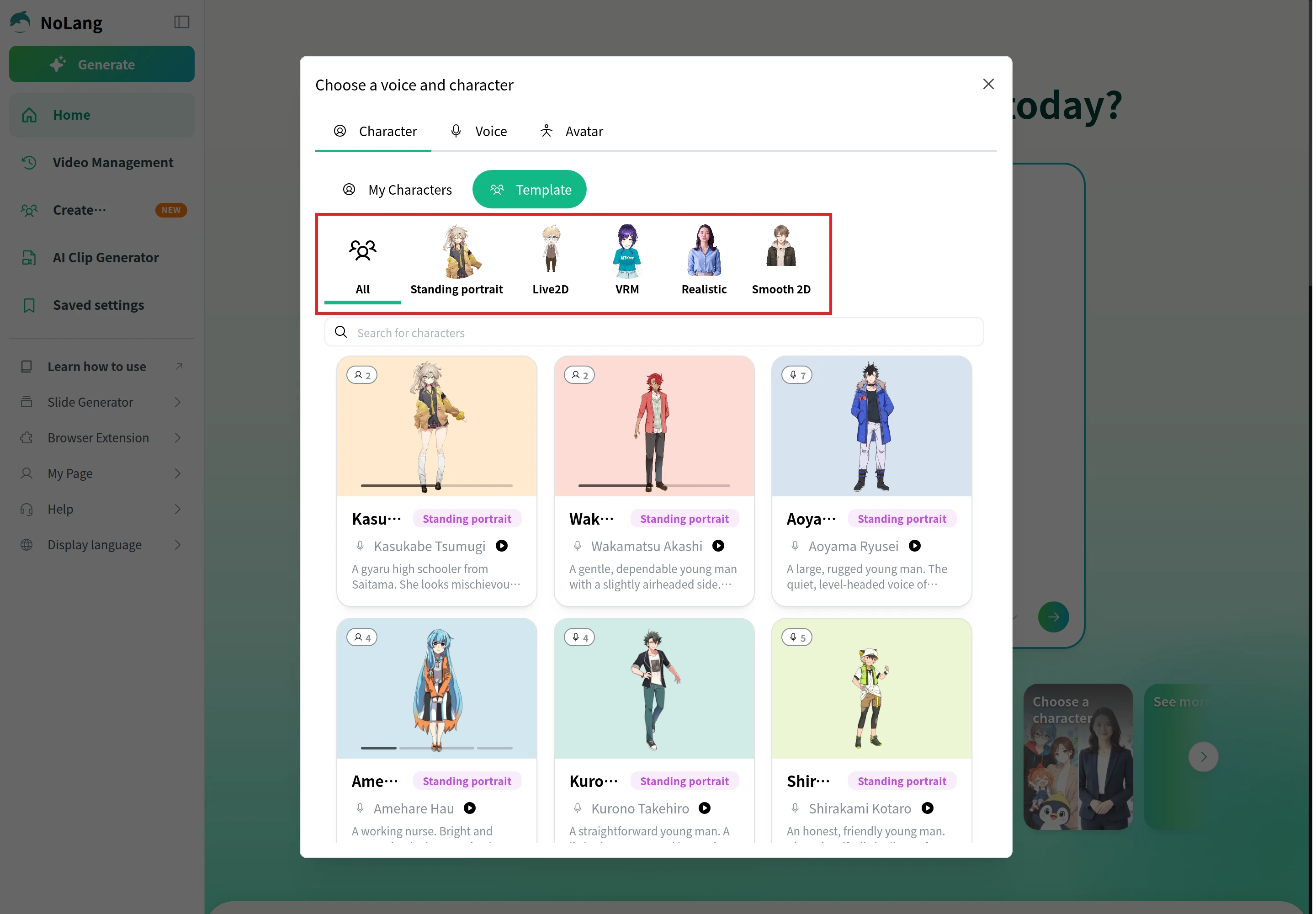
Click + at the bottom left of the input box, choose Choose a voice and character, and open the Character tab. Under Template, filter by Standing portrait, Live2D, VRM, Realistic or Smooth 2D, and pick the character who will present.
Set the format and generate
Choose the orientation and length, then generate. The AI Clip Generator item in the same + menu sets how much AI-generated footage goes into the video: None, Standard or Max.
For more on videos presented by a character or avatar, see AI avatar video.
Fix the pictures and the movement in the editor
Open the video’s editor to change any scene after it is generated.
Select an illustration
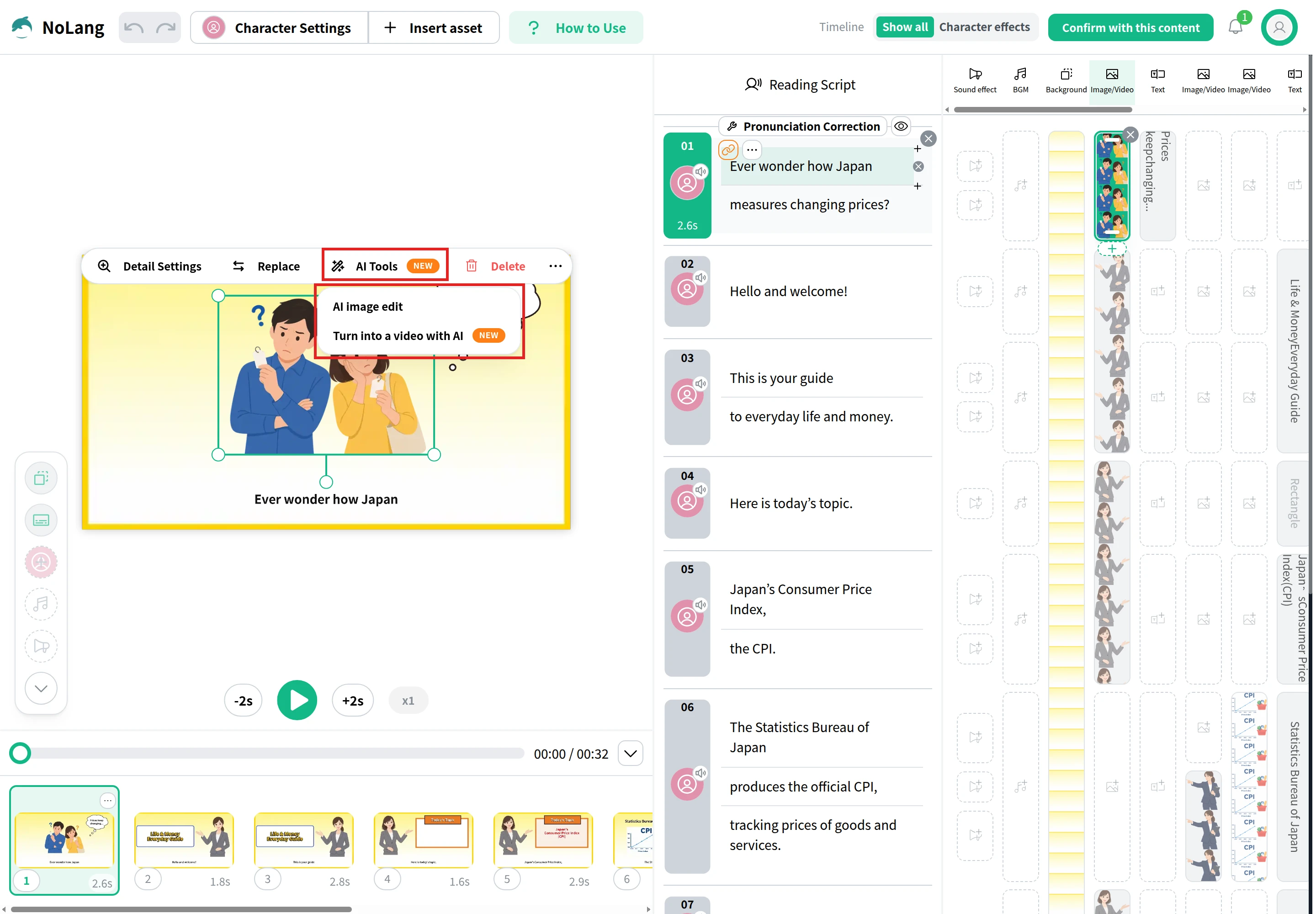
Click the illustration you want to change. A toolbar appears above it with Detail Settings, Replace and AI Tools.
Edit or animate it with AI
Open AI Tools. AI image edit changes the picture from a written instruction, and Turn into a video with AI makes a short moving clip from the illustration based on the movement you describe.
Adjust characters and text
Switch the Timeline at the top right to Character effects to change a character’s Expression and Motion scene by scene. To change how a selected element moves, open Detail Settings and use the Animation section, which sets its Start Animation, Main Animation and End Animation.
Regenerate
Click Confirm with this content, then Confirm and Regenerate to produce the updated video.
If your marketing team needs a steady run of animated explainers, product ads and onboarding videos, NoLang can produce them in-house from the scripts, product pages and decks you already have, in the formats each channel needs. To talk through how it would work for your company, contact us, or download the overview below.
Studio prices depend mostly on the style and the length. Vidico puts a professional animated video at about $5,000–$25,000, with complex 3D at $100,000+, and publishes per-minute ranges of about $1,500–$6,000 for 2D motion graphics and $5,000–$15,000 for 2D character animation. Broadcast2World's custom animated marketing videos start at $2,400 for 60 seconds. Freelance animators charge about $25–$150+ an hour. Online animation makers and AI video generators are paid by subscription instead of per video.
Q
How long does it take to make an animated video?
⌃
Studios that publish their schedules put a typical animated video at four to eight weeks (MiniMatters) or four to six weeks from brief to delivery (Broadcast2World), with 3D taking longer. Most of that time is writing, approvals and revisions rather than the animation itself. With an AI video generator, the first version is generated in minutes and the remaining time goes into checking and editing it.
Q
How long should an animated marketing video be?
⌃
It depends on where it runs. Broadcast2World plans landing-page and website videos at 60–120 seconds in 16:9, LinkedIn videos at 30–60 seconds, and Instagram Reels and YouTube Shorts at 15–30 seconds in 9:16. For narration, plan on roughly 120–150 words per minute.
Q
What is the difference between 2D and 3D animation?
⌃
2D animation is drawn or designed on a flat plane: characters, icons, charts and text. It is quicker to produce and to update. 3D animation builds objects as models that can be turned and lit from any angle, which suits showing a physical product or its internal parts, and it takes the longest to make.
Q
Do I need to know how to draw to make an animated video?
⌃
Not for template-based or AI-generated videos, where the illustrations and characters are provided or generated for you. Drawing skill matters for frame-by-frame 2D animation, where an animator draws every movement.
Q
Can I use animated videos made with NoLang in ads and on my website?
⌃
Yes. NoLang's terms allow you to reuse generated content freely, including for commercial purposes, so a generated video can go on a landing page, into paid social or on YouTube. You are responsible for confirming that what you publish does not infringe anyone else's rights, and NoLang may ask you to stop or suspend a particular reuse, in which case you are expected to comply promptly.