How to Use Video for Social Media: A One-Week Plan and Steps
Key takeaways
To use video on social media, give each post one job, pick the platform and shape that suit it, plan the week before you film, make each video for where it plays, then adjust from the analytics.
As of November 2026, a vertical video of three minutes or less fits Instagram Reels, TikTok, YouTube Shorts and Facebook at once; YouTube's regular videos are built around horizontal 16:9.
A one-week plan for a café mixes discovery shorts, follower posts and a YouTube how-to; two of its videos, a vertical short and a horizontal how-to, were made with NoLang as templates.
Social media video production runs from planning and filming to editing, versioning and measuring; hire a production company for shoot-heavy campaigns and keep fast weekly posts in-house.
Since September 2025 every Facebook video is a reel: upload it from your profile's Reels tab or as a post on your Page, where Video Options adds captions on a computer.
SHARE
Video on social media works when each post has one job. A short vertical clip that introduces a new menu item to people who have never heard of you is a different video from a two-minute how-to that customers find on YouTube, and both differ from the captioned update your Facebook followers may watch with the sound off.
So the answer to how to use video for social media is a short routine: decide the job, pick the platform and shape that fit it, plan a week of posts, make each video for the place it will play, then read the numbers and adjust the next week.
This guide walks through those five steps, the current format limits from each platform’s own help pages, a one-week plan for a fictional café with two of its videos actually made, how social media video production splits between your team and a production company, and how to post a video on Facebook now that every Facebook video is a reel.
How to use video on social media in five steps
1. Give each video one job
Before you think about cameras or apps, write the job of the video in one sentence. Most social videos do one of four things:
Get found by people who don’t follow you yet.
Bring followers back for a visit, a purchase or a sign-up.
Answer a question customers keep asking.
Show the people and the process behind the business.
“Get people within walking distance to try the new latte this week” is a job. “Post more video” is not. The job decides everything after it: the platform, the shape, the length and the one thing you ask viewers to do at the end.
2. Match the platform and the shape to the job
Discovery happens in the full-screen vertical feeds: Instagram Reels, TikTok’s For You feed, YouTube Shorts and Facebook reels, where each platform recommends videos to people who don’t follow you yet. How-tos that people search for belong on YouTube, where the standard shape for regular videos is horizontal 16:9. Updates for people who already follow you go to your Facebook Page, and business-to-business audiences sit on LinkedIn.
Meta’s guidance for creators sums up the length side: shorter reels of 10 to 30 seconds drive reach, while longer reels of 30 seconds to three minutes and beyond drive engagement and help build community (Meta for Creators). The table in the next section lists the shape and length each platform accepts.
3. Plan the week before you film
A plan turns one-off posts into a routine you can keep. List five to seven posts for the coming week, and give each one a day, a platform, a job and a shape. Plan reuse up front: one script or one morning of filming can feed a vertical short, a Facebook post and a longer YouTube video. The café plan later in this guide shows what a week can look like.
4. Make each video for the place it will play
Say what the video is about at the very start. Meta’s advice for Facebook is to create entertaining content “that has a clear hook”, and YouTube’s Shorts creation tools include a Get feedback button that analyzes a video’s hook and pacing.
Put the words on screen. Captions carry the message for people watching without sound. On a Facebook Page, people who watch with the sound off automatically see the captions you add.
Keep key text away from the edges. LinkedIn’s help asks you to keep the top, bottom and sides of a video free of key text and logos so the app’s interface doesn’t cover them.
Make the shape natively. YouTube recommends against adding black bars or padding to a video, and Meta advises against reels that are low resolution, carry another app’s watermark or have a border.
Ask for one thing. End with a single call to action that matches the job: visit this week, book a seat, watch the full how-to.
5. Post natively, then read the numbers
Upload the file through each platform’s own upload flow, write the post caption there, and give each post a week. Then open each platform’s analytics and look at how many people watched, how long they kept watching and what they did next. Keep what held attention, rewrite the opening of what didn’t, and carry the changes into next week’s plan.
Which video format fits each platform
The values below come from each platform’s help pages, checked on November 10, 2026. Platforms change these limits, so check the linked page before a big launch.
The overlap is what makes a weekly routine possible. A vertical video of three minutes or less fits Instagram Reels, TikTok, YouTube Shorts and Facebook at once. Instagram accepts reels up to 20 minutes but says reels over three minutes won’t be recommended to new audiences, and YouTube counts square and vertical uploads of up to three minutes as Shorts. Facebook accepts any shape, and its own tips for reels recommend vertical video.
Horizontal video still has a place. YouTube’s player is built around 16:9 on a computer, so a how-to meant to be found in YouTube search works best as its own horizontal version rather than a vertical clip with black bars around it.
A one-week social media video plan for a café
Juniper Street Coffee is a fictional neighborhood café. Here is a week that uses five videos for four different jobs and leaves Saturday free to film the next week’s clips.
One week of social media video for a café
Day
Video
Where
Shape
Job
Mon
New maple oat latte
Reels, TikTok, Shorts
9:16, under 30 s
Get found
Tue
Monday’s video again
Facebook Page
Same file
Bring followers in
Wed
Opening prep behind the bar
Reels, TikTok
9:16, under 30 s
Show the people
Thu
“Which milk is best in a latte?”
Reels, Shorts, Facebook
9:16, under 1 min
Answer a question
Fri
Saturday latte-art class
Facebook Page, Reels
9:16, under 30 s
Fill seats
Sat
No new post: reply to comments, film next week
—
—
—
Sun
Cold brew at home, step by step
YouTube
16:9, 1–3 min
Be found in search
Two rows of the plan were made with NoLang, so you can see how the same café looks in two shapes. Each one is published as a template: open it, swap in your own business, product and details, and generate your version.
Monday: one vertical short for Reels, TikTok and Shorts
The Monday video runs 26 seconds and is built for a full-screen feed and for viewers who keep the sound off. It opens on maple syrup falling onto latte foam with the question “Your fall coffee order?”, names the drink and the café within the first five seconds, and stacks the four ingredients on screen one by one. Every spoken line also appears as a caption, and the only ask is to come in while the drink is available for a limited time, before a closing card that says “Come taste fall.”
Because it is vertical and under three minutes, the same file can go to Reels, TikTok, Shorts and, on Tuesday, the café’s Facebook Page.
Café New Drink Vertical Short
A vertical short for Reels, TikTok and Shorts announcing the new Maple Oat Latte at our café, Juniper Street Coffee.
Show the four ingredients, say it comes hot or iced, and end with “available for a limited time.”
The Sunday video is a horizontal how-to of 2 minutes 22 seconds, the kind of video people look for on YouTube rather than stumble on in a feed. Maya, the café’s head barista, introduces herself, previews the five steps (grind, ratio, stir, steep and strain) and promises a barista trick at the end, which gives viewers a reason to stay. Each step gets its own title card with the numbers on screen, such as a 1:5 coffee-to-water ratio by weight and 12 to 18 hours of steeping, so someone following along can pause and check.
The wide frame leaves room for the step label on one side and the action on the other.
Café Cold Brew How-To
A horizontal YouTube how-to in which Maya, head barista at our café Juniper Street Coffee, teaches cold brew at home in five steps.
Show the ratio and steeping time on screen, and save one barista trick for the end.
NoLang generates a finished video, with narration, on-screen text and visuals, from a prompt or from material such as slides and documents. For a social media week, the useful part is that the shape is a setting rather than a new project.
Describe the video. In the prompt box on the home screen, write what the video is about, who it is for and where it will be posted.
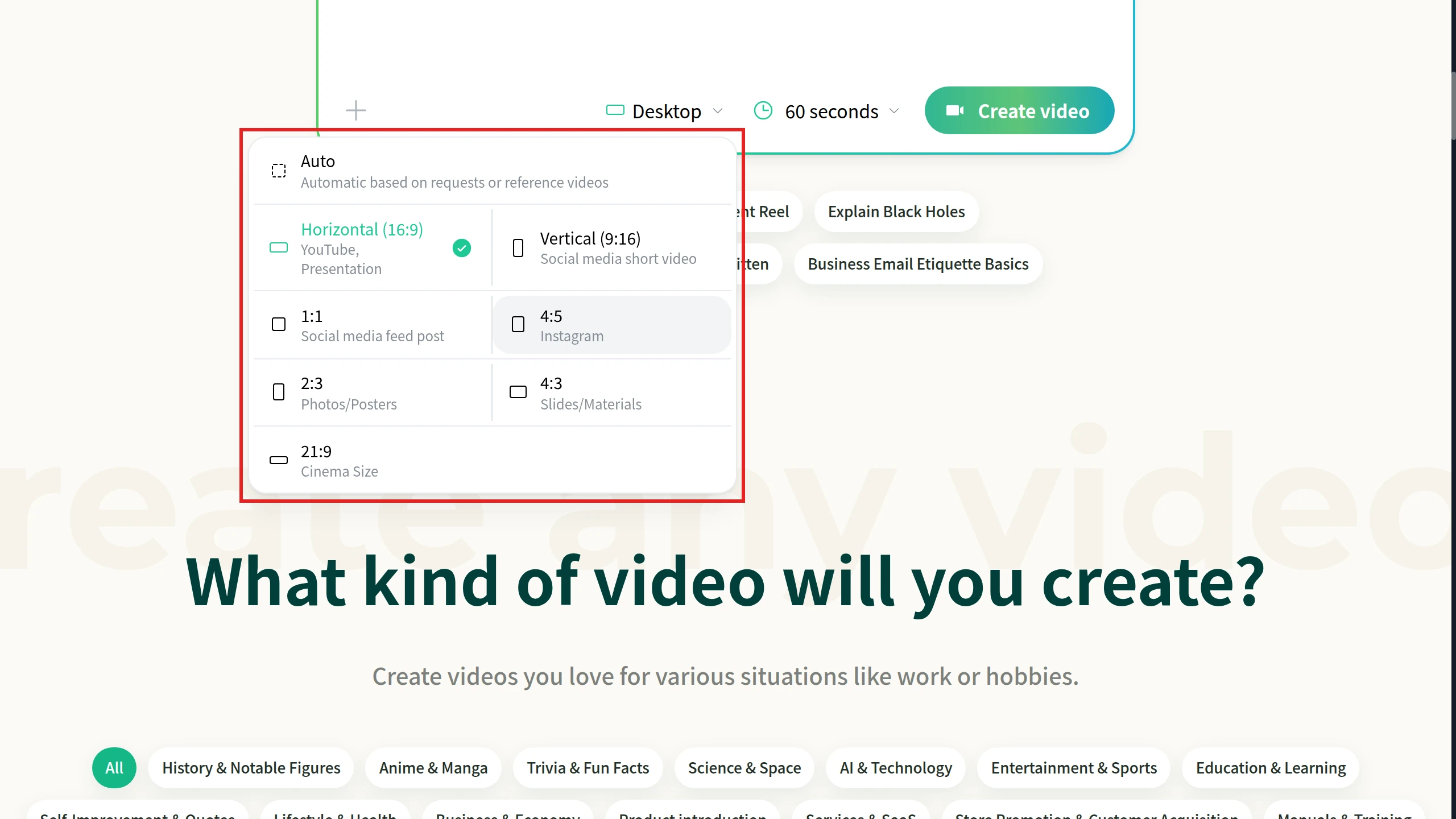
Choose the shape. Under the prompt box, open the shape menu next to the video length and pick Vertical (9:16) for social media shorts, 1:1 for feed posts, 4:5 for Instagram or Horizontal (16:9) for YouTube. Auto lets NoLang decide from your request. Then click Create video.
Check the result and edit it. Play the finished video through, and use Edit to fix any line or scene before you post.
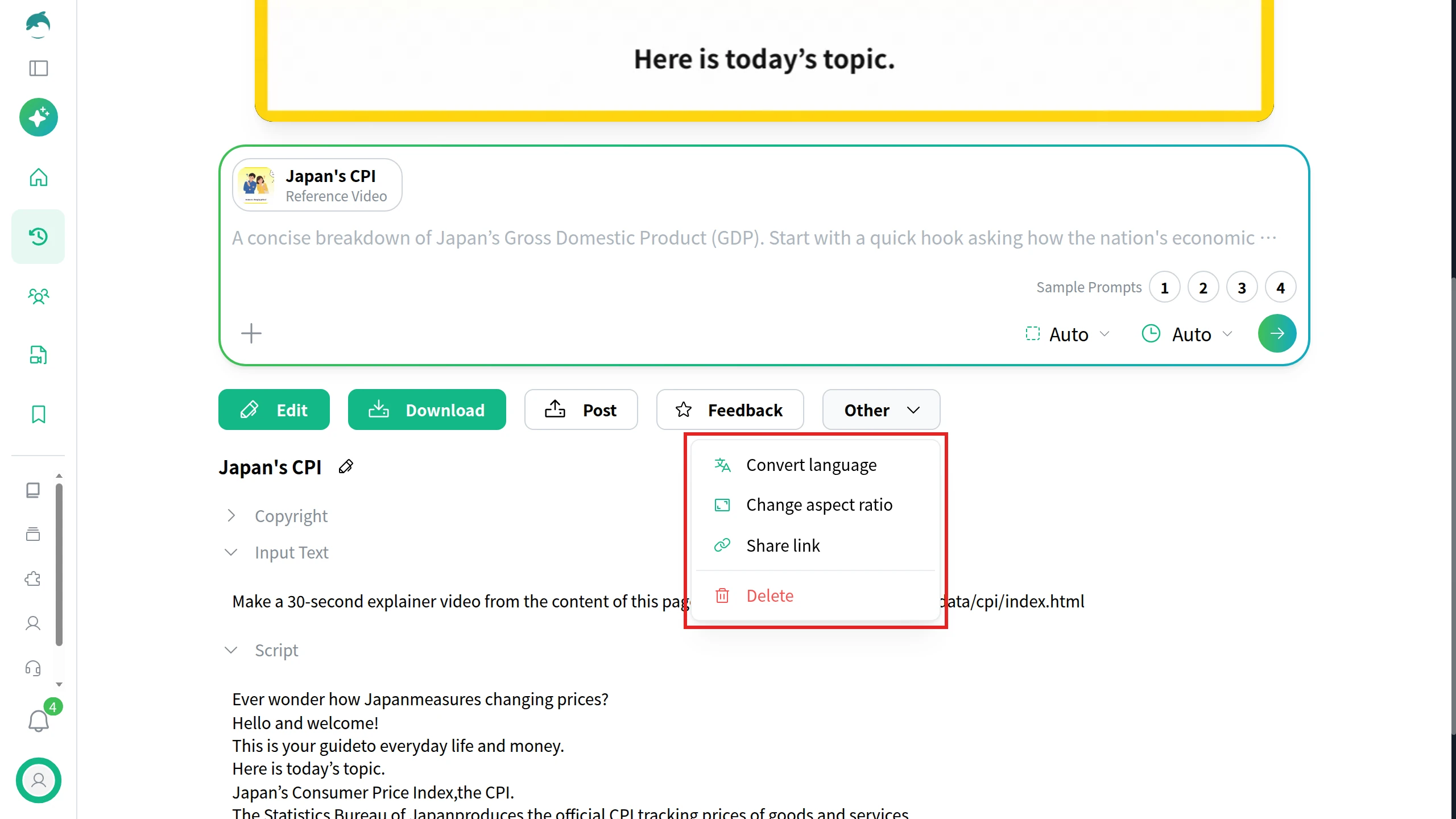
Make another shape for another platform. On the video’s page, open Other, choose Change aspect ratio, select the target ratio and click Convert. NoLang makes a new video in that ratio and leaves the original as it was.
Download and post. Click Download and upload the file through each platform’s own upload flow, as described for Facebook below.
Social media video production: in-house or with a production company
Social media video production is the same set of stages whether your team does it or you hire a studio. What changes is who does each stage, and how fast you can repeat it every week.
The stages of social media video production
Stage
What happens
In-house
Production company
Plan and script
Job, platforms, script, shot list
Fast for weekly posts
Strong for campaigns
Film or gather
Shoot, photos, screen captures
Phone, existing assets
Crew, locations, talent
Edit and caption
Cut, music, on-screen text
Templates and tools
Higher polish
Version
One cut per shape and length
Re-export or convert
Agreed in the brief
Post and measure
Upload, caption, analytics
Your team
Often not included
When a production company is worth it
Hire a production company when the video depends on filming you can’t do yourself: a crew, locations, actors, lighting or a product shoot that has to look the same across a whole campaign. Keep the weekly work in-house when speed matters more than polish, such as a new menu item, an event this Saturday or an answer to a question customers asked yesterday.
Budget is the other half of the decision. Our video production cost guide puts social media short-form projects at $500 to $10,000, based on three published rate guides, with volume and whether each cut is shot or assembled from existing material moving the price most.
What to put in a brief for corporate social media video
A production company can only deliver the cuts you ask for. A short brief avoids paying twice for versions nobody ordered:
The job and the audience of each video.
The deliverables per platform, for example one 9:16 cut under three minutes for Reels, TikTok and Shorts plus one 16:9 version for YouTube.
Captions, either burned into the picture or delivered as .srt files you can upload.
Brand assets and approvals: logo, colors, product shots and who signs off.
Usage rights for music, footage and on-camera talent, including where and for how long you can post them.
Review rounds and dates, and how results will be measured once the videos are live.
How to create a video on Facebook
Since September 2025, Facebook shares every video you post as a reel, whatever its length or shape; only Stories and Live work differently. So creating a video on Facebook means making the video file first, then uploading it as a reel from your profile or as a post on your Page.
On a computer, from your profile
Click your profile picture in the top right of Facebook, then click your name.
Click Reels, then click Create reel.
Click Add video, select the video on your computer and click Next.
Trim the video if needed, click Next, add a description and hashtags, and choose the audience.
Click Publish.
Effects, music and multi-clip editing are only in the Facebook app for iPhone and Android (Create a reel on Facebook).
On a computer, for your Facebook Page
Click your profile photo in the top right, click See all profiles and select your Page.
Click What’s on your mind? at the top of your Feed.
Click Add video and select the video.
Optionally click Video Options to add a title, tags, a thumbnail or captions, either auto-generated or uploaded as an .srt file.
From your Feed, tap + in the top right and select Reel. Choose an existing video or record a new one, add audio, text or effects, and tap Next. Write a description, choose the audience and tap Share now. Reels from business or creator Pages can only be posted publicly (Create a Facebook Reel).
Social media video for your company
If your company posts to several accounts every week, NoLang lets the marketing team produce those videos in-house from a short brief, slides or a PDF, in vertical and horizontal versions, without booking a shoot for each post. For details on using NoLang across a team, download the materials below or talk to our team.
Long enough for its job, and within the platform's limit. For discovery, keep it to three minutes or less: YouTube counts square and vertical uploads of up to three minutes as Shorts, and Instagram says reels over three minutes won't be recommended to new audiences. Meta's creator guidance adds that reels of 10 to 30 seconds drive reach, while reels of 30 seconds to three minutes and longer drive engagement.
Q
What aspect ratio should I use for social media video?
⌃
Use vertical 9:16 for Instagram Reels, TikTok, YouTube Shorts and Facebook reels, and horizontal 16:9 for regular YouTube videos. LinkedIn accepts 1:2.4 to 2.4:1 and X accepts 1:2.39 to 2.39:1, so a vertical or square video also works there.
Q
Can I post the same video on every platform?
⌃
Yes, if the file is within each platform's limits. A vertical video of three minutes or less fits Reels, TikTok, Shorts and Facebook. Change the post caption, hashtags and call to action for each platform, and make a separate horizontal version for a YouTube how-to rather than adding black bars.
Q
Is there a length limit for Facebook videos?
⌃
No. Meta's help says reels have no minimum or maximum length and can be any orientation, and since September 2025 every video posted to Facebook, except Stories and Live, is shared as a reel.
Q
How do I add captions to a Facebook video?
⌃
On a computer, when you post a video to your Facebook Page, click Video Options and add auto-generated captions or upload an .srt file. Meta says people who watch your Page's video with the sound off automatically see those captions. You can also burn captions into the video itself before uploading.
Q
Can NoLang make vertical videos for social media?
⌃
Yes. Choose Vertical (9:16) in the aspect ratio menu before generating, or open a finished video, choose Other, then Change aspect ratio to make a new version in 9:16, 1:1, 4:5 or 16:9 while keeping the original.