
[Advanced] How to edit a Live2D avatar file so it shows emotions and motions that match the dialogue
Last updated
The English examples and diagrams are translated and adapted from the Japanese examples.
Live2D avatar specification v2.0
0-1. How expressions are matched to the dialogue
NoLang provides emotion and gesture tags.
Some Live2D models come with expressions and motions already configured. For such Live2D models, once you map each Expression and Motion to NoLang’s emotion and gesture tags, the corresponding Expression or Motion is called whenever NoLang infers an emotion or gesture from the lines.
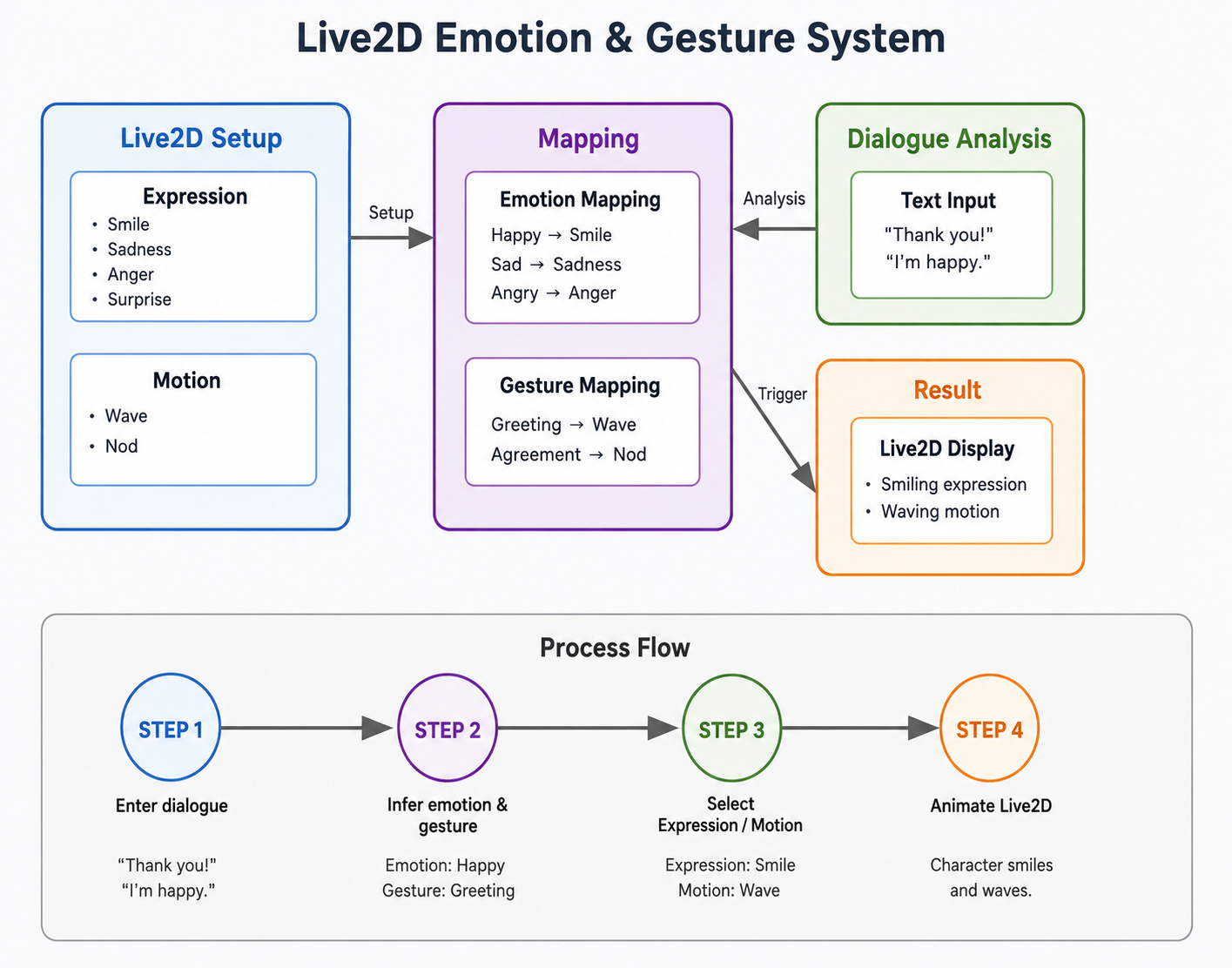
List of emotion tags
| Tag | Japanese example |
|---|---|
| happy | Happy / cheerful |
| amused | Laughter |
| proud | Smug |
| sad | Sadness |
| disappointed | Disappointed |
| angry | Anger |
| annoyed | Annoyed |
| fear | Fear / pale |
| surprise | Surprise |
| disgust | Displeased |
| gentle | Gentle / calm |
| excited | Excited |
| thinking | Thinking |
| embarrassed | Bashful |
| confused | Confused / puzzled |
| tired | Sleepy / tired |
| serious | Serious |
| love | Heart eyes |
| sweating | Sweat / nervous |
List of gesture tags
| Tag | Example uses |
|---|---|
| point | Pointing |
| nod | Nod |
| shake_head | Head shake (no) |
| bow | Bow |
| wave | Hand wave / bye-bye |
| clap | Applause |
| thumbs_up | Thumbs up |
| thumbs_down | Thumbs down |
| fist_pump | Fist pump |
| facepalm | Covering the face |
| head_tilt | Head tilt |
| jump | Jump |
| spin | Spin |
| shrug | Shrug |
| emphasize | Emphasis (double lines, lightbulb, etc.) |
0-2. Preparation
In the folder that contains the Live2D files, find and open the file with the .model3.json extension.
For example, the contents look like this
{ "Version": 3, "FileReferences": { "Moc": "hoge_0001.moc3", "Textures": [ "hoge_0001.4096/texture_00.png" ], "Physics": "hoge_0001.physics3.json", "DisplayInfo": "hoge_0001.cdi3.json", "Expressions": [ { "Name": "expression1", "File": "animation/costume_v0001.exp3.json" } ], "Motions": { "Idle": [ { "File": "motions/default1.motion3.json", "FadeInTime": 0.5, "FadeOutTime": 0.5 }, { "File": "motions/default5.motion3.json", "FadeInTime": 0.5, "FadeOutTime": 0.5 }, { "Type": "SL", "File": "motions/default3.motion3.json", "FadeInTime": 0.5, "FadeOutTime": 0.5 } ] } }, "Groups": [ { "Target": "Parameter", "Name": "LipSync", "Ids": ["ParamMouthOpenY"] } ]}1. Configuring Expressions (expressions, accessories, effects and so on)
1-1. Expressions that are always applied
Expressions (facial expressions, accessories, effects and so on) written in files with the .exp3.json extension can be applied continuously throughout video playback.
Create "FileReferences" → "Expressions" if it does not already exist, and set the Expression’s "Name" to "NOLANG_P_<custom_name>" there as shown below.
"Expressions": [ { "Name": "NOLANG_P_<custom_name>", "File": "<PATH to .exp3.json>" }]NoLang applies a single Expression whose "Name" starts with "NOLANG_P" from start to finish while the video plays.
1-2. Expressions applied according to the dialogue
You can also set which Expression is applied depending on the content of the lines.
As shown below, for each Expression write one of the tags listed under “Emotion tag list” in “0-1. How it works” into "Name", in the format "NOLANG_E_<emotion>_<custom_name>".
"Expressions": [ { "Name": "NOLANG_E_happy_<custom_name>", "File": "<PATH to .exp3.json>" }, { "Name": "NOLANG_E_amused_<custom_name>", "File": "<PATH to .exp3.json>" }]You can also link several Expressions to a single emotion. In that case, NoLang picks an appropriate Expression each time.
2. Configuring Motions
2-1. The Motion applied as the base
Motions written in files with the .motion3.json extension can be applied during video playback.
Create "FileReferences" → "Motions" → "Idle" if it does not already exist, and set each Motion’s "Type" there to one of "S", "L", or "SL" as shown below.
"Motions": { "Idle": [ { "Type": "S", "File": "<PATH to .motion3.json>", "FadeInTime": 0.5, "FadeOutTime": 0.5 }, { "Type": "L", "File": "<Another PATH to .motion3.json>", "FadeInTime": 0.5, "FadeOutTime": 0.5 }, { "Type": "SL", "File": "<Another PATH to .motion3.json>", "FadeInTime": 0.5, "FadeOutTime": 0.5 } ]}NoLang sorts motions into three types and handles them accordingly.
"Type": "S"→ a Motion applied only while speaking"Type": "L"→ a Motion applied only while listening"Type": "SL"→ a Motion applied both while speaking and while listening
For each of "S" and "L", if several Motions are included, an appropriate one is called. If no Motion is included at all, a motion is assigned separately by an algorithm.
2-2. Motions applied according to the “emotion” that matches the dialogue
In the same way, you can set the Motion that is applied according to the “emotion” matching the line.
As shown below, for each Motion write one of the tags listed under “Emotion tag list” in “0-1. How it works” into "Type".
"Motions": { "Emotion": [ { "Type": "happy", "File": "<PATH to .motion3.json>", "FadeInTime": 0.5, "FadeOutTime": 0.5 }, { "Type": "amused", "File": "<Another PATH to .motion3.json>", "FadeInTime": 0.5, "FadeOutTime": 0.5 } ]}2-3. Motions applied according to the “gesture” that matches the dialogue
In the same way, you can set the Motion that is applied according to the “gesture” matching the line.
As shown below, for each Motion write one of the tags listed under “Gesture tag list” in “0-1. How it works” into "Type".
"Motions": { "Gesture": [ { "Type": "point", "File": "<PATH to .motion3.json>", "FadeInTime": 0.5, "FadeOutTime": 0.5 }, { "Type": "nod", "File": "<Another PATH to .motion3.json>", "FadeInTime": 0.5, "FadeOutTime": 0.5 } ]}3. Uploading to NoLang
Once you have finished editing and saving, bundle the file together with its related files into a zip file and upload it to NoLang.
In the end, the contents of the .model3.json file look something like this.
Example of a completed .model3.json
{ "Version": 3, "FileReferences": { "Moc": "hoge_0001.moc3", "Textures": [ "hoge_0001.4096/texture_00.png" ], "Physics": "hoge_0001.physics3.json", "DisplayInfo": "hoge_0001.cdi3.json", "Expressions": [ { "Name": "NOLANG_P_1", "File": "animation/costume_v0001.exp3.json" }, { "Name": "NOLANG_E_happy_1", "File": "expressions/smile.exp3.json" }, { "Name": "NOLANG_E_amused_1", "File": "expressions/laugh.exp3.json" } ], "Motions": { "Idle": [ { "Type": "S", "File": "motions/default1.motion3.json", "FadeInTime": 0.5, "FadeOutTime": 0.5 }, { "Type": "L", "File": "motions/default5.motion3.json", "FadeInTime": 0.5, "FadeOutTime": 0.5 }, { "Type": "SL", "File": "motions/default3.motion3.json", "FadeInTime": 0.5, "FadeOutTime": 0.5 } ], "Emotion": [ { "Type": "happy", "File": "motions/Happy_Pose.motion3.json", "FadeInTime": 0.5, "FadeOutTime": 0.5 }, { "Type": "amused", "File": "motions/amused_Pose.motion3.json", "FadeInTime": 0.5, "FadeOutTime": 0.5 } ], "Gesture": [ { "Type": "point", "File": "motions/Point_Hand.motion3.json", "FadeInTime": 0.5, "FadeOutTime": 0.5 }, { "Type": "nod", "File": "motions/Nod_Head.motion3.json", "FadeInTime": 0.5, "FadeOutTime": 0.5 } ] } }, "Groups": [ { "Target": "Parameter", "Name": "LipSync", "Ids": ["ParamMouthOpenY"] } ]}