Motion Graphics Video Production: Process, Tools and 3 Examples
Key takeaways
Motion graphics video production turns words, icons, charts, screens and logos into a video that moves to a voiceover or music, in eight steps from the brief to delivery.
Motion graphics are a kind of animation built from graphic design. Use them when the viewer has to understand a feature, a number or a process.
Approve the look on a few style frames and the timing on the animatic. Studios that publish their schedules put a custom video at four to eight weeks.
After Effects controls every frame with keyframes. AI video generators such as NoLang build the scenes, narration and movement from a script, adjusted with preset animations.
Studios publish motion graphics prices from about $1,000 to $10,000 per finished minute. The three examples in this guide, a feature launch, a data report and a social ad, are templates you can reuse.
SHARE
Motion graphics video production is the work of making a video out of moving graphic design: words, shapes, icons, charts, app screens and logos, animated to a voiceover or music. There is no camera footage and usually no acting character. Businesses use motion graphics to explain products, report numbers and run short ads, and the videos are made by motion designers in software such as Adobe After Effects, in browser tools built on templates, or by AI video generators that build the scenes from a script.
This guide explains how motion graphics differ from other animation, the stages a production goes through from brief to delivery, how to storyboard one, which software does what, and whether to hire a studio or make the video yourself. It ends with three motion graphics videos made with NoLang, each shown with an example prompt and a template you can reuse.
What motion graphics are
Adobe describes motion graphics as “graphics with movement”: text and design elements set in motion, usually in short pieces that inform or entertain rather than a full animated story. A motion graphics video is built from a small set of moving parts:
Kinetic typography: words that slide, scale and appear as they are spoken.
Shapes, lines and icons: simple marks that point, connect, build up and transform.
Charts and numbers: bars that grow, lines that draw themselves, counters that climb.
Interface screens: app or website screens with highlights and labels on the parts that matter.
Logos: a logo that assembles itself at the start or end of a video.
Camera moves: pans and zooms across a designed layout, as if a camera were moving over it.
Motion graphics are a kind of animation. In Adobe’s words, animation is a broad field that “often focuses on characters and storytelling,” while motion graphics use “text, graphics, logos, and illustrations to explain ideas or support brand communication.” The difference shows up in what moves, what each does well and how it is made.
Motion graphics compared with character animation
Motion graphics
Character animation
What moves
Type, shapes, icons, charts, screens, logos
Characters who act and react
Does best
Explaining how something works, showing numbers, stating an offer
Telling a story, showing feelings and relationships
How it is made
Designs animated in layers with keyframes
Characters designed, built for movement and animated pose by pose
Typical business use
Product and feature videos, data reports, social ads, titles
Brand stories, ads built around a customer, service explainers
The line is not sharp, and many explainers mix the two: a character for the customer, motion graphics for the product. Choose motion graphics when the viewer has to understand something, such as a feature, a number or a process, and characters when the viewer has to care about a person. For character animation, 3D, whiteboard and the other styles side by side, see animated video production.
What businesses use motion graphics videos for
Motion graphics suit subjects that a camera cannot film well or that change often: software, data, systems and offers. Businesses use them for videos like these.
Common motion graphics videos
Video
What the motion graphics do
Where it runs
Product or feature video
Show the screen, label what matters and step through how it works
Product pages, launch emails, YouTube
Data report
Make numbers grow, compare them and point out the one that matters
Reports, investor and board updates, LinkedIn
Social ad or teaser
Carry the message in large moving type for viewers who watch with the sound off
Instagram Reels, YouTube Shorts, TikTok
Logo animation
Open or close every video with the brand
Channel intros, the end of ads
Titles and lower thirds
Add names, captions and section titles over filmed footage
Interviews, webinars, event videos
Because everything in the frame is designed, a motion graphics video is also easier to update than footage. A new price, a renamed feature or another language means changing text layers and the voiceover, not booking another shoot. Where the message depends on a real person, such as a customer testimonial or a founder’s story, filmed footage or character animation is the better fit.
The motion graphics production process
Studios name and group the stages a little differently, but a custom motion graphics video goes through these eight steps. The table shows what each step produces and what you do as the client.
Motion graphics production, step by step
Step
What gets produced
What you do
Sign-off
1. Brief
Goal, viewer, one message, placements, length, reference videos
Write it and name everyone who approves
Yes
2. Script
Narration and on-screen text
Check every fact and the word count
Yes
3. Storyboard
A frame for every few seconds: what is on screen, what moves, which line plays
Check the order and that each line has a picture
Yes
4. Style frames
A few frames at finished quality: type, color, icons, layout
Check that it looks like your brand
Yes
5. Voiceover
Recorded or AI narration
Choose the voice
Yes
6. Animatic
The storyboard frames cut to the voiceover
Check the pacing before anything moves
Yes
7. Animation
Every scene built and animated, with timing, easing and transitions
Review a first cut and send one combined set of changes
Review
8. Sound and delivery
Music, sound effects, captions, versions in other sizes
Check the final file for each placement
Final
Two steps carry more weight in motion graphics than in most video, because the design and the movement are the whole picture.
Style frames fix the look. Yum Yum Videos, an explainer studio, starts with a moodboard and then usually designs three style frames that are “close to final quality,” so the client sees the palette, type and layout before every scene is built. Style frames often run alongside the storyboard.
The animatic fixes the timing. Cutting the storyboard frames to the recorded voiceover shows whether each point gets enough time on screen. CreativeLive’s motion graphics certificate has students produce an animatic “to preview the pacing and structure” of the final video before animating it in After Effects.
Approve the look on the style frames and the timing on the animatic. Changes after that point mean redesigning and re-animating scenes. Yum Yum Videos estimates that a major late change can add around 20% to the budget and the timeline.
A few numbers help with planning:
Script length: MiniMatters, a video production company, counts 120–130 words as about one minute of voiceover, and Yum Yum Videos plans on roughly 140 words per minute. A 60-second video has room for about 120 to 140 words. For help writing it, see how to write a video script.
Schedule: MiniMatters puts animated videos at four to eight weeks depending on length and style. Yum Yum Videos quotes about six to eight weeks for a custom explainer, including review time, and three to four weeks for a rush job.
Where the time goes: in Yum Yum Videos’ timeline for a 60–90 second video, the script takes 2–3 days, the storyboard about a week, style frames 2–3 days, illustration about a week, animation about a week and music and sound 1–2 days. Your reviews add time between steps: the studio allows 1–2 days for each major delivery.
How to storyboard a motion graphics video
A motion graphics storyboard describes design and movement more than camera angles. MiniMatters draws a separate frame for roughly every five seconds of video. For each frame, write down four things:
On screen: the words, icons, chart or screen the viewer sees.
Movement: what moves and how, written as a verb: slides in, counts up, draws itself, zooms to.
Narration: the line that plays over it.
Time: how long the frame stays on screen.
Here is the storyboard of the first example further down, a 73-second feature launch video, written out scene by scene from the finished video.
Storyboard of the feature launch example
Time
On screen
Movement
Narration
0:00
FRIDAY, a clock, a task status
The clock slams in, the minute ticks to 4:52, the status flips to Slipped
“Friday. 4:52 PM. Launch is Monday.”
0:08
A small timeline of three tasks and the launch
Each late bar pushes the next to the right; the launch marker turns red
“One late task quietly drags the next one with it…”
0:18
A question, then the feature’s icon and name
Fade to dark, the question appears, the icon and name land on a beat
“What if your timeline could see it coming? Meet Risk Radar.”
0:25
The app’s timeline screen
The window tilts up into view, a scan line sweeps across, a flag rises on one task
“Risk Radar watches every task… it raises a flag.”
0:38
A cursor, the flag, a “Why it’s at risk” panel
The cursor clicks, the view zooms in, the reasons appear one by one
“Click a flag to see exactly why.”
0:44
The Rebalance button, the bars, the launch date
The button is pressed, bars slide to new dates, a lock closes on the launch, “12 tasks adjusted” pops up
“Then hit Rebalance…”
0:54
A change summary card
The summary types out line by line
“Every change comes with a plain-English summary…”
1:01
Three tiles with icons
The tiles appear and light up one per phrase
“Spot it early. See why. Fix it in one click.”
1:05
The logo and the launch line
The logo and lines rise in and hold
“Risk Radar is live today in every Planloom workspace.”
Nine frames cover 73 seconds here because each frame stands for one idea, and the movement inside it changes on every line of narration.
Maverick-kun
Write every movement as a verb. If you cannot name what moves, whoever animates it will have to guess.
Motion graphics software and tools
The software decides how much control you have over each frame and how much skill and time each scene takes.
Software for motion graphics
Tool
What it is
How you animate
Suits
Adobe After Effects
Motion design and visual effects app
Layers, keyframes, the Graph Editor and expressions
Custom motion graphics at any level of detail
Cavalry
2D animation software, free for individuals
Real-time, procedural and data-driven animation
2D designs that repeat or follow data, such as a spreadsheet
Apple Motion
Motion graphics app for Mac
Drag-and-drop behaviors and templates
Titles, transitions and effects for Final Cut Pro
Blender
Free, open-source 3D creation suite
3D modeling, animation and rendering
3D motion graphics
Jitter
Online animation tool for creative teams
Vector shapes animated along paths and morphed, with AI starting points
Brand and product animations made by design teams
Powtoon
Online animated video maker
Ready-made templates you edit
Simple explainers without animation software
AI video generators such as NoLang
Video generation from a description or script
Scenes, narration, captions and movement built for you, then adjusted with preset animations
Narrated product videos, data reports and ads made often
After Effects costs US$22.99 a month on an annual plan billed monthly, with a seven-day free trial. Cavalry is free for individuals and needs a Canva account. Apple Motion costs $49.99 on the Mac App Store, Blender is free and open source, and Jitter has a free plan and paid plans from $15 per editor per month, billed annually.
A dedicated tool lets you decide every frame; an AI video generator decides the frames for you and lets you change them. In After Effects, you set keyframes for the properties of each layer, so any movement you can design is possible, at the cost of hours per scene and real practice. NoLang works at the level of the scene: you describe the video or paste a script, and it writes the narration, lays out text, icons, charts and images in each scene, animates them and adds captions. In the editor, you choose how each element enters, moves while it is on screen and exits from a set of preset animations. Choose a dedicated tool when you want to design each movement by hand, and an AI video generator when you need narrated videos often and would rather adjust a finished draft than build every frame.
Hire a studio, a freelancer or make it yourself
There are four ways to get a motion graphics video made. They differ in cost, time and what you are left with afterwards.
Four ways to get a motion graphics video made
Route
Good fit
Time
What you keep
Motion graphics studio
A launch or brand video that has to be exact, a series in one visual style
Weeks
Final files; project files if agreed
Freelance motion designer
One style, a finished script and brand assets, a project you can manage
Depends on availability
As agreed
Template tool
Simple explainers, social posts and titles
Hours to days
An editable project in the tool
AI video generator
Narrated product videos, data reports and ads you make often or update
Minutes to generate, then editing
An editable project in the tool
Studios publish their motion graphics prices per finished minute. Vidico, a video agency, puts simple motion graphics at about $1,000 per minute. Beverly Boy Productions lists motion graphics at $3,000–$5,000 per minute, and MotionGility, a motion graphics studio, at $1,500–$10,000 per minute depending on the type of video. MotionGility puts a freelance motion graphics video at $500–$5,000. These are the suppliers’ own figures, and what they include (voiceover, music, revision rounds) differs. For what sits inside a quote, see video production costs.
Whoever makes the video, it moves faster when you hand over these on day one:
The script, or at least the one message and the action the viewer should take
Brand assets: logo files, colors, fonts and any product screenshots or data
Two or three reference videos, with what you like about each one
Placements: where the video will run, and so the sizes and lengths you need
Approvers and dates: who signs off, and when the video has to go live
3 motion graphics videos made with NoLang
The three videos below were made with NoLang for fictional brands, one for each of the main jobs above: a feature launch, a data report and a social ad. Each was built in NoLang from a short request and then turned into a template, so you can reuse the same structure with your own product.
Feature launch video for a software product (16:9)
Where it runs: a product page, a launch email, a release announcement on YouTube or LinkedIn
Techniques: an app screen built from shapes and text, animated icons, a cursor, kinetic type
Planloom is a fictional project management app, and the video launches its new feature, Risk Radar. It opens on a deadline: a clock reads Friday 4:52 PM, and a small timeline shows one late design review pushing every task after it past Monday’s launch. After the question “What if your timeline could see it coming?”, the app screen takes over. A scan line runs across the timeline, a flag rises on the task at risk, a click opens a panel listing why (the blocking task, an overloaded teammate, three days at stake), and the Rebalance button slides the bars into a new plan with the launch date locked. It ends on three words on beat, “Spot it early. See why. Fix it in one click.”, and where to find the feature.
The app screen in this video is not a screen recording: every bar, label and button is a separate shape or line of text, which is what lets each one move on its own cue. To reuse the structure, keep the order (the problem, the feature at work, three words, where to find it) and replace the tasks, reasons and button with your own product’s. For more on explaining a product step by step, see how to make an explainer video.
Annual report video with animated charts (16:9)
Where it runs: an annual or impact report page, a board or investor update, LinkedIn
Techniques: counters, bar, line and donut charts that build as the numbers are spoken, numbered section labels
BayCycle is a fictional bike-share service, and the video is its 2025 year in review. It opens on a counter climbing to 1,284,600 rides, then gives each finding its own chart that builds while the narration reads the number: two bars for 2024 and 2025 with a +38% tag, a month-by-month bar chart that rises from a quiet January to a July peak, a line of weekday trips with peaks at 8 a.m. and 6 p.m., a donut of why people ride, and a distance counter that passes four million kilometers. Labels in the corner (01 Growth, 02 Seasons, 03 Daily rhythm, 04 Why we ride, 05 Distance) tell viewers where they are. The video closes with a grid of 40 dots for the new stations coming in 2026, then a thank-you.
In a data video, each chart should answer one question, and the number should appear at the moment the voice says it. When you reuse this template with your own figures, check that each bar, arc and line matches the new numbers before you publish, since a chart that looks wrong undoes the point of showing data.
Kinetic typography ad for social feeds (9:16)
Where it runs: vertical feeds such as Instagram Reels, TikTok and YouTube Shorts, organic or paid
Techniques: kinetic typography timed word by word, a counter inside a clock ring, color changes on the beat, a product reveal
STILLHOUR is a fictional canned cold brew coffee, and the 26-second ad announces its launch with little more than words. Each phrase lands as it is spoken, from “Good coffee can’t be rushed” to a slow serif “slowed it down” and a 20 HOURS counter inside a clock ring. “Smooth. Bold. Never bitter.” flips the background color on each word, a build-up ends in a “CRACK!” as the can opens, and the can appears between the letters of STILL HOUR. It closes on “Brewed slow. Ready fast.” and the date it reaches stores.
Kinetic type works when each screen holds only a few words, so viewers can read the ad at a glance with the sound off. Split your script into short phrases before you design anything, and give the product name the biggest moment. For the formats and specs each ad platform expects, see video ads.
How to make a motion graphics video with NoLang
NoLang, an AI video generation service from Mavericks, Inc., turns a description or a script into a narrated video with moving text, icons, charts and images. Everything it generates stays editable afterwards.
Start from a template
The three examples above are templates. Using one keeps the structure and the movement of the example and replaces the subject with yours.
Open the template
Click Create a Video with This Template under an example. NoLang’s home screen opens with that example already in the input box, labeled Reference Video.
Describe your product and message
Write what you are promoting, who it is for and the numbers or features the video should show.
Choose the format and generate
Set Desktop for a 16:9 video or Mobile for 9:16, pick a length, and press the arrow at the right end of the input box.
Use Freeform effects for camera work and diagrams
When you start from a description, the generation method decides how far the movement goes.
Describe the video
On the home screen, write what the video is about, who it is for and what it should show.
Choose the generation method
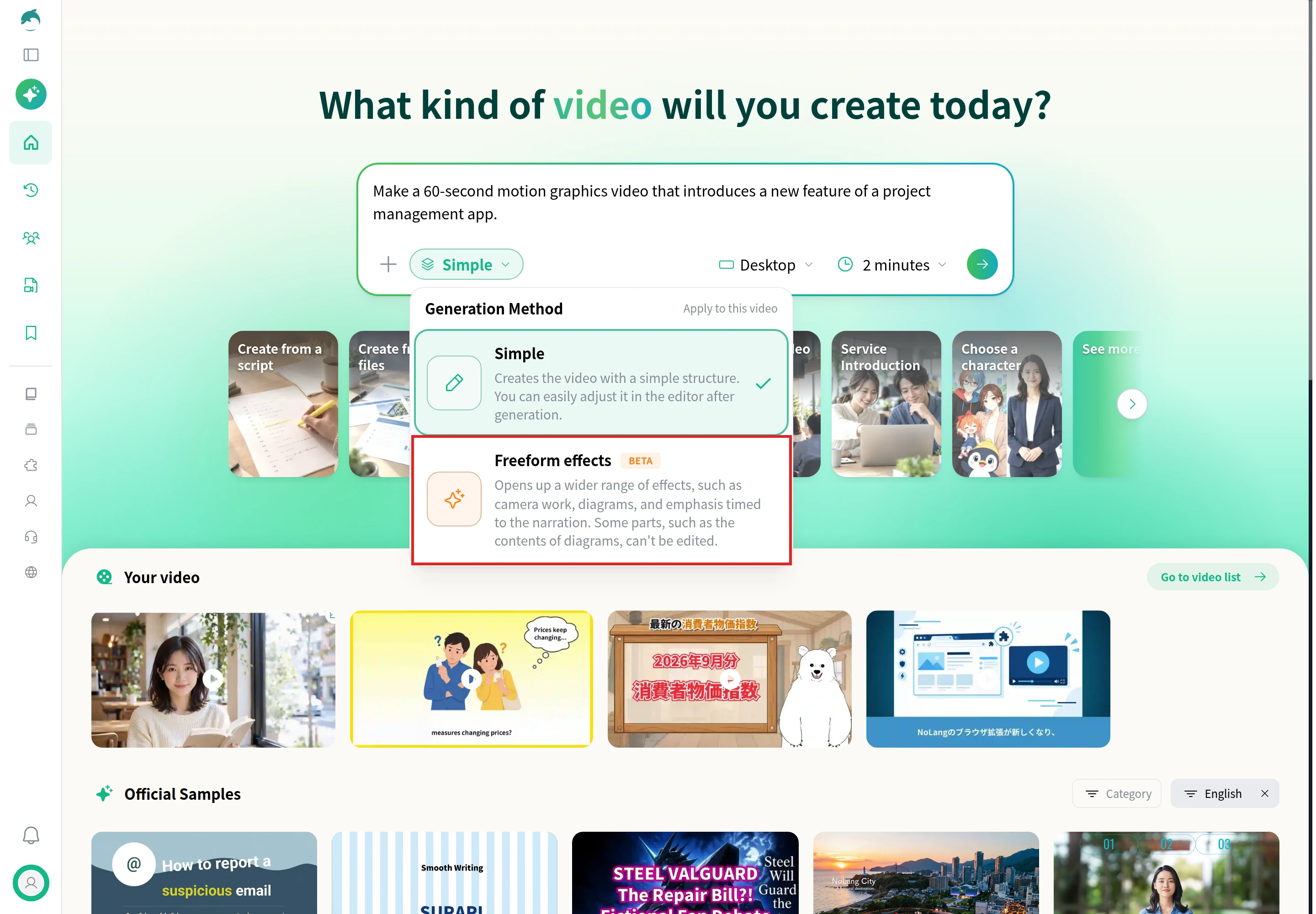
Click Simple under the input box. Simple builds the video with a simple structure that is easy to adjust in the editor. Freeform effects adds camera work, diagrams and emphasis timed to the narration.
Generate
Choose the orientation and length, then generate. Pick Simple when you plan to fine-tune every element in the editor, and Freeform effects when the movement itself should carry the explanation.
Adjust the movement in the editor
Open a generated video from Video Management to change how any element moves.
Select an element
Click the text, icon or image you want to change in the scene. A toolbar appears above it.
Open the animation settings
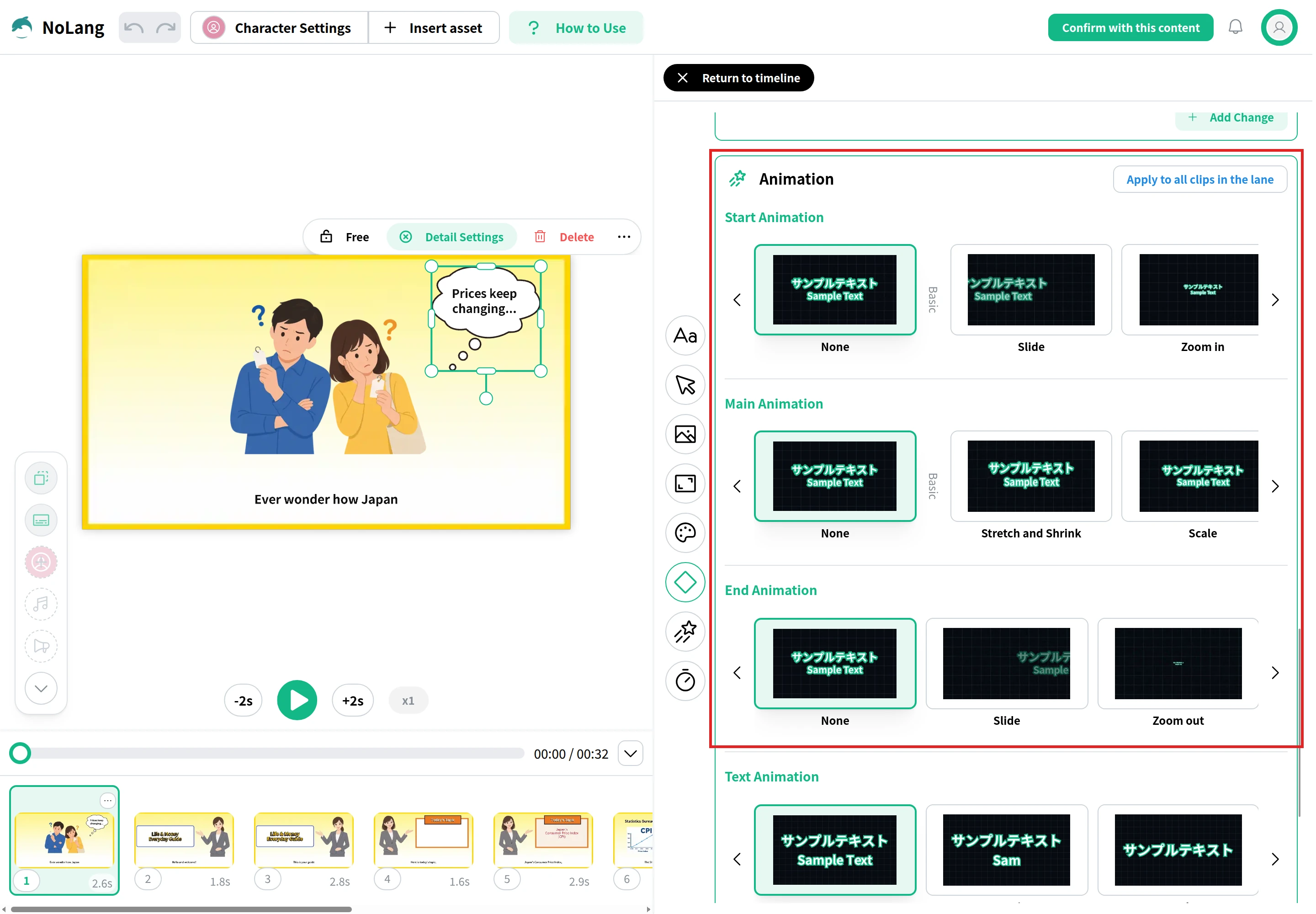
Click Detail Settings in the toolbar and scroll to the Animation section. Start Animation sets how the element enters, for example Slide or Zoom in. Main Animation sets how it moves while on screen, for example Stretch and Shrink or Scale. End Animation sets how it leaves, for example Slide or Zoom out. Apply to all clips in the lane copies the same movement to the other clips in that lane of the timeline.
Regenerate
When the movement looks right, press Confirm with this content at the top right and choose Confirm and Regenerate. NoLang renders the video again with your changes.
For everything else you can change after generation, see AI video editing.
If your marketing or product team needs feature videos, data reports and social ads on a steady schedule, NoLang can produce them in-house from the scripts, decks and product pages you already have, in the sizes each channel needs. To see how it would fit your team’s workflow, contact us or download the overview.
Q
What is the difference between motion graphics and animation?
⌃
Motion graphics are a type of animation. Animation is the broad field and often centers on characters and a story, while motion graphics animate graphic design: text, shapes, icons, charts, screens and logos. Use motion graphics to explain a product, a process or numbers, and character animation when the story depends on a person.
Q
How much does motion graphics video production cost?
⌃
Studios publish motion graphics prices per finished minute: Vidico about $1,000 for simple motion graphics, Beverly Boy Productions $3,000–$5,000, and MotionGility $1,500–$10,000 depending on the type of video. MotionGility puts a freelance motion graphics video at $500–$5,000. Making it yourself costs the software subscription and your time.
Q
How long does it take to produce a motion graphics video?
⌃
MiniMatters puts animated videos at four to eight weeks, and Yum Yum Videos quotes about six to eight weeks for a custom explainer including review time, or three to four weeks for a rush job. An AI video generator produces a first version in minutes, and the time then goes into editing.
Q
What software is used to make motion graphics?
⌃
Adobe After Effects is the desktop motion design and visual effects app for custom work, with keyframes and expressions. Cavalry is 2D animation software that is free for individuals, Apple Motion builds titles and effects for Final Cut Pro, and Blender is a free 3D suite. Jitter and Powtoon run online, and AI video generators such as NoLang build the scenes from a script.
Q
Can I make motion graphics without After Effects?
⌃
Yes. Cavalry and Blender are free, online tools such as Powtoon start you from ready-made templates, and an AI video generator such as NoLang builds a narrated video with moving text, icons and charts from a description or script. After Effects remains the tool for movement you want to design by hand.
Q
What is a style frame in motion graphics?
⌃
A style frame is a still frame designed at finished quality before animation starts, showing the colors, type, icons and layout of the video. Studios make a few of them so you can approve the look before every scene is built; Yum Yum Videos, for example, usually designs three.
Q
Can I use the example videos in this guide for my own product?
⌃
Yes. The Create a Video with This Template button under each example opens NoLang with the example attached as a Reference Video. Replace the instructions with your own product, audience and numbers, then generate.