Testimonial Video Production: 7 Steps, Interview Questions and Story Structures
Key takeaways
Testimonial video production in 7 steps: choose the customer and result, get a signed release, prepare questions, record, edit into a story, get approval, then publish and measure.
Use interview questions grouped by the part of the story they feed, and story structures with timings for a case study, a short testimonial and a montage.
Studios that publish their prices quote from about $2,400 to $20,000 and 3 to 12 weeks; remote recording tools and in-house interviews are the alternatives.
In the US, FTC rules and guides ban fake testimonials from people who don't exist, such as AI-generated ones, and call for disclosing incentives and employee connections.
The example case study video was made in NoLang from a written customer story (a fictional sample), and you can use it as a template.
SHARE
Testimonial video production means filming real customers as they describe, in their own words, the problem they had and what changed after they bought from you, then editing the recording into a short video for your website, sales emails and ads. Production companies that publish their prices quote from about $2,400 to $20,000, with three to twelve weeks from start to delivery.
You can make many of these videos yourself, though. What it takes is a customer with a result worth sharing, a signed release, good questions and a quiet room.
This guide covers the types of testimonial and case study videos, what a studio costs compared with recording remotely or in-house, a seven-step process, the interview questions to ask, story structures with timings, ideas for ads, and the FTC rules that apply in the US. It ends with a case study video made in NoLang from a written customer story, and how to edit a recorded interview in NoLang.
What a testimonial video is
A testimonial video shows a real customer telling other buyers what your product or service did for them. Viewers give it weight because the words come from someone who paid for the product, not from your marketing team. That is also why both the customer and the words have to be real. In the US, FTC rules make this explicit, as a later section of this guide explains.
Testimonial videos come in several forms, and they differ in length, in how much of the story they tell, and in what you need to make them.
Types of testimonial and customer story videos
Type
Typical length
Best for
What you need
Single-customer testimonial
30–90 seconds
Landing and pricing pages
One customer, one interview
Case study video
2–4 minutes
Sales follow-ups, case study pages
A measurable result, footage of the work
Testimonial montage
60–90 seconds
Homepage, event screens
Several customers, one question
Remote testimonial
30–90 seconds
Collecting many quickly
A recording link, guiding questions
Testimonial ad
15–30 seconds
Paid social and video ads
One strong line, captions, a vertical cut
Employee or partner testimonial
1–2 minutes
Careers pages, partner programs
A willing employee or partner
These lengths follow the ranges testimonial studios commonly recommend. Vidico, for example, suggests 2 to 4 minutes for the main case study cut, 30 to 60 seconds for social cutdowns and 15 to 30 seconds for paid ads.
A testimonial is the customer’s opinion, usually in a minute or so. A case study video, also called a customer story video, tells the whole story: who the customer is, what was going wrong, why they chose you, what changed, and the numbers that show it. Many teams record one long interview and cut both from it: a case study of a few minutes for the sales team, and several short testimonials for web pages and ads.
Corporate testimonial videos are usually the B2B versions of these, where a manager speaks for the client company, along with employee testimonials made for recruiting.
Hire a production company, use a recording tool, or make it yourself
Some production companies publish their prices for testimonial and case study videos. The table lists what four of them show on their own pages, checked in November 2026.
Published prices for testimonial and case study video production
Read what each price includes before you compare them. Demo Duck’s range, for instance, covers a one-day shoot, the customer interviews and editing, and it bills crew travel outside Chicago separately. Our guide to video production cost breaks down what sits inside a quote.
There are three ways to get testimonial videos made, and many companies use more than one.
Three ways to produce testimonial videos
Route
How it works
Cost
Choose it when
Production company
A crew films and edits
The published prices above
You need a flagship case study or polished product footage
Remote recording tool
Customers record on a phone or webcam from a link
A subscription
You want many short testimonials from customers far apart
In-house
Your team interviews and edits
Mainly staff time
A few customers are ready to talk and someone can interview
Remote recording tools are sold as subscriptions; Vocal Video, for example, lists a starting price of $99 a month on its site. An in-house video costs mainly the time of the people who set up the interview, record it and edit it, plus a microphone if you do not have one.
If you hire a studio, compare quotes on what you get, not only on the price:
Deliverables: the main cut, short social cuts, a vertical version, and whether captions are included.
Usage rights: where and for how long you may use the video, and who owns the raw footage.
Customer releases: who drafts the release form, who collects the customer’s signature, and who keeps it.
Revisions: how many rounds are included, and when your customer reviews the cut.
Remote options: whether the studio can record customers who are far away, and how.
How to make a testimonial video in 7 steps
The order matters: permission and questions come before the camera, and the customer’s approval comes before publishing. The same steps apply whether a studio films the customer or your own team does.
1. Choose the customer and the result to show
Pick a customer whose situation resembles your buyers’, and who got a result they can describe in concrete terms. Your sales and customer success teams usually know who is happy and who would be comfortable on camera.
They have used your product long enough to see a result.
They can name a number: hours saved, costs cut, sales up, errors down.
Their company or role resembles the buyers you want to reach.
They speak comfortably, which a short call will tell you.
Decide before the interview which result the video will show. One result, told well, does more than a list of features.
2. Ask, and get permission in writing
Ask at a good moment, such as right after a strong result, a renewal or a compliment to your team. Tell the customer where the video will run, how long the recording will take, and that they will see the final cut before it is published.
Then get a signed release: the customer’s written permission to use their name, image, voice and words. Have your legal team draft or approve the form. The table shows what it should settle.
What a testimonial release should settle
Item
What to settle
Who appears
Each person on camera or audio, plus the company name and logo
What you may use
Face, voice, name, job title, quotes, footage of their workplace
Where
Website, sales materials, social media, paid ads, events
How long
A set period, or until the customer asks you to stop
Edits
That you may shorten the interview, and that the customer approves the cut
Anything given in return
Any discount, gift or payment, so you can disclose it
Some people agree to share their story but not to appear on camera, or their employer does not allow it. Record what their release does and does not cover, and plan the video around it.
3. Prepare the questions and run a short pre-interview
Before the recording, hold a short call to confirm the story and the numbers, and to learn what the customer can and cannot say in public. Send the topics in advance, but not a script: answers read from a page sound like an ad. The question list in the next section is grouped by the part of the story each answer feeds.
4. Record the interview
For an interview in person:
Camera: a recent phone or a camera on a tripod, at the customer’s eye level.
Sound: a clip-on (lavalier) microphone, in a quiet room with soft furnishings rather than bare walls.
Light: have the customer face a window or one soft light.
Eyeline: the customer looks at the interviewer, sitting just beside the camera, not into the lens.
B-roll: film the customer at work and your product in use, so the edit has something to show while they talk.
For a remote interview, record the video call or use a remote recording tool. Ask the customer to sit facing a window, wear headphones with a microphone, and raise the laptop to eye level.
In both cases, ask the customer to answer in full sentences that repeat the question (“Before we switched, we scheduled every visit by phone…”), because your questions will be cut out of the video.
5. Edit the interview into a story
Choose one of the story structures described later in this guide first, then pick the answers that fill each part.
Keep the meaning: you can shorten an answer, but do not join fragments into a sentence the customer never said, or cut a sentence so it means something else. Words in quotation marks must be the customer’s exact words.
Name the speaker: show the customer’s name, job title and company the first time they speak.
Add captions: many people watch with the sound off, and captions let viewers who are deaf or hard of hearing follow the story.
End on one next step: book a demo, read the full case study, or start a trial.
If you sell in more than one language, our guide on how to translate a video compares subtitles, voice-over and dubbing.
6. Get the customer’s approval
Send the final cut to the customer, and to anyone at their company who must sign off, such as their communications or legal team. Keep the approval with the signed release, so whoever reuses the video next year can see what was agreed.
7. Publish, use and measure
Put the video where a buyer is deciding, not only on a testimonials page.
Website: next to the pricing table, on the product page, and on the case study page.
Sales: send the case study to prospects in the same industry or with the same problem. Our guide to sales videos shows which video fits each stage of a B2B deal.
Social and ads: upload short cuts directly to each platform, with vertical versions for Reels, Shorts and TikTok.
Events: play it at your booth or before a presentation.
Measure what the video asked for, such as demo requests, replies to sales emails and deals where the prospect watched it. Use the point where viewers stop watching to decide what to trim in the next version.
Testimonial interview questions
Group the questions so that each group supplies one part of the story. The right-hand column shows where you will use the answers in the edit.
Testimonial interview questions and where each answer goes
Part of the story
Questions to ask
Where the answer goes
Who they are
What does your company do, and what is your role? Who are your customers?
The opening, with the name and title on screen
Before
What was going wrong before you used [product]? What did that cost you in time, money or stress? What had you already tried?
The problem
The decision
Why did you choose [product]? Did you have doubts before you signed up? What were the first weeks like?
The turning point
After
What is different now? What number shows the change, and what was it before? What surprised you?
The result, and the line you will reuse in ads
Advice
What would you tell someone in your position who is considering [product]? Is there anything I didn’t ask that you want people to know?
The closing line
How you ask matters as much as what you ask:
Ask one question at a time, and let a short silence run before you move on. People often add their best line after a pause.
When an answer stays general (“it saved us a lot of time”), follow up: “Roughly how much time? What do you do with it now?”
Do not suggest the words you want to hear. A line you fed the customer sounds rehearsed, and a testimonial has to reflect what the customer actually thinks.
Ask the result question twice in different words; the second answer is often shorter and easier to use.
Story structures for testimonial and case study videos
Each structure below puts the answers from the question table in a different order. Pick it according to where the video will run.
Three story structures, with timings
Structure
Order of the story
Length
Case study
Who they are (0:00–0:15), the problem (to 0:45), the decision (to 1:15), the result with numbers (to 1:50), advice and next step (to 2:15)
About 2–2.5 minutes
Short testimonial
The result in one line, who they are, what changed, a recommendation
30–90 seconds
Montage
One question on screen, several customers answer in turn, the shared result
60–90 seconds
The case study timings above add up to just over two minutes, at the short end of the two to four minutes studios suggest for a full case study. A full case study usually takes several answers from one long interview; the shorter formats take one or two of its strongest lines.
Testimonial video ideas, including ads
One interview can feed several videos. These ideas reuse the same recording or need only one or two extra questions.
The one-number story: build a short video around a single result, such as “visits where no one was home fell from 10% to 3%.”
The doubt, answered: ask customers what worried them before they bought. Prospects have the same worry, and a customer’s answer is more convincing than yours.
The first 30 days: what getting started was really like, for products that look hard to set up.
The switch: why the customer moved from their old way of working, such as spreadsheets or an older system.
One question, many customers: the montage format, with the same question put to five or six customers.
A day at work: film the customer doing the job your product helps with, and let them narrate it.
Employee testimonial: employees describe the work for your careers page.
Partner testimonial: a reseller or integration partner explains why they work with you.
From written review to video: with the reviewer’s permission, put an approved written quote on screen with footage or images.
For testimonial video ads, cut from the same interview:
Open with the result or the strongest line, in the first few seconds.
Burn in captions, since many feeds play video without sound.
Make vertical (9:16) and square or 4:5 versions for social feeds.
Keep the customer’s name and company on screen.
If the result is better than what most customers get, say what customers can generally expect (see the rules below).
For each platform’s ad formats and specs, see our guide to video ads.
Testimonial rules in the US
In the US, the Federal Trade Commission (FTC) regulates testimonials in marketing. Its Endorsement Guides were revised in 2023, and its rule on consumer reviews and testimonials took effect on October 21, 2024, under which courts can impose civil penalties for knowing violations. These are the points that change how you plan and edit a testimonial video.
FTC rules and guides that affect testimonial videos
Rule
What it means for your video
A testimonial must reflect the honest opinion and real experience of the person giving it
Feature only customers who have used the product, and do not script opinions they do not hold
Fake testimonials that claim to come from someone who does not exist, such as AI-generated ones, are banned
Do not present an AI-generated or invented person as your customer
Ads that present people as actual customers should use actual customers, or disclose that they are not
If an actor plays the customer, say so clearly on screen
You may reword a testimonial, but not take it out of context or distort it
Shorten answers without changing their meaning; quoted words must be exact
Incentives may not be conditioned on a positive (or negative) opinion, and should be disclosed
You may thank customers with a gift or discount, but not only for positive testimonials, and you should say so in the video itself, not only in its description
Testimonials from employees and other insiders must disclose their connection to the business
Employees and managers say they work for you; relatives say how they are related
A result better than what most customers get needs a disclosure of the generally expected result
Say what customers can generally expect, if you do not have evidence that the result is typical
The FTC says its rule has no blanket ban on AI-generated avatars in marketing. An avatar might still be considered a testimonial, which the rule prohibits only if the underlying testimonial is fake or false, and using avatars can also be deceptive under the FTC Act. A sample video made for a guide or a template, like the example below, should say clearly that it is a sample, and should never be published as a real customer’s endorsement.
Example: a case study video made from a written customer story
Many companies already have written case studies on their website or in a PDF, with the customer’s approved quotes. This example turns one of them into a case study video.
The written case study below is a sample created for this guide. Marlow Creek Heating & Air, Routewell, Dana Ortiz and every number in it are fictional. Dana’s release, as written in the sample, covers her name, her job title and her written quotes, but not her face or voice, so the video uses her words as on-screen quotes.
The written case study behind the example (fictional sample)
Item
Content
Customer
Marlow Creek Heating & Air, a family-run heating and air conditioning company with 14 service technicians
Product
Routewell, scheduling and dispatch software for home service teams
Challenge
Visits were scheduled on a whiteboard and by phone; about 1 in 10 booked visits ended with no one home
Solution
Online booking, daily route planning, and a text with the technician’s name and arrival time
Results (first six months)
Visits with no one home down from about 10% to 3%; jobs per technician per day up from 4 to 5, with no new hires; arrival-time calls down by half
Approved quotes
Three, from Dana Ortiz, Office Manager, including “Now customers get a text with the tech’s name and arrival time. Our phones finally went quiet.”
Next step
See how Routewell schedules your team: example.com/demo
This is the case study video we made in NoLang from that written case study. At 1 minute 32 seconds, with English narration and captions, it is a short version of a case study video.
The video opens on the first cold snap and an office phone that keeps ringing, with Dana’s first quote on screen. It then introduces Marlow Creek and its 14 technicians and shows the problem: a whiteboard schedule, an arrival window of “between eight and five,” and about one in ten visits with no one home. Next comes the switch to Routewell in the spring and its three parts: online booking, daily routes and a text on the day of the visit. The results follow one at a time: visits with no one home from about 10% to 3%, arrival-time calls cut in half, and jobs per technician from four to five with no new hires. Dana’s other two quotes appear as on-screen text during pauses in the narration, so the narrator never speaks for her. The video ends on example.com/demo, with a note that the companies, people and figures are fictional.
It follows the case study structure described earlier in a shorter form, and opens on the problem before introducing the customer, which gets to the tension in the first seconds. Select Create a Video with This Template to open this video in NoLang as a model, then replace the companies, numbers and quotes with your own customer’s story, using only quotes your customer has approved in writing.
Making testimonial and case study videos in NoLang
NoLang is an AI video generator from Mavericks, Inc. For testimonial and case study videos, it helps in two places: turning a recorded interview into a finished, subtitled video, and turning a written case study into a narrated video. Both start from Generate in the left menu, which opens the How will you create it? window.
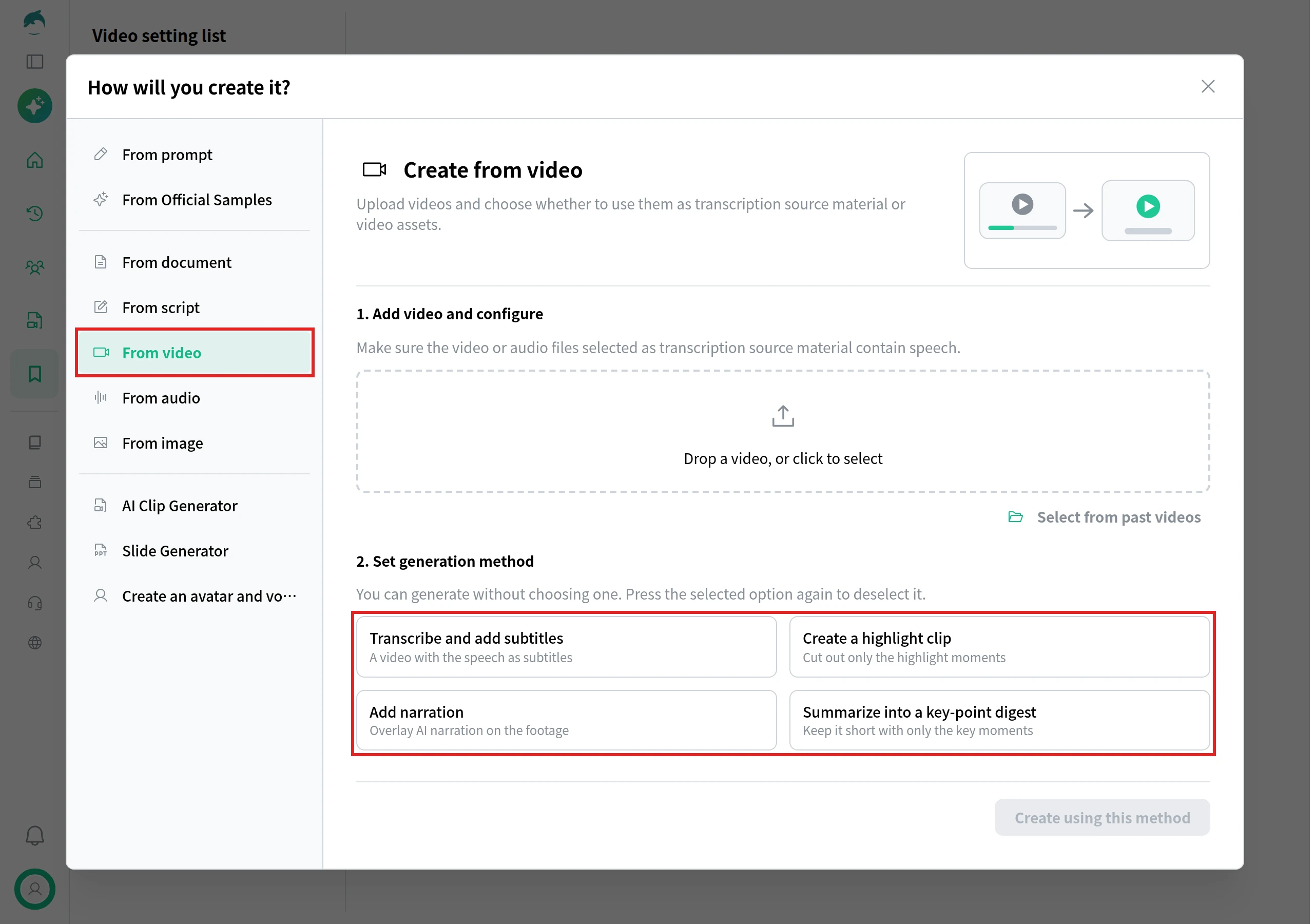
If you recorded an interview, choose From video, upload the recording, and choose a generation method:
Transcribe and add subtitles keeps the interview and adds the customer’s speech as subtitles.
Create a highlight clip pulls the strongest moments into a short clip, a starting point for short testimonials and ads.
Summarize into a key-point digest condenses a long interview into a shorter video made of its key moments.
The fourth option, Add narration, lays AI narration over the footage instead of using its original audio, which suits b-roll better than an interview.
Before you publish, check the subtitles against the recording, and check that every cut keeps the customer’s meaning (steps 5 and 6).
If your customer story is a written case study in a PDF or PowerPoint file, choose From document instead, upload the file, and choose how much of it to explain, such as Explain key points only for a long case study.
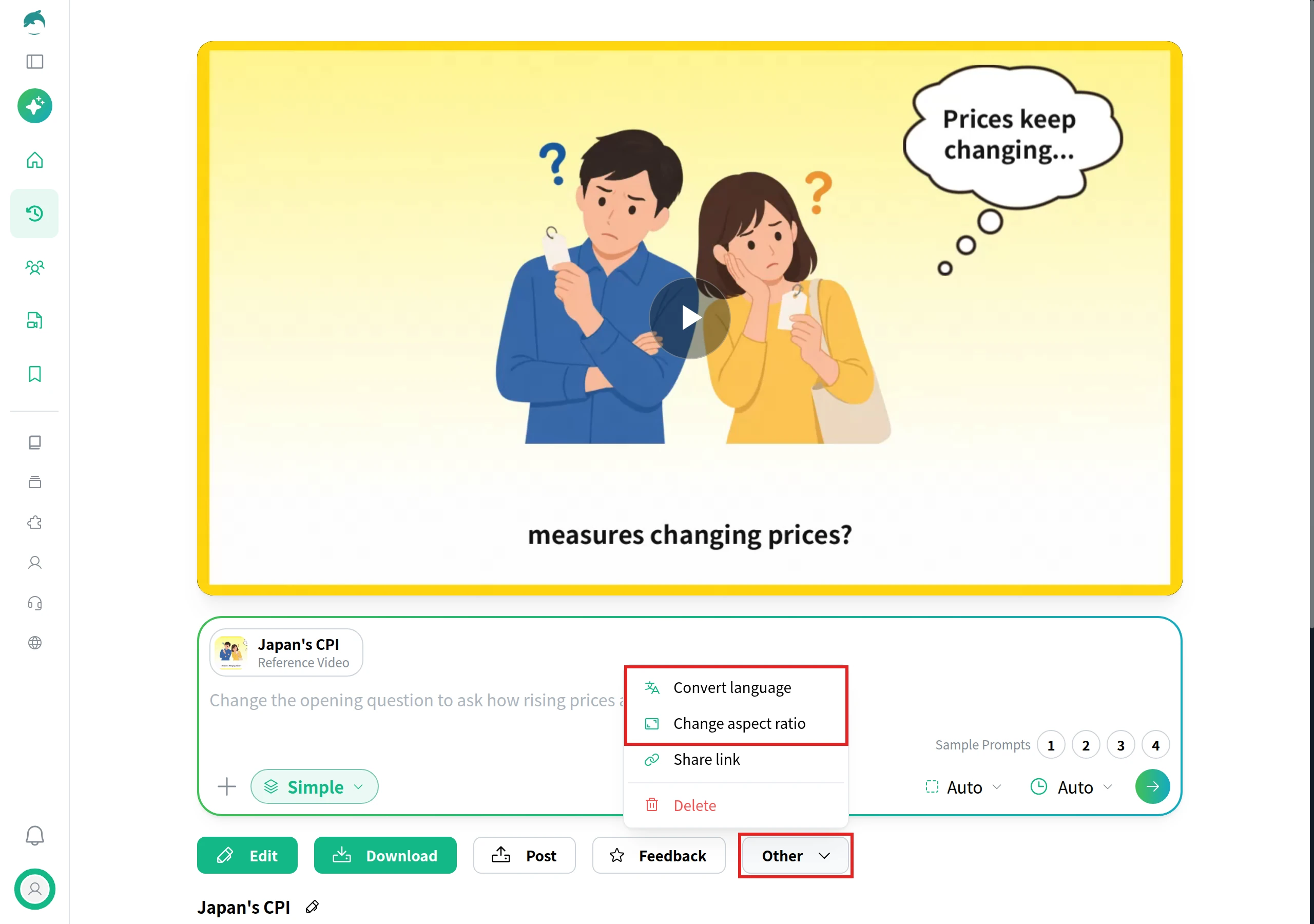
To make versions for ads and other markets, open the finished video and choose Other. Change aspect ratio converts the video to another ratio, such as 9:16 for Reels, Shorts and TikTok or 1:1 and 4:5 for feeds, and Convert language makes a version in another language.
Companies that publish customer stories from several teams, such as marketing, sales and customer success, can use NoLang to turn interview recordings and written case studies into subtitled testimonials, case study videos and short cuts for ads. To talk about using it across your company, use our contact form, or download an overview below.
Q
How many people should speak in one case study video?
⌃
Usually one to three. SWNG Productions calls one to three interviews the sweet spot for a case study video, since four or more voices can clutter the conversation. If several people at the customer's company want to take part, give each a different part of the story, such as the problem, the decision and the result.
Q
What if a customer wants to change what they said after the recording?
⌃
Let them, and re-record the line or drop it. A testimonial has to reflect what the customer actually thinks, so do not publish words they no longer stand behind, and do not argue them back into a stronger claim.
Q
Can I use clips from a customer's webinar or conference talk as a testimonial?
⌃
Ask first. A talk at your event or webinar was not recorded as an endorsement, so get the speaker's written permission to use it in marketing, and keep the meaning of what they said when you cut the clip.
Q
What video files can I upload to NoLang's From video?
⌃
MP4, MOV and WebM files, up to 1,024 MB each, and up to 10 videos at a time. If the recording is meant to be transcribed into subtitles, make sure it contains clear speech.